
Virtual Receptionist vs Answering Service: 2-Week Playbook for Local Services
Compare AI virtual receptionists and answering services for local service businesses. Get TCPA/HIPAA checks, cost-to-ROI signals, and a two-week rollout plan.
How many customers are slipping away before you can answer?
Answer 4 quick questions and get a simple missed-call estimate for your business.
Answer with one tap. Contact details come after your result.
Here is the estimate.
Thanks. Your result was received.
An AI virtual receptionist is the fastest way for a small service business to capture leads and book appointments around the clock without adding a full-time hire, and we built RingPort specifically to do that job. The sections below walk through what these systems actually do, the compliance details you need to confirm before signing up, realistic cost math, and a short rollout plan you can run in two weeks.
TL;DR:
- Virtual receptionists answer calls 24/7, book appointments automatically, and log leads directly into CRMs, reducing missed calls and manual work.
- Ensure the vendor offers a signed BAA if handling protected health information and clarify how consent, opt-outs, and data retention are managed.
- Pricing models typically include flat monthly tiers based on call volume, with extra charges for outbound calls, messaging, or storage, which can impact ROI calculations.
- Use warm transfer rules and incremental rollout to integrate the system smoothly without disrupting current operations and to validate performance.
- AI virtual receptionists are best suited for routine bookings and lead capture, while complex calls requiring judgment may still benefit from human intervention.
Table of Contents
- What we mean by "virtual receptionist" in this guide
- Core features your system needs to earn its keep
- TCPA and HIPAA basics every buyer must confirm
- Costs and ROI: what to expect and how to calculate payback
- How to choose: a vendor checklist and sales-call questions
- Rolling out a virtual receptionist without disrupting your team
- Virtual receptionists versus answering services: the real differences
- Weighing the pros and cons for a small local business
- How AI answering changes the caller's experience
- What response times and service levels look like in practice
- What we've learned helping small businesses automate their front desk
- Getting started with RingPort
- FAQ
- Sources
What we mean by "virtual receptionist" in this guide
When we talk about a virtual receptionist here, we mean an AI-powered inbound answering system, not a human operator picking up calls from a call center. This system answers every call automatically, books appointments directly into your calendar, captures lead details, and logs everything into your CRM without anyone on your team having to touch the phone.
In practice, that looks like a plumber's after-hours calls getting answered at 9 PM, a caller stating they need a water heater replaced, and the system checking calendar availability and texting a confirmed appointment time before the caller even hangs up. It also looks like a salon's no-show caller getting automatically re-booked and a property manager's maintenance request getting logged and routed to the right technician. These are the workflows worth evaluating, because they determine whether the system actually reduces your workload or just adds another dashboard to check.
Core features your system needs to earn its keep
Not every virtual receptionist product does the same job well, so it helps to know which features actually move the needle for a small service business before you commit to a plan.
- 24/7 availability that answers calls during nights, weekends, and holidays, when most missed-call leads go to a competitor instead.
- Appointment booking with calendar sync so a caller gets a confirmed slot without a human checking availability.
- Lead capture and CRM logging that records caller details, job type, and urgency automatically.
- Smart routing and warm transfers that send urgent calls to a live person while handling routine bookings automatically.
- Customizable call flows and integrations that let you adapt scripts and connect to your existing calendar or CRM tools.
Each of these maps directly to a business outcome: fewer missed calls, faster booking, and less manual data entry for you or your staff.
TCPA and HIPAA basics every buyer must confirm
Before you sign up with any AI phone vendor, it pays to understand two regulatory frameworks that shape what you can and cannot do.
The Telephone Consumer Protection Act governs outbound calls that use an artificial or prerecorded voice. The FCC confirmed that AI-generated voices fall under these same TCPA restrictions, which means prior express consent is required before your system places outbound AI voice calls to a customer. Inbound answering, where a caller reaches your business and an AI system answers, sits in different territory: the FCC's related proposal distinguishes inbound automated answering from outbound AI-generated calling and recommends that callers using AI-generated voice disclose that use and obtain consent where outbound calling applies.
If your business touches protected health information, such as a medical office logging appointment notes or call recordings, HHS guidance explains when a vendor becomes a business associate that requires a signed BAA. A vendor that stores, transcribes, or otherwise handles PHI typically qualifies, even when the vendor cannot view decrypted data.
A vendor that creates, receives, or maintains PHI on your behalf is a HIPAA business associate and must sign a BAA before you send it any patient data.
Before signing with any vendor, confirm:
- Whether the vendor offers a signed BAA for healthcare-adjacent use cases.
- How consent is logged and stored for outbound calling features.
- How opt-outs are handled and how long call data is retained.
- Who has access to transcripts, recordings, and caller information.
Costs and ROI: what to expect and how to calculate payback
Pricing for AI virtual receptionists usually follows one of a few shapes: flat monthly tiers based on call volume, pay-as-you-go minutes, or add-on credits for SMS and email follow-ups. Outbound calling features, when offered, are often billed separately from inbound answering. Our own breakdown of typical virtual receptionist pricing walks through how these models compare for different business sizes.
A simple way to estimate return: multiply your recovered missed calls by your typical conversion rate and average job value, then compare that figure against your monthly subscription and usage costs.
Watch for a few costs that do not always appear in the headline price:
- Integration or setup fees for connecting your calendar or CRM.
- Transcription and storage charges for call recordings kept longer than the default window.
- Outbound calling or messaging credits billed separately from your base plan.
For solo owners and two-person teams, the simplest signal is whether the subscription costs less than a single missed job per month, because that threshold usually makes the decision for you.
How to choose: a vendor checklist and sales-call questions
A short, structured checklist keeps you from getting sold on features you will never use and missing the ones that matter.
- Integration fit: Confirm calendar sync, CRM compatibility, and webhook or API access for your existing tools.
- Compliance readiness: Ask directly whether the vendor offers a signed BAA and how consent and opt-outs are logged.
- Call handling logic: Test how warm transfers work, how routing rules are set, and how much you can customize the script.
- Support and proof: Ask about onboarding support, response-time commitments, and whether they can show case studies with verifiable numbers rather than vague growth claims.
On that last point, it is worth being skeptical of vendors who promise instant results without specifics. The FTC has taken enforcement action against an AI provider for deceptive claims about business growth and earnings, which is a reminder to favor vendors who share realistic, specific outcomes over those who lean on broad promises.
Pro Tip: Ask any vendor to run a live test call with your actual script before you sign anything, not just a canned demo.
Rolling out a virtual receptionist without disrupting your team
A phased rollout keeps your current operations intact while you confirm the system actually works for your call volume and booking style.
- Pick one line and a two-week window. Route a single phone number or service line to the new system rather than switching everything at once.
- Build your call flows first. Set calendar rules, define what counts as an urgent transfer, and write a script that sounds like your business, not a generic template. Our guide to setting up automated call answering covers common setup mistakes worth avoiding.
- Run test calls and adjust. Call in yourself, have a friend call in, and fix anything that sounds robotic or misroutes.
- Collect feedback and measure results. Track missed-call reduction, appointments booked, and what your staff and customers say about the handoff.
- Scale in phases. Once the pilot line performs, expand to additional lines and write down the operating procedure so new hires can follow it.
Virtual receptionists versus answering services: the real differences
The core distinction comes down to who, or what, is on the other end of the call and how consistently they perform. An AI virtual receptionist answers every call the same way, every time, following the exact script and logic you configure, and it books directly into your calendar without a hand-off step. A traditional answering service instead relies on staffed operators taking messages or performing basic call screening, which means quality can vary between shifts and between individual agents.
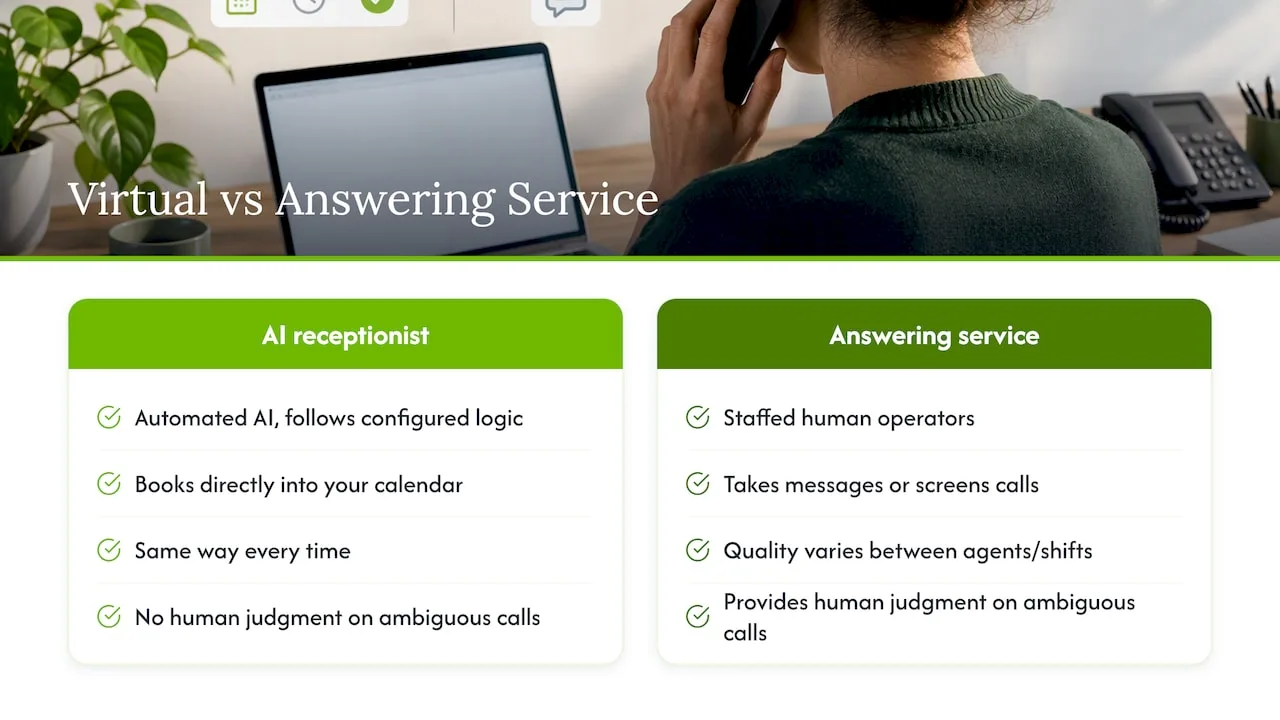
For a home-service contractor who needs same-minute appointment booking at 11 PM, an AI receptionist tends to fit better because it connects directly to scheduling software and acts the moment the call ends. For a business that needs nuanced judgment calls on ambiguous situations, like a property manager deciding whether a maintenance call counts as an emergency, a service with live human judgment might feel safer, though that judgment comes with inconsistency between agents and higher staffing costs.
The use cases also diverge by volume. A solo salon owner fielding a dozen calls a day benefits from an AI system that never misses a ring and logs every caller into a CRM automatically. A business with complex, high-stakes phone interactions that require genuine conversational nuance may still lean toward services with trained human operators, accepting the added cost and variability as a trade-off for that judgment.
Weighing the pros and cons for a small local business
Every option comes with real trade-offs, and the right fit depends on your call volume, budget, and how predictable your customer interactions tend to be.
An AI virtual receptionist's biggest advantage is consistency: it answers every call the same way at 2 AM as it does at 2 PM, and it never calls in sick. It also tends to cost less than staffing a part-time receptionist, since pricing is usage-based rather than tied to hourly wages. The trade-off is that it handles scripted, structured interactions better than it handles genuinely unpredictable ones, so a business with highly variable customer needs may need to lean on warm transfers more heavily.
A staffed answering service offers human judgment on ambiguous calls and can sound more personal to callers who prefer talking to a person. The downside is cost, since staffing live operators around the clock is expensive, and consistency, since quality can shift depending on which agent picks up.
For most local service businesses, the practical answer is not either-or. Many owners run an AI receptionist for routine booking and lead capture, with warm transfer rules that route anything unusual to a live person on the team, combining round-the-clock coverage with human backup for the calls that need it.
How AI answering changes the caller's experience
Customer experience hinges less on whether a voice is human or synthetic and more on whether the caller gets what they called for: a fast answer, a clear next step, and confirmation that something actually happened. A caller who reaches an AI receptionist at midnight and walks away with a booked appointment time generally reports a better experience than one who reaches voicemail and has to wait until morning for a callback.
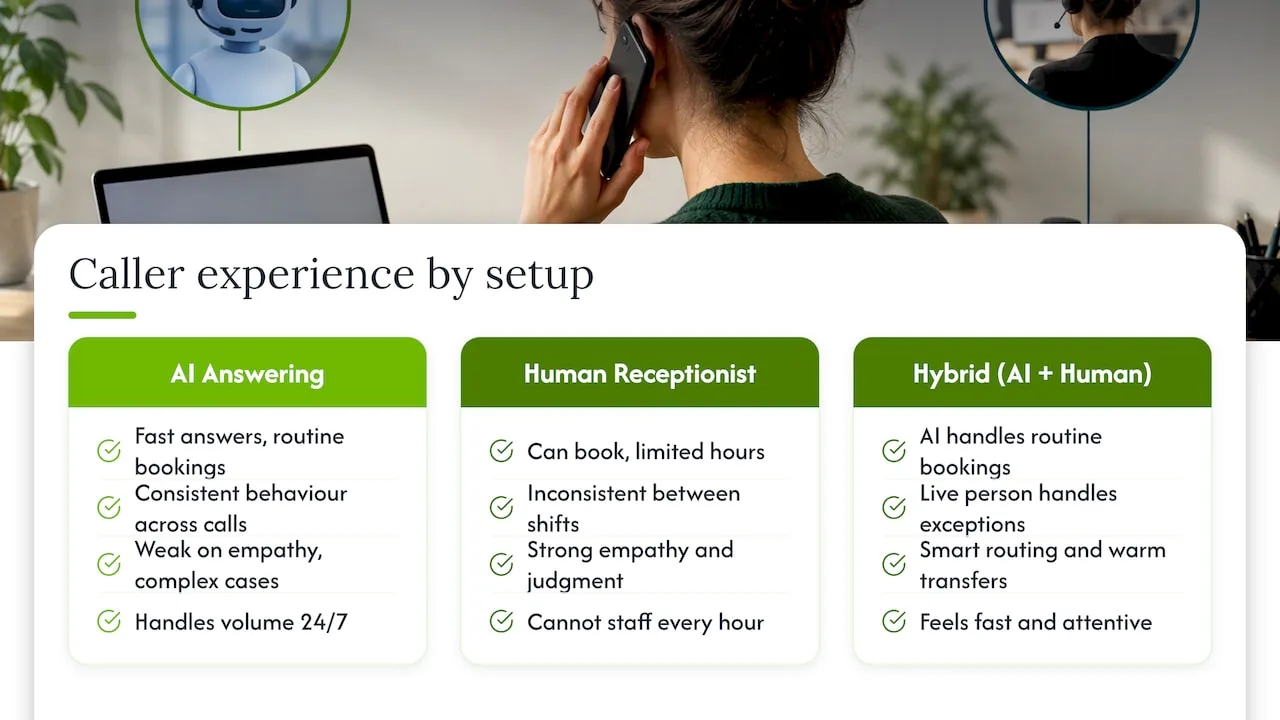
Where AI systems can fall short is in situations that require empathy or complex problem-solving, like a distressed customer describing an emergency that does not fit a standard script. That is why smart routing and warm transfers matter so much: a well-configured system recognizes those moments and hands the caller to a live person instead of forcing them through an automated flow that cannot help.
Human receptionists bring judgment and tone that AI cannot fully replicate yet, but they come with inconsistency between shifts and cannot staff every hour without significant cost. The practical middle ground, which many small businesses land on, is AI handling the volume and routine bookings while a live person handles the exceptions. That combination tends to produce a caller experience that feels both fast and attentive, rather than purely efficient or purely personal.
What response times and service levels look like in practice
An AI virtual receptionist answers calls immediately, every time, since there is no queue, no hold music, and no risk of a call going to voicemail because every staffed line is busy. Appointment confirmations typically happen within the same call, with the system checking calendar availability in real time rather than requiring a callback.
A staffed answering service's response time depends on operator availability: calls may be answered quickly during business hours but queued or routed to voicemail during peak volume or overnight shifts unless the service specifically staffs for 24/7 coverage, which usually carries a higher price. Message-based services may take longer to connect a caller to an actual appointment, since a human often needs to relay details back to the business before a slot gets confirmed.
For a small business comparing the two, the practical question is not just "how fast do they answer" but "how fast does the caller get a confirmed outcome." An AI system that books directly into your calendar during the call itself generally beats a service that collects a message and waits for a callback, especially for time-sensitive requests like emergency repairs or same-day salon openings.
What we've learned helping small businesses automate their front desk
The businesses that get the most out of an AI receptionist are the ones that resist over-automating every call. Owners who route everything through AI, including genuinely urgent or emotional calls, tend to frustrate customers who needed a human. The better approach pairs AI for routine booking with warm transfer rules for anything ambiguous.
A second common mistake is skipping consent and compliance checks early, then scrambling to fix logging gaps after a vendor review. Confirming BAA availability and consent logging before go-live saves that headache entirely.
— Serhii
Getting started with RingPort
We built our system around the exact checklist above: 24/7 answering, calendar sync, CRM logging, and smart routing that hands off anything unusual to a live person on your team. Our Fast Agent product handles rapid call qualification and lead handling, so routine bookings get resolved without anyone on your staff picking up the phone.
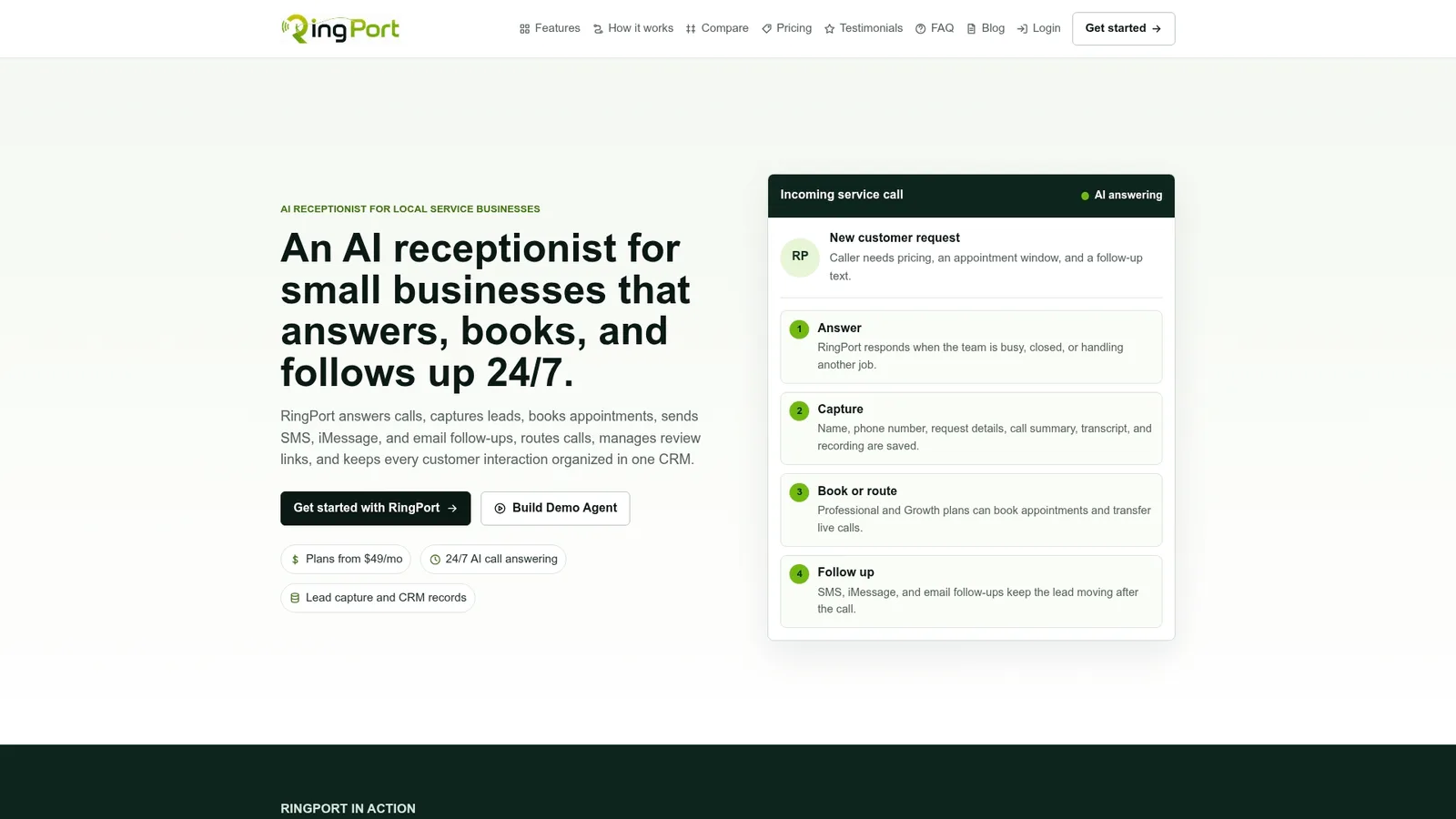
If you are ready to test it, our Starter plan runs $49 per month, with Professional at $149 and Growth at $299 for higher call volumes, plus pay-as-you-go options for extra minutes or messaging. At signup, ask us about BAA availability if you handle patient information, and our team can help with calendar and CRM integration during onboarding.
- 24/7 automated answering and appointment booking
- CRM logging and multi-channel follow-ups
- Smart routing with warm transfers to your team
FAQ
What's the main difference between a virtual receptionist and an answering service?
A virtual receptionist in this context uses AI to answer calls, book appointments, and log leads automatically, while a traditional answering service relies on staffed human operators taking messages or screening calls. The AI approach tends to offer more consistent, round-the-clock coverage at a lower cost for routine bookings.
How much does a virtual receptionist cost for a small business?
Pricing typically runs in monthly tiers based on call volume, with our own Starter plan priced at $49 per month and higher tiers for more usage. Add-ons like extra minutes or messaging credits are often billed separately from the base subscription.
Do I need a BAA if my business handles patient information?
Yes, if a vendor creates, receives, or maintains protected health information on your behalf, HHS guidance confirms that vendor qualifies as a business associate and requires a signed BAA before you share any patient data.
Is using an AI voice for outbound calls legal?
Outbound calls using an AI-generated voice require prior express consent under the TCPA, since the FCC has confirmed AI-generated voices fall under the same rules as prerecorded or artificial voice calls. Inbound answering, where a caller reaches your business, falls under different considerations than outbound AI calling.
When should a small business switch from voicemail to a virtual receptionist?
Once missed calls start translating into lost bookings, especially outside business hours, a virtual receptionist usually pays for itself by capturing leads that would otherwise go to a competitor. Businesses with inconsistent after-hours coverage or frequent no-shows tend to see the clearest return.
Sources
- Implications of Artificial Intelligence Technologies on Protecting Consumers from Unwanted Robocalls and Robotexts (FCC-24-17)
- Guidance on How the HIPAA Rules Permit Covered Health Care Providers and Health Plans to Use Remote Communication Technologies for Audio-Only Telehealth (HHS)
- FTC sues AI provider for deceptive claims about business growth (FTC press release)


