
Phone Answering That Books Your Calendar — Solo Businesses
Practical, implementation-first guide for solo service businesses to capture phone leads: choose AI, live, or automated answering, run a 7–14 day pilot,...

How many customers are slipping away before you can answer?
Answer 4 quick questions and get a simple missed-call estimate for your business.
Answer with one tap. Contact details come after your result.
Here is the estimate.
Thanks. Your result was received.
For most solo business owners, a lightweight AI receptionist with live-backup escalation beats hiring a full-time answering service or relying on basic voicemail. It costs less than a human answering service, picks up every call around the clock, and books directly into your calendar. Tools like RingPort build this exact combination for owners who cannot afford to miss a lead while they're on a job or with a client.
TL;DR:
- AI receptionist with live-backup escalation offers a cost-effective solution for solo owners, providing 24/7 call coverage and direct calendar booking.
- Real-time calendar integration and immediate SMS confirmations are essential for reducing no-shows and ensuring accurate appointment scheduling.
- Pricing plans should match your average call volume, with lower tiers suited for infrequent calls and higher tiers offering automation for busy schedules.
- Demonstrations should verify calendar sync, realistic call flow handling, and the system’s ability to manage specific business inquiries.
- Starting with a short trial allows you to test setup, call handling, and follow-up accuracy before fully switching to a new phone answering system.
Table of Contents
- Live receptionists, AI receptionists, and automated answering: what's the difference
- How appointment booking and lead capture actually happen on a call
- What phone answering actually costs and how to estimate your bill
- Choosing the right service: criteria, questions, and red flags
- Rolling out your new phone system without breaking what works
- How RingPort maps to the decision criteria above
- Which approach fits your type of business
- Try RingPort without disrupting how you already work
- FAQ
- Sources
Live receptionists, AI receptionists, and automated answering: what's the difference
Before you pick a tool, you need to understand what each category actually does, because the names get used loosely and the differences matter for a solo operation.
A live answering service routes your calls to a human operator, usually working from a script you provide. They can sound warm and handle nuance a machine might miss, but they typically charge per minute or per call, and the quality depends heavily on how well the agent knows your business. For a plumber fielding calls about a specific model of water heater, a generic call center operator often falls short.
An AI receptionist, sometimes called a voice agent, uses conversational software to answer, qualify, and often book the call without a human on the line. It never clocks out, never calls in sick, and costs a fraction of staffing a phone line yourself. The tradeoff is that it needs a sound setup: clear call flows, accurate business information, and a backup path for unusual requests.
An automated answering system, or auto-attendant, is the simpler, older category: a menu tree ("press 1 for scheduling, press 2 for billing") that routes calls but doesn't actually converse with the caller. It's inexpensive and predictable, but it can't book an appointment or answer a question, and many callers hang up rather than navigate a phone tree.
When you're comparing options in any of these categories, look past the marketing copy and check for:
- Appointment scheduling that writes directly to a calendar, not just a message that someone has to act on later.
- Multi-channel follow-up, meaning texts or emails sent automatically after the call ends.
- Transfer capability so urgent calls can reach you or another human when the situation calls for it.
- Hours of coverage, since "24/7" means different things depending on whether it's a live service with overnight staffing gaps or software that genuinely never sleeps.
For a solo owner, the AI receptionist category tends to offer the best balance of cost, consistency, and booking accuracy, as long as the appointment and follow-up pieces are handled well.
How appointment booking and lead capture actually happen on a call
The feature list sounds good on a sales page, but what you need to know is what happens between the moment the phone rings and the moment an appointment lands on your calendar.
- The caller reaches a greeting that identifies your business and asks what they need, either through a scripted human agent or a conversational AI flow.
- The system asks qualifying questions: service type, preferred time, location, or urgency, depending on how your call flow is configured.
- It checks your connected calendar for open slots in real time, rather than guessing or asking the caller to wait for a callback.
- Once a time is chosen, it creates the calendar event directly, often through an integration with Google Calendar or a connected CRM.
- A confirmation message, usually by text, goes out immediately so the caller has a record of the appointment without needing to write it down.
The calendar and CRM integration is the piece that separates a genuinely useful system from a glorified voicemail box. Most solid options connect to Google Calendar natively and use something like Zapier to push lead details into common CRMs, so a plumber's job gets logged the same way whether it came from a phone call, a text, or a web form.
Follow-up matters just as much as the booking itself. The useful options here include:
- SMS confirmations sent right after the call, which give the caller a reference point and cut down on no-shows.
- Voicemail-to-email, so any message left outside the automated flow still reaches you without a delay.
- Outbound confirmation calls or texts the day before an appointment, which catch the cancellations that would otherwise show up as empty slots on your schedule.
This matters more than it might seem, since most people don't pick up calls from unknown numbers and tend to check voicemail instead. A system that only rings through and hopes for an answer is working against that habit from the start.
What phone answering actually costs and how to estimate your bill
Pricing in this category generally falls into a few recognizable shapes, and understanding them before you commit saves you from an unpleasant invoice later.
- Flat monthly tiers price the service by expected call volume or feature set, with higher tiers unlocking more minutes, more integrations, or more automation.
- Pay-as-you-go charges per call or per minute, which suits a business with unpredictable or seasonal call patterns.
- Hybrid plans combine a base monthly fee with add-on credits for extra minutes, outbound calls, or messaging once you exceed what's included.
A low-volume solo consultant who gets a handful of calls a day usually does better on a lower tier or a pay-as-you-go model, since paying for a high-capacity plan that mostly sits idle wastes money. An appointment-heavy business, like a salon or a home repair service fielding dozens of daily calls, usually comes out ahead on a mid or higher tier, where the per-call cost drops and the plan includes the automation features that reduce no-shows.
To estimate your own monthly cost, start with a rough count of inbound calls per day, multiply by the days you want coverage, and compare that volume against what each tier includes before add-on charges apply. If you expect spikes, say during a seasonal rush, check whether the plan lets you add capacity temporarily rather than forcing an upgrade to a permanent higher tier.
The point isn't to find the cheapest plan on paper. It's to match the pricing shape to how your phone actually rings.
Choosing the right service: criteria, questions, and red flags
A trial or demo is where you find out if a service does what the pitch promised, so go in with a specific checklist rather than a general impression.
Judge any option against these criteria:
- Booking reliability: does it correctly check calendar availability and avoid double-booking?
- Integrations: does it connect to the calendar and CRM you already use, or will you need to change your workflow?
- Hours of coverage: is it genuinely available overnight and on weekends, or does it quietly hand off to voicemail after hours?
- Call handling detail: can it answer specific questions about your services, or does it default to generic responses?
- Compliance assurances: does the vendor explain clearly how consent is obtained and stored for any outbound calling or texting?
- Price transparency: are the tiers, overage charges, and cancellation terms stated plainly, or buried in fine print?
During a demo, ask direct questions: How does calendar sync behave when two callers want the same slot? Can I hear a sample call flow for my specific type of business? Does the platform support webhooks or an API if I want to connect it to another tool later? What happens when the AI can't handle a request, does it escalate to a human, and how fast?
Watch for red flags while you test. A vendor that can't demonstrate live calendar sync, that gives vague answers about pricing beyond the base tier, or that talks about consent in general terms without explaining how it's actually collected is worth a second look before you commit. The FTC's guidance on illegal robocalls makes clear that vendors facilitating this kind of calling can be held responsible, and that informed consent can't be an afterthought.
Pro Tip: Ask the vendor to walk through a real booking on your own calendar during the demo, not a staged example, so you see exactly how it behaves with your actual availability.
Rolling out your new phone system without breaking what works
Switching how your business answers the phone is not something to flip on overnight. A short pilot period protects you from losing calls while you learn the system.
- Prepare your script and business hours before launch, including how the system should greet callers and what information it needs to collect.
- Decide your routing logic: which calls go straight to the AI or live agent, and which should ring through to you directly.
- Connect your calendar and confirm test bookings land in the right place with the right details.
- Get a test number running in parallel with your main line so you can check call quality before full rollout.
- Route a subset of real calls through the new system for the first week or two, keeping your existing setup as backup for the rest.
- Track bookings per call and ask a handful of customers directly how the experience felt, since their feedback catches issues a dashboard won't show.
- Review call analytics after the pilot window, refine the call flow based on what tripped people up, and turn on full follow-up automation once you're confident in the booking accuracy.
A pilot that runs seven to fourteen days gives you enough calls to spot patterns without dragging out the transition. Keep the old system reachable as a fallback during that window, since a dropped call during a trial costs you a customer, not just data.
How RingPort maps to the decision criteria above
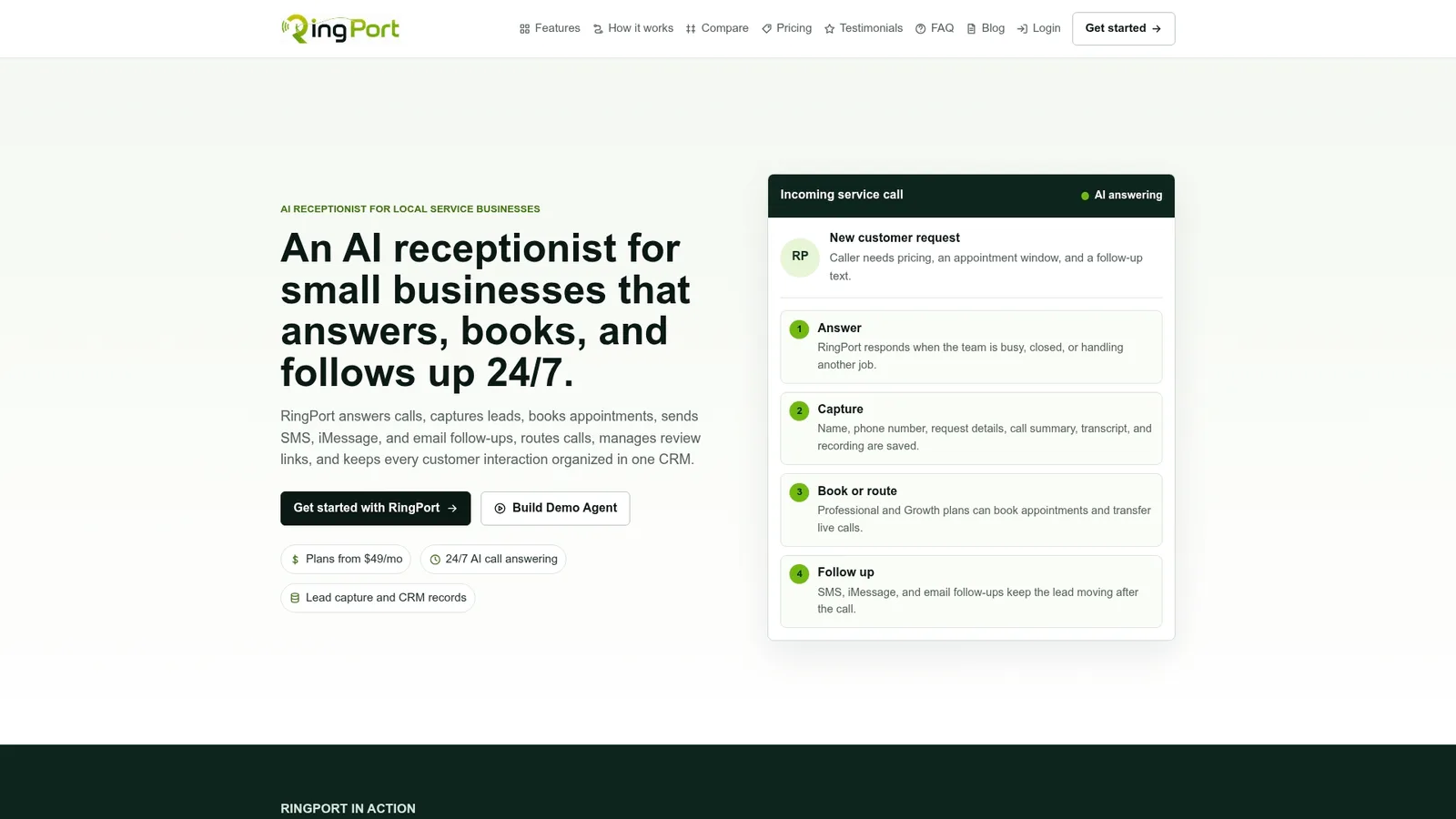
This platform offers features a solo service business would need to run through: automated call answering, appointment booking that writes to a calendar, smart call routing, and CRM management, all without adding a staff member to the payroll. The smart call routing approach is designed to cut wait time and improve first-call resolution, while the Fast Agent workflows handle the back-and-forth of qualifying a caller and locking in a time slot.
Picture a home services business: a caller phones at 9 PM about a leaking pipe. RingPort answers immediately, confirms the service needed, checks the technician's calendar, and books the earliest available slot, sending a text confirmation before the caller even hangs up.
Now picture a solo consultant who's mid-meeting when a prospective client calls. RingPort takes the call, captures the lead's details, answers basic questions about availability, and schedules a consultation without the consultant lifting a finger.
Both scenarios lean on the same features:
- Calendar sync that checks real-time availability before confirming a booking.
- CRM integration that logs the lead automatically for follow-up.
- Local-presence dialing on outbound confirmations, which tends to raise answer rates compared to calls from unfamiliar numbers.
Which approach fits your type of business
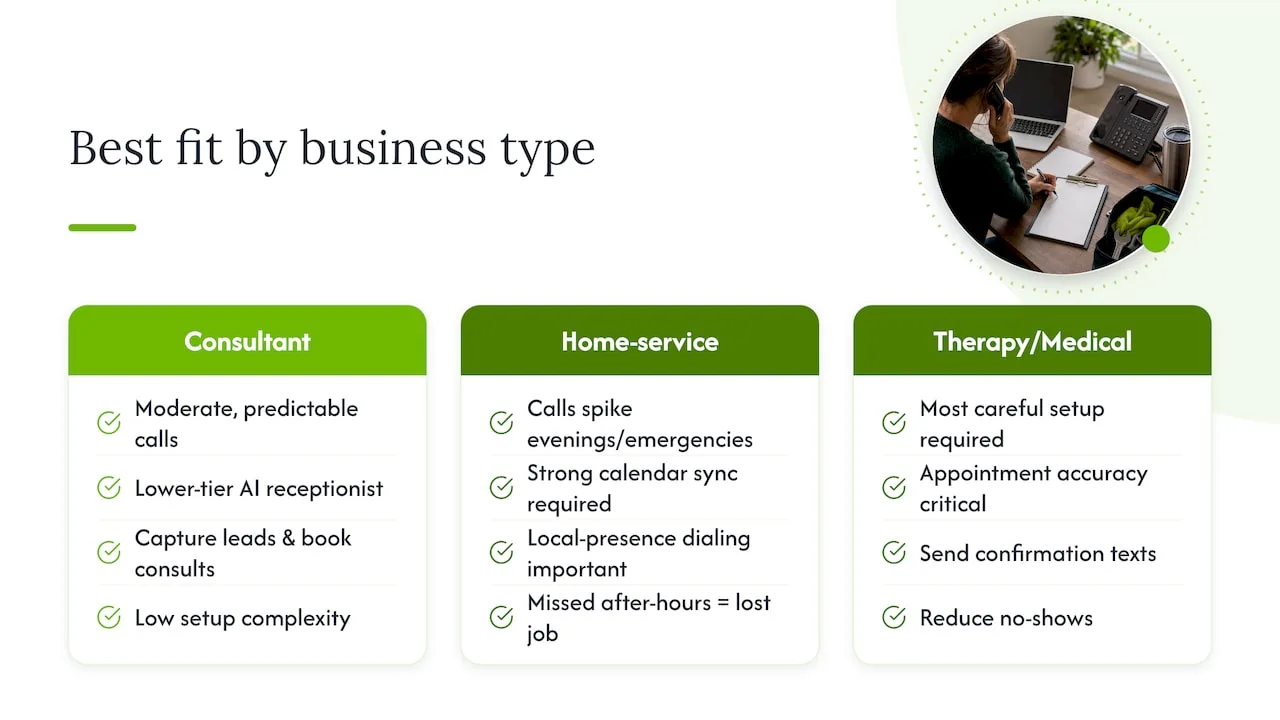
A consultant or freelancer with a moderate, predictable call volume usually does fine with a straightforward AI receptionist on a lower tier, since the main job is capturing leads and getting a consultation on the calendar without extra complexity.
A home-service technician, where calls spike during emergencies and evenings, benefits more from a plan with strong calendar sync and local-presence dialing, since missing an after-hours call often means losing the job entirely.
A solo therapy or medical practice needs the most careful setup: appointment accuracy matters more here than almost anywhere else, and confirmation texts reduce the no-show problem that hits health-adjacent practices particularly hard.
Across all three profiles, a few tactics apply universally. Use local-presence dialing on outbound calls so your number looks familiar rather than getting screened. Send a confirmation text immediately after every booking. Set clear expectations in your greeting about response times so callers know what to expect.
Start with a short paid trial rather than committing to a year up front, and track two numbers closely: bookings per call and first-call resolution. Those two figures tell you faster than any sales pitch whether a system is actually working for your business.
— Serhii
Try RingPort without disrupting how you already work
If you've read this far, you already know what to look for: reliable booking, real calendar sync, and follow-up that happens without you lifting a finger. RingPort was built for exactly that, aimed at local service businesses that can't justify a full-time receptionist but still need every call answered.
During a trial, put these three things to the test:
- Confirm calendar sync works correctly and doesn't double-book or miss slots.
- Walk through the booking flow as a test caller and see how it handles a realistic request.
- Check call-handling accuracy against questions specific to your business, not generic small talk.
You can review the Starter, Professional, and Growth plans, along with pay-as-you-go options for extra call volume, directly on the RingPort site. Set up a trial, run your own test calls, and see whether the booking flow holds up against how your phone actually rings.
FAQ
What is the best phone answering system for a small business?
The best system for most solo and small business owners is an AI receptionist that books appointments directly to a calendar and offers live-backup escalation for unusual calls. This combination keeps costs lower than a full staffing solution while covering calls around the clock.
Can I get paid to answer phone calls?
Yes, this typically happens through live answering services that hire remote agents to handle calls for client businesses, usually paid hourly or per call. That's a separate path from the phone answering tools small business owners use to manage their own incoming calls.
How much does it cost to hire an answering service?
Costs vary by provider and model: some charge flat monthly tiers based on call volume, while others bill per call or per minute under a pay-as-you-go structure. For example, RingPort's plans start at $49 per month for the Starter tier, scaling up to $149 for Professional and $299 for Growth, with pay-as-you-go add-ons available for extra usage.
Is there a free AI answering service for small businesses?
Most AI receptionist platforms operate on paid subscription tiers rather than a permanently free plan, since the service involves ongoing call handling, calendar integration, and support. Some providers offer a trial period, which lets you test the booking flow and call quality before committing to a paid tier.


