
Smart Call Routing for Managers: Cut Wait Time, Lift FCR
Discover how smart call routing cuts wait times, improves First Call Resolution, and enhances agent efficiency without extra hires.

How many customers are slipping away before you can answer?
Answer 4 quick questions and get a simple missed-call estimate for your business.
Answer with one tap. Contact details come after your result.
Here is the estimate.
Thanks. Your result was received.
Smart call routing is a decision engine that reads context, such as caller history, intent, and agent availability, and sends every call to the person or system best equipped to resolve it on the first try. Get it right and you'll typically see First Call Resolution (FCR) climb, Average Handle Time (AHT) shrink, and abandonment rates drop, all without hiring another body for the phones.
Here's what that shift actually delivers for a team once the routing logic is dialed in:
- Higher FCR because callers land with the agent or automated flow most likely to solve their issue, not just the next available line.
- Lower AHT since context arrives with the call, so nobody has to ask the caller to repeat themselves.
- Fewer blind transfers, because the engine matches skill and intent up front instead of guessing.
- Reduced abandonment, since time-based and priority rules keep queues moving during peak load.
- Better agent utilization, spreading volume based on real-time capacity instead of a fixed hunt group.
Contact centers with high call volume see the fastest returns, but the same logic scales down. A five-person plumbing company using a system like RingPort to answer, qualify, and route every call gets the same first-touch accuracy a 200-seat call center pays a full IT team to build.
Key Takeaways
Smart call routing works because it feeds every call context, caller identity, history, and intent, into a decision engine that picks the best destination before a human ever answers.
| Point | Details |
|---|---|
| Definition matters | Smart routing uses AI and real-time data to route calls, not just a fixed hunt group order. |
| KPIs to prioritize | Track FCR and abandonment first in a pilot; save revenue uplift for the scale-up review. |
| Fallback is non-negotiable | Configure a timeout fallback route before testing any routing logic to avoid stalled callers. |
| Pilot before you scale | Run a 30 to 90 day pilot on a limited queue and set rollback criteria in advance. |
| Data work comes first | Clean CRM fields and tested integrations matter more than the routing logic itself. |
| RingPort applies this directly | RingPort gives local service businesses 24/7 automated answering, intent capture, and CRM-synced booking without building custom routing infrastructure. |
Table of Contents
- How Does Smart Call Routing Work?
- What Are the Main Call Routing Methods?
- What Business Benefits and KPIs Should You Track?
- How Do You Implement Smart Call Routing Without Disrupting Operations?
- Where Does Smart Call Routing Actually Get Used?
- What Pitfalls Should You Watch for With Smart Call Routing?
- How RingPort Applies Smart Routing for Local Service Businesses
- What Experienced CX Practitioners Get Wrong About Rollout
- Ready to Put Smart Routing to Work for Your Business?
- Where to Learn More About Smart Call Routing
- Sources
How Does Smart Call Routing Work?
The runtime flow moves in a straight line: a call comes in, the system enriches it with context, a decision engine picks a destination, and the outcome feeds back into the model. That sequence is what separates "smart" routing from a phone tree that just asks you to press 2 for sales.
It starts at intake, where the system reads ANI (the caller's number) and DNIS (the number they dialed) to know who's calling and what they were trying to reach. From there, an IVR or a conversational IVA either collects more detail through menu choices or lets the caller speak naturally, with natural language understanding (NLU) extracting the actual intent behind the words. That intent gets paired with a live CRM lookup, so a returning customer's history, open tickets, or appointment status arrives at the routing engine before a human ever picks up. The engine then applies routing logic against real-time conditions, agent skill, queue depth, and predicted resolution probability, to choose a destination. Whatever agent or bot receives the call also receives the enriched context on their desktop, so there's no cold start. After the call ends, the outcome gets logged and folded back into the model.
The data inputs feeding that decision typically include:
- ANI/DNIS for caller and destination identity.
- CRM fields like account status, contract tier, or past complaints.
- Interaction history across prior calls, chats, or emails.
- Speech or text intent extracted through NLU.
- Queue state, meaning current wait times and staffing levels.
- Workforce management (WFM) signals, such as scheduled breaks or shift changes.
At the moment of decision, the engine is weighing agent availability, current queue wait, and a predicted probability of resolution for each candidate agent, not just who's been idle longest. Salesforce describes this as matching callers to the best resource available rather than simply the next available one, and that distinction is the entire value proposition of intelligent routing over a basic hunt group.
The learning loop is the part most explainers skip. Every routed call produces an outcome, resolved, transferred, escalated, and the system uses those outcomes, often through A/B tests on routing rules, to refine which agent or flow gets picked next time under similar conditions.
What Are the Main Call Routing Methods?
The primary routing methods you'll evaluate are skill-based, intent-based, time-based, priority-based, ANI/DNIS, and predictive or AI-driven routing, each suited to a different kind of call volume and complexity.
| Routing Method | Routes On | Best Use Case | Implementation Complexity | Required Data Integrations |
|---|---|---|---|---|
| Skill-based | Agent expertise or certification | Technical support, specialized sales | Moderate | Agent skill database, ACD |
| Intent-based | Detected purpose of the call | High-mix support queues | High | NLU engine, CRM |
| Time-based | Business hours, shift schedules | After-hours handling, global coverage | Low | Scheduling system, WFM |
| Priority-based | Customer tier or urgency flag | VIP accounts, SLA-bound clients | Moderate | CRM, account tiering data |
| ANI/DNIS | Caller number or dialed number | Multi-location or multi-brand routing | Low | Telephony/ACD |
| Predictive/AI | Resolution probability, historical outcomes | Large, high-volume centers | High | CRM, ML model, interaction history |
Each method solves a different problem, so it helps to know what you're actually buying:
- Skill-based routing sends a call to the agent qualified to handle the specific issue, not just any available agent.
- Intent-based routing uses NLU to detect what the caller actually wants before a human ever engages.
- Time-based routing changes destinations by hour, day, or holiday schedule, useful for after-hours voicemail or on-call escalation.
- Priority-based routing moves high-value or urgent callers to the front of the queue based on account data.
- ANI/DNIS routing directs calls based on the number dialed or the caller's origin, common for businesses running multiple brands off one system.
- Predictive/AI routing forecasts which agent has the highest probability of resolving a specific caller's issue, based on historical performance patterns.
Before signing with any vendor, confirm the integration checklist: CRM integration for context lookup, workforce management (WFM) for staffing signals, a knowledge base for agent-assist prompts, telephony or ACD for call control, analytics for KPI tracking, and webhooks for triggering downstream actions like appointment confirmations. GetVoIP's overview of intelligent routing frames these integrations as the difference between a routing tool and a routing platform.
Omnichannel routing matters once your customers move fluidly between voice, chat, and text. If a customer texts your business before calling, a router that only sees phone history is routing blind. That's less critical for a single-channel operation, but for any business fielding SMS or web chat alongside calls, unifying those channels into one routing decision is worth the added integration work.
What Business Benefits and KPIs Should You Track?
The most reliable gains from smart call routing are higher FCR, lower AHT, reduced abandonment, improved Customer Satisfaction (CSAT), and better agent utilization, in that rough order of measurable impact.
Pro Tip: Track FCR and abandonment first during a pilot. Revenue uplift takes longer to surface and is easier to misattribute to other changes happening at the same time.
| KPI | How to Measure It | Baseline to Track | Common Confounder |
|---|---|---|---|
| FCR | % of calls resolved without transfer or callback | Pre-routing baseline over 30 days | Definition varies by team; lock it down first |
| AHT | Average time from call start to disposition | Current average by queue | Complex calls skew averages upward |
| Abandonment rate | % of callers who hang up before connecting | Current queue-level rate | Seasonal volume spikes distort short windows |
| CSAT | Post-call survey score | Current average score | Low survey response rates bias results |
| Agent utilization | % of scheduled time spent on productive call work | Current utilization by shift | Idle time from system downtime, not routing |
Zendesk's guidance on intelligent call routing recommends measuring FCR, wait times, abandonment, and agent metrics together rather than in isolation, since a gain in one can mask a loss in another. Vendors routinely cite double-digit FCR improvements and meaningful AHT reductions after deploying intelligent routing, but treat those figures as vendor-reported and context-dependent. Call mix, staffing levels, and baseline data quality all shape what's realistic for your team.
For a pilot, prioritize FCR and abandonment because they move fastest and are hardest to fake. Revenue uplift and long-term CSAT trends belong in your scale-up review, not your 30-day checkpoint.
How Do You Implement Smart Call Routing Without Disrupting Operations?
The safest path is a phased rollout: discover, pilot, iterate, then scale, with a hard fallback rule at every stage so no caller ever hits dead air.
- Discover. Document current call flows, identify your highest-volume intents, and map which CRM fields the router will need at decision time.
- Map your data. Confirm ANI/DNIS capture, CRM field accuracy, and whether your interaction history is clean enough to trust in a live decision.
- Build fallback rules first. Before testing any routing logic, configure a default queue or voicemail path for when a lookup fails or times out.
- Integration test. Run the CRM lookup, NLU intent detection, and ACD handoff in a staging environment against real call recordings.
- Train agents. Walk your team through what context will appear on their screen and how routing decisions were made, so they trust the system instead of fighting it.
- Pilot on a limited queue. Route a defined slice of calls, say 10 to 20 percent of one queue, and monitor FCR, AHT, and abandonment daily.
- Set monitoring dashboards. Track the KPI table above in real time, not just in a weekly report.
- Ramp traffic gradually. Move from a pilot slice to full queue coverage over several weeks, watching for KPI drift at each increase.
- Scale to additional queues. Once the pilot queue stabilizes, replicate the configuration to the next highest-volume queue.
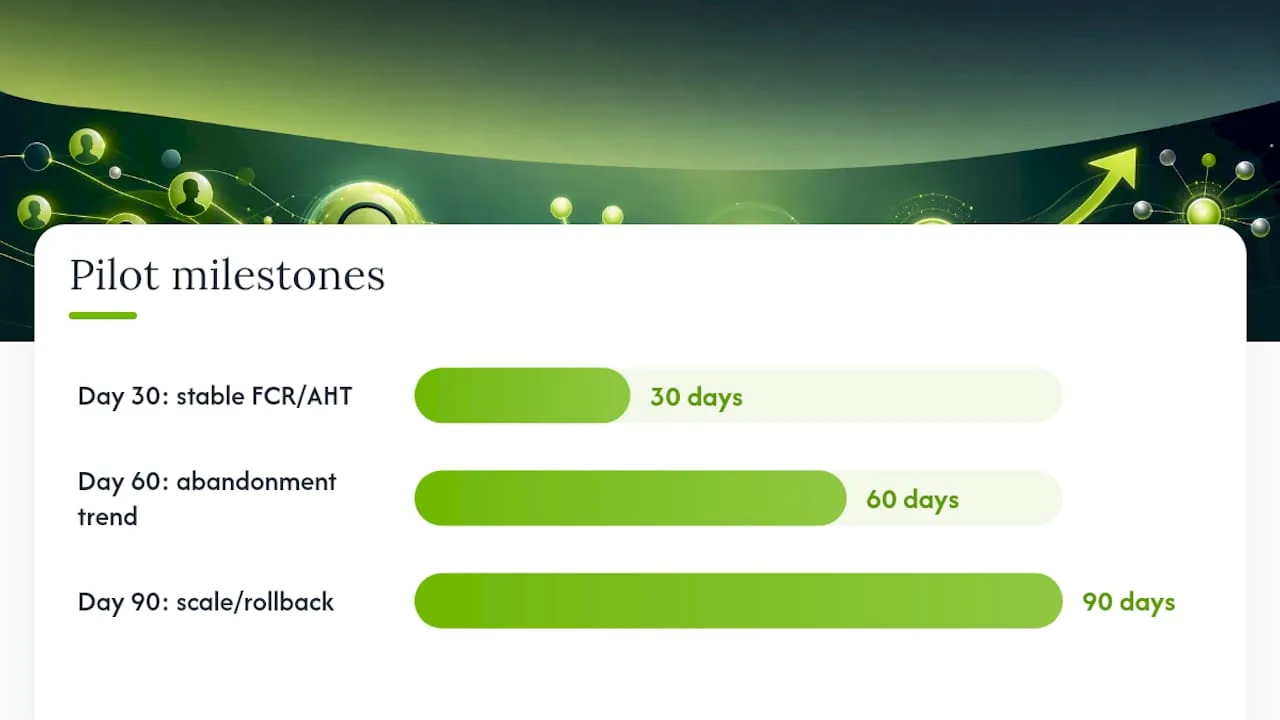
A realistic pilot runs 30 to 90 days. By day 30, you should see stable FCR and AHT data on your pilot queue. By day 60, abandonment should show a clear trend versus your pre-routing baseline. By day 90, you should have enough data to decide whether to scale or roll back.
Set rollback criteria before you start, not after something breaks. A measurable CSAT drop or a rise in dropped calls during the pilot window should trigger an immediate pause and fallback to your prior routing method. This is exactly why a timeout fallback or default route matters so much: if a CRM lookup or API call exceeds two to three seconds or fails outright, the caller needs an immediate path to a general queue or voicemail rather than silence.
Before any live traffic touches the new system, run synthetic test calls against every intent path, then shadow route real calls without acting on the decision, comparing what the engine would have done against what actually happened. Only after shadow testing checks out should you ramp real traffic.
Where Does Smart Call Routing Actually Get Used?
The top use cases are support triage, sales qualification, appointment booking, after-hours handling, and priority routing for high-value or urgent callers.
A few scenarios show how this plays out day to day:
- A software company routes a billing question away from tier-one support and straight to a specialist who already sees the account's payment history on screen.
- A returning sales lead who requested a demo last week gets routed to the same rep instead of starting over with someone new.
- A caller after business hours reaches a scheduling flow that books a slot directly instead of leaving a voicemail nobody checks until morning.
- A flagged high-value account gets bumped ahead of the general queue the moment the system recognizes the account tier.
- A caller asking about a service outage gets routed to a dedicated escalation queue instead of the standard support line.
For a small service business, the clearest use case is appointment scheduling end to end. A caller reaches out after hours, the system answers immediately, asks what they need, checks calendar availability through CRM sync, and books the slot without a human touching it. This is precisely where a platform like RingPort fits: instead of building custom IVR logic and NLU pipelines from scratch, a local business gets that same intake, intent capture, and booking flow out of the box.
Channel suitability matters here too. Voice routing works best for anything requiring real-time back and forth, appointment changes, urgent issues, complex questions. Messaging channels handle asynchronous, lower-urgency requests well, like confirmation reminders or simple status checks, but they're a poor substitute for voice when a caller needs an answer in the next sixty seconds.

What Pitfalls Should You Watch for With Smart Call Routing?
The most common failure modes are stale data, missing fallback paths, and KPIs that don't match what the business actually needs to improve. Here's how each pitfall pairs with its fix:
- Stale CRM data leads to routing decisions based on outdated account status. Fix: add a data hygiene step before go-live and cache a fallback profile when a lookup returns nothing.
- No timeout fallback leaves callers stuck in silence when an API call is slow. Fix: set a hard two to three second timeout with an automatic route to a general queue.
- Misaligned KPIs means teams chase AHT reduction when the real goal was FCR improvement. Fix: define your primary KPI before configuring any routing logic, not after.
- One-time tuning treats go-live as the finish line. Fix: build a recurring review cadence, weekly for the first month, monthly after that, to retune based on outcome data.
- No clear escalation path frustrates callers when the router can't find a match. Fix: always define a human escalation route that a caller can reach within one or two attempts.
Escalation clarity and ongoing monitoring matter more than any single tuning session at launch. Routing logic drifts as call patterns change, so treat it as a living system, not a one-and-done configuration.
Privacy and security deserve real attention here, since routing systems pull identity and account data the moment a call connects. The FTC's Red Flags Rule guidance lays out how businesses handling customer account data should build identity-risk detection into their processes, and that principle applies directly to routing systems that surface account details based on a phone number alone. Practice data minimization: pull only the fields the routing decision actually needs, and make sure any CRM lookup is authenticated before sensitive account details display on an agent's screen.
How RingPort Applies Smart Routing for Local Service Businesses
RingPort is an AI receptionist built to give local service businesses the same intelligent routing and appointment capture that large contact centers use, without the IT team required to build it.
The routing-relevant capabilities line up directly with what this article has covered:
- Automated call answering around the clock, so no call goes to voicemail during off-hours or peak volume.
- Intent capture that identifies whether a caller wants to book, ask a question, or reach a specific person.
- Appointment booking synced to real-time calendar availability, closing the loop without human intervention.
- CRM sync that pulls prior interaction history so returning callers aren't treated like strangers.
- Fallback rules that route to a human or a callback queue when the automated flow can't resolve the request.
- Smart transfers that hand off complex or high-value calls to the right person on the team.
A common outcome for a small service business, whether that's a home services company or a medical office, is fewer missed calls converting into fewer missed appointments, since the system captures and books leads at 2 a.m. as reliably as at 2 p.m.
RingPort fits best for solo operators and small teams who can't justify a full-time receptionist but still need every call handled with the same accuracy a large call center gets from a six-figure routing platform. Teams ready to see it in action can start with a trial or a live demo to see how the routing and booking flow performs against their own call patterns.
What Experienced CX Practitioners Get Wrong About Rollout
Most teams underestimate how much of this project is data work, not routing logic. The routing engine is only as good as the CRM fields, call history, and intent labels feeding it, and that groundwork takes longer than picking a vendor.
A few things worth prioritizing before you sign anything:
- Get your CRM data clean and your integrations tested before you touch routing rules. Garbage context in means garbage routing out.
- Commit to iterative tuning as a standing calendar item, not a one-time launch task. Call patterns shift with seasons, promotions, and staffing changes.
- Protect your agents' flow states. Routing that interrupts an agent mid-task to hand them an unrelated call erodes the productivity gains you were trying to capture.
Budget real management attention here, not just implementation hours. The technology does the routing, but a manager watching the KPI dashboard weekly for the first quarter is what actually turns a pilot into a permanent gain.
Ready to Put Smart Routing to Work for Your Business?
RingPort gives local service businesses the routing accuracy of an enterprise contact center, packaged as a receptionist that answers, qualifies, and books every call automatically, day or night.
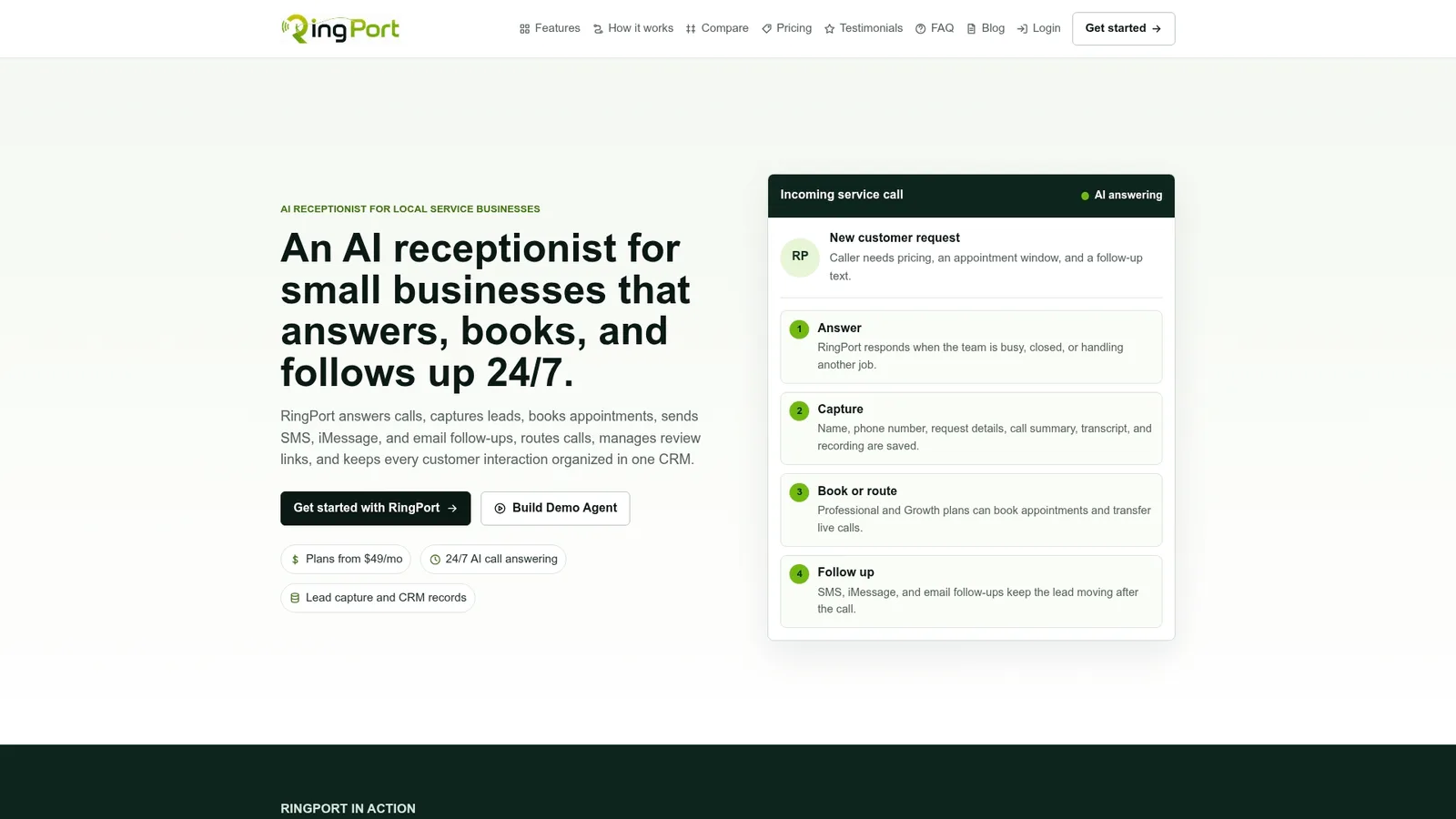
Instead of building custom IVR scripts and NLU pipelines, or hiring a full-time front desk hire just to cover the phones, you get 24/7 call answering, smart routing, appointment booking, and CRM sync running from day one. That means the intent capture, fallback rules, and calendar sync covered throughout this article come configured and ready, not something your team has to piece together from three separate vendors.
If your business is missing calls after hours or losing leads to slow follow-up, the fastest way to see the difference is to start a RingPort trial and run it against a week of your real call volume. Compare what gets booked automatically against what used to go to voicemail.
Where to Learn More About Smart Call Routing
These sources were chosen for practical implementation guidance, policy context on data handling, and independent technical explainers rather than vendor sales copy.
- Fighting identity theft: Red Flags Rule — How-to guide for businesses | FTC
- Digital
- Intelligent Call Routing: Benefits & How It Works | GetVoIP
- Default fallback routing — Hyperswitch docs
- Intelligent call routing: Benefits & how it works | Salesforce
- Intelligent call routing: How it works and best practices | Zendesk
- AI Interaction Routing | NiCE CX Products
- RingPort | AI Receptionist for Small Business
Sources
- Fighting identity theft: Red Flags Rule — How-to guide for businesses | FTC
- Digital
- Intelligent Call Routing: Benefits & How It Works | GetVoIP
- Default fallback routing — Hyperswitch docs


