
New Patient Intake: A Practical Guide to Forms and Workflow
Streamline your new patient intake process. Discover essential forms, proven templates, and compliance guidelines to enhance patient experience.

How many customers are slipping away before you can answer?
Answer 4 quick questions and get a simple missed-call estimate for your business.
Answer with one tap. Contact details come after your result.
Here is the estimate.
Thanks. Your result was received.
Every new patient intake packet needs six sections: contact and ID verification, insurance and billing details, reason for the visit, medical and family history, current medications and allergies, and signed consents. That's the whole structure. If you're building or fixing a packet today, the fastest move is to grab a proven template rather than start from a blank page. The AMA Private Practice Playbook offers downloadable sample forms built around this exact framework, and Johns Hopkins publishes preregistration guidance worth reviewing for timing and required documents.
Before you customize anything, understand the two compliance items every packet must carry: a HIPAA Notice of Privacy Practices acknowledgment, and, for self-pay or uninsured patients, a Good Faith Estimate disclosure under the No Surprises Act.
Here's the shortcut version:
- Contact/ID: legal name, date of birth, address, emergency contact
- Insurance/billing: subscriber ID, relationship to subscriber, card photos
- Reason for visit: chief complaint in the patient's own words
- History: medical, surgical, family, and social background
- Medications and allergies: current doses, frequency, and reaction types
- Consents: HIPAA acknowledgment, treatment consent, financial policy signature
Key Takeaways
A complete new patient intake process pairs a six-section template with digital delivery, verified insurance data, and documented HIPAA and Good Faith Estimate consents.
| Point | Details |
|---|---|
| Start with a proven template | Use the AMA Playbook or a hospital sample packet instead of building forms from scratch. |
| Prioritize four billing fields | Legal name, policy number, subscriber relationship, and card photos prevent most claim denials. |
| Digitize before the visit | Sending forms 48 to 72 hours ahead cuts front-desk transcription time and check-in delays. |
| Document consent properly | Keep signature and consent text on one page, and date every individual consent. |
| Pilot before full rollout | Test the new workflow on one appointment type and track completion rates first. |
Table of Contents
- Where to Find Ready-to-Use New Patient Intake Templates
- What Fields Belong in Every New Patient Intake Form?
- How Does Digital Intake Improve Accuracy and Cash Flow?
- How to Roll Out a New Patient Intake Workflow in Seven Steps
- What Compliance Items Belong in Every Intake Packet?
- How Do You Design Forms People Actually Finish?
- Where Automation Fits Into the Intake Process
- Turning Intake Automation Into Fewer No-Shows and Cleaner Registrations
- Templates and Resources Worth Bookmarking
- The Real Gap in Most Intake Advice
- Sources
Where to Find Ready-to-Use New Patient Intake Templates
You don't need to design a packet from scratch, and you shouldn't. Three sources cover most practice types well.
The AMA's Private Practice Playbook gives you a full new patient packet plus HIPAA notices and administrative forms in downloadable DOCX and PDF formats, which makes it easy to edit directly in Word. Hospital systems like Johns Hopkins publish preregistration forms geared toward larger, multi-department settings. And clinic-level examples, like the packet from St. Paul Medical Clinic, show what a lean, single-provider version looks like in practice.
For format fit: solo clinics usually do best starting from a PDF or DOCX packet they can trim down fast. Group practices tend to need the AMA's broader template set since they're juggling more specialties and payers under one roof. Specialty clinics should start with a general packet and bolt on a short specialty addendum rather than rebuilding the whole thing.
Before you roll out any borrowed template, run this three-point check:
- Strip out fields you'll never use. Every unused field slows completion for no benefit.
- Localize consent language to match your state's requirements.
- If you're adopting a digital form, confirm a signed Business Associate Agreement is in place with that vendor.
What Fields Belong in Every New Patient Intake Form?
Some fields are cosmetic. Others determine whether your claim gets paid on the first pass. Here's the priority order.
- Legal name and date of birth, matched to ID. Mismatches between the form and the insurance card are one of the most common causes of claim kickbacks.
- Insurance member ID and subscriber relationship. If the patient isn't the subscriber, you need the subscriber's name and relationship spelled out, not assumed.
- Insurance card photos, front and back. A photo catches typos that a hand-copied number never will.
- Chief complaint, in the patient's own words. Clinical staff can translate it into coded language later; capturing it verbatim protects the visit's medical necessity documentation.
- Current medications with dose and frequency. "Metformin" alone tells a provider nothing useful, and dosing errors carry patient safety risk.
- Allergy type and reaction. A "penicillin allergy" without reaction detail (rash versus anaphylaxis) forces a provider to re-ask at the worst possible moment, mid-visit.
Beyond these six, some fields only apply to certain specialties. Pediatric practices need immunization history. Orthopedic clinics need injury mechanism and prior imaging. Behavioral health practices need a longer psychosocial history. The rule of thumb: collect specialty-specific fields pre-visit only if they change scheduling or triage; otherwise, gather them in the room, where a clinician can ask follow-up questions live.
Fields that most often trigger denials: exact legal name spelling, policy or member ID number, subscriber name and relationship, and a legible insurance card image. Get these four right and you'll eliminate a large share of avoidable rework, according to guidance from Phreesia on registration accuracy and its link to clean claims.
How Does Digital Intake Improve Accuracy and Cash Flow?
Paper forms get lost, misread, or filled out in a waiting room chair with a clipboard balanced on a knee. Digital intake fixes more than convenience. It changes outcomes.
Sending forms before the visit means patients aren't rushing through fields at check-in, and staff aren't retyping handwriting into your practice management system. That reduction in manual transcription is directly tied to fewer errors and, per Phreesia's guidance on registration accuracy, a higher rate of clean claims on first submission.
To get real value from digital intake, require these integration pieces before you sign a vendor contract:
- Two-way sync with your EHR or practice management system, not just a PDF export
- HIPAA-compliant hosting with a signed BAA
- Native e-signature capture with a timestamped audit trail
- Real-time insurance eligibility checks
- Mobile camera upload for insurance cards
Pro Tip: Test every new digital form on an actual phone screen before rollout, not just a desktop browser. Most patients will complete intake from their phones, and a form that looks clean on a laptop can be unusable with fat-finger tapping on a five-inch screen.
How to Roll Out a New Patient Intake Workflow in Seven Steps
Changing your intake process doesn't have to disrupt a full week of scheduling. Break it into stages and pilot before you scale.
- Offer online scheduling with pre-registration, sending intake links 48 to 72 hours before the appointment so patients have time without forgetting.
- Digitize the forms themselves, building mobile-first layouts with card photo upload built in.
- Automate eligibility verification against the insurance details submitted, flagging mismatches for staff review before the patient walks in.
- Add e-consent and a Good Faith Estimate prompt specifically for self-pay and uninsured patients.
- Set up staff notifications and an exception queue so incomplete or flagged intakes surface automatically instead of getting caught at check-in.
- Pilot with one appointment type first, tracking completion rates and front-desk time before and after.
- Train staff on the new steps and expand to the rest of your schedule once the pilot numbers hold up.
Digitizing pre-visit intake shifts a meaningful chunk of front-desk workload upstream, ahead of the appointment, which is where the time savings and the error reduction actually happen. Practices that pilot before a full rollout catch integration gaps, like a card upload feature that doesn't sync to the EHR, while the stakes are still small.
What Compliance Items Belong in Every Intake Packet?
Two federal requirements anchor a defensible intake packet, and both are easier to satisfy than most practices assume.
HIPAA: every packet needs a Notice of Privacy Practices acknowledgment. Patients should sign and date it at intake, and that signature should live with the rest of the consent documents, not in a separate file that's easy to lose track of.
No Surprises Act: for self-pay and uninsured patients, you're required to provide a Good Faith Estimate before or at the time of scheduling. Guidance on GFE requirements recommends building this into your financial responsibility section rather than treating it as a separate afterthought conversation.
A few signature habits protect you in an audit:
- Keep consent text and the signature line on the same page, never split across a page break
- Date every individual consent, not just the packet as a whole
- For e-signatures, maintain a timestamped audit trail tied to the patient's account
How Do You Design Forms People Actually Finish?
Shorter forms get completed. Longer forms get abandoned halfway through, or filled out carelessly just to reach the end. Ask only what you'll actually use at this visit, and push specialty-specific questions into a targeted follow-up instead of the initial packet.
A few design choices make a measurable difference in completion quality: mobile-first layouts, plain-language field labels with a short example next to anything confusing (a date format, a policy number), logical grouping so related fields sit together, and inline validation that catches a typo before submission instead of after. Shorter, purpose-built forms with plain-language labels produce better completion rates and cleaner clinical data.
Not every patient is comfortable with a digital form, and your process should account for that. Keep an in-office tablet or kiosk option ready, and train front-desk staff to walk a patient through the form verbally when needed. If a meaningful share of your patient population speaks a language other than English, offer the packet in that language directly. LiveWell Family Medicine, for instance, publishes its intake packet in both English and Spanish.

Pro Tip: Print your form and count the fields a first-time patient has to fill out. If it's more than 25 to 30, you're likely losing people partway through. Trim before you add.
Where Automation Fits Into the Intake Process
A lot of missed intake completion isn't a form problem. It's a scheduling and reminder problem. A missed call means a patient never gets the intake link in the first place, and a booking made after hours often sits unconfirmed until someone calls back the next morning.
This is where a 24/7 answering system earns its keep in the intake workflow, not by replacing the forms themselves but by making sure patients actually receive them. An AI receptionist like Ringport answers calls around the clock, books the appointment, and sends the intake link the same day instead of waiting on a callback queue. It can also send a gentle reminder if the packet hasn't been completed close to the visit date.
The practical benefits show up as fewer missed bookings, smoother check-ins because forms arrive earlier, and a front desk that spends less time chasing paperwork by phone.
Turning Intake Automation Into Fewer No-Shows and Cleaner Registrations
Ringport handles the piece of the intake workflow that most templates and checklists skip entirely: making sure the patient actually gets the form and fills it out before showing up. Every missed call is a patient who doesn't get an intake link, doesn't get a reminder, and shows up (or doesn't show up) unprepared. Ringport answers every call, books the appointment, and triggers the intake sequence automatically, day or night, without adding headcount to your front desk.
For a solo provider or small practice team juggling patient care and administrative work at the same time, that kind of consistency matters more than another feature on your practice management system. If your current process depends on someone remembering to call back after hours, Ringport's AI receptionist closes that gap. Practices weighing a broader operational upgrade, including financing for new intake technology, can also review operational strategies for reducing appointment delays and manual data entry as part of that planning.
Templates and Resources Worth Bookmarking
A handful of sources cover nearly everything a practice needs to build or refine its intake packet.
- The AMA Private Practice Playbook offers downloadable new patient packets plus HIPAA privacy notices in DOCX and PDF.
- Johns Hopkins' registration guidance shows how a large health system structures preregistration and required documentation.
- Commure's free template breaks down the six-section structure with field-level detail.
- St. Paul Medical Clinic's packet is a real, single-provider example worth studying for its consent placement.
The Real Gap in Most Intake Advice
Most intake guides obsess over the form itself, the fields, the layout, the consent language, and barely mention the moment before the form even reaches the patient. That's backwards. A perfectly designed packet does nothing if the patient never gets the link because the call went to voicemail or the front desk was slammed at 4:45 on a Friday.
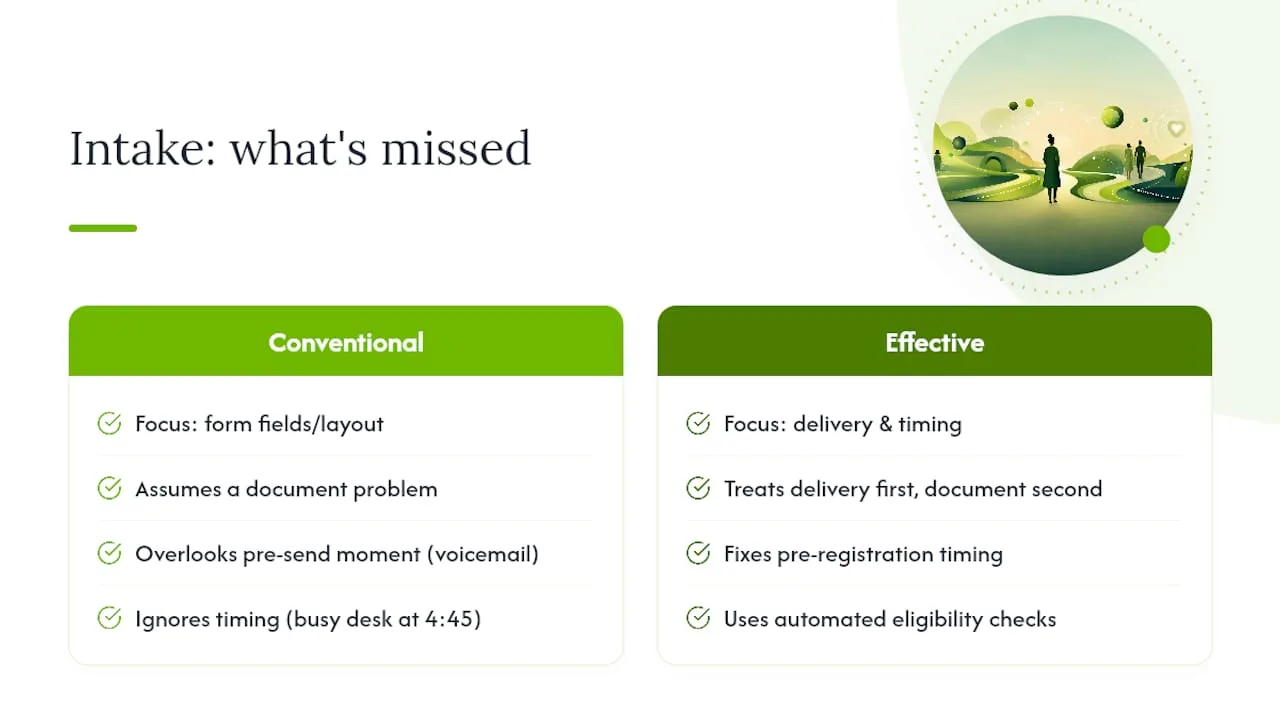
The conventional advice treats intake as a document problem. It's actually a delivery and timing problem first, and a document problem second. Practices that fix delivery, through pre-registration timing, automated eligibility checks, and reliable call handling, see the accuracy gains that Phreesia and others document, because the form actually gets filled out correctly with enough lead time to catch errors.
If you're auditing your process this year, don't start with the form. Start with what happens between the moment a patient tries to reach you and the moment they receive that first link. That gap is where most of the friction actually lives, and it's the cheapest one to close.
— Serhii
Sources
- Private Practice Playbook: Sample forms
- Johns Hopkins patient registration and preregistration guidance
- Why accurate patient registration matters (and how to get it right) | Phreesia


