
iMessage for Business: A Practical Setup and Launch Guide
Discover how to set up iMessage for businesses and connect with customers seamlessly through text, enhancing engagement and sales.
How many customers are slipping away before you can answer?
Answer 4 quick questions and get a simple missed-call estimate for your business.
Answer with one tap. Contact details come after your result.
Here is the estimate.
Thanks. Your result was received.
Apple Messages for Business is Apple's native conversational channel that lets customers text your company from the Messages app, Apple Maps, Safari, or a QR code, with support for Apple Pay purchases and appointment booking inside the thread. It differs from a personal iMessage conversation in almost every way that matters for a company: you register the channel through Apple Business Register, you're identified by a business ID rather than a phone number, and Apple assigns each customer a private Opaque ID instead of handing you their real contact details.
Before you commit engineering time to this, run through a short gut check:
- Device share: does a meaningful share of your customers use iPhones? This channel is invisible to Android users.
- In-thread commerce: would Apple Pay checkout or Time Picker scheduling inside a text thread actually shorten your sales or booking cycle?
- Privacy comfort: are you fine building CRM logic around an Opaque ID instead of a phone number?
- MSP and staffing: are you ready to work through an approved Messaging Service Provider (MSP) and staff a human-in-the-loop escalation path, since Apple does not allow fully autonomous bots?
Pro Tip: If you already use a tool like RingPort for call handling and follow-up texting, treat Apple Messages for Business as an additional channel feeding the same CRM record, not a separate silo.
Key Takeaways
Apple Messages for Business succeeds when you pair its native in-thread payment and scheduling features with a properly staffed human escalation path through an approved MSP.
| Point | Details |
|---|---|
| Registration is mandatory | Sign up through Apple Business Register with a corporate Apple Account before building anything. |
| MSP selection comes first | You cannot connect to Apple directly, so choose an approved Messaging Service Provider early. |
| Opaque ID replaces phone numbers | Design your CRM schema around Apple's Opaque ID instead of relying on contact details you'll never receive. |
| Human escalation is required | Apple rejects fully autonomous bots, so every automated flow needs a working handoff to a live agent. |
| Staffing determines success | Tools like RingPort provide 24/7 call handling and CRM routing that support the human-in-the-loop staffing this channel demands. |
Table of Contents
- What Is iMessage for Business and How Does It Actually Work?
- How Do You Sign Up and Get Approved by Apple?
- What Are the Technical Integration Options?
- How Much Does Apple Messages for Business Cost?
- What Staffing and SLAs Does This Channel Need?
- What Do Real Conversation Flows Look Like?
- What Are the Limitations and Privacy Considerations?
- What's a Realistic Launch Timeline?
- Where Does Apple Messages for Business Fit in Your Stack?
- How RingPort Supports Your Apple Messages for Business Rollout
- Frequently Asked Questions
- Sources
What Is iMessage for Business and How Does It Actually Work?
Think of Apple Messages for Business as a business front door built into the Messages app. A customer taps an entry point, Apple routes that first message to your MSP, and from there either an automated flow or a live agent picks up the conversation. Nothing about this resembles texting a business's cell phone. Apple's own documentation confirms that this is a B2C channel with dedicated interactive features, its own registration process, and identification mechanisms that have nothing in common with consumer iMessage.
The feature set is what makes this worth building for. Inside a single thread, a customer can:
- Pick from a List Picker to choose a product, service tier, or troubleshooting option without typing a word.
- Schedule with Time Picker and get a calendar-ready appointment slot.
- Send a Quick Reply to answer a yes/no or multiple-choice question in one tap.
- Pay with Apple Pay directly inside the conversation, no app switch, no phone call to read out a card number.
- Authenticate via OAuth2 to verify an account before pulling up order or membership details.
- Send and receive rich attachments, from receipts to photos of a damaged product.
Customers reach you through several entry points: a "Message Us" button on your website, a listing in Apple Maps, a Safari or Siri search result, a QR code on a receipt or storefront sign, a Wallet pass, or Apple's Message Suggest feature. In every case, customers can start conversations without knowing or dialing a phone number, since your business is identified by a registered ID instead.
On the security side, Apple never hands you the customer's real phone number or Apple Account details. You get an Opaque ID unique to that relationship, messages travel encrypted over TLS to your MSP, and undelivered messages are cached on Apple's servers for a limited window if a device is offline.
Pro Tip: Design your first flow around one picker plus Apple Pay, not five features at once. A support flow that lets a customer select "Where's my order?" from a List Picker and get a tracking link back in seconds will deflect more calls than an elaborate multi-step bot ever will.
How Do You Sign Up and Get Approved by Apple?
Getting live involves three phases: registration, building and testing, and passing Apple's review. None of it is instant, but none of it is mysterious either if you follow the sequence in order.
- Create a corporate Apple Account and start your setup inside Apple Business Register, Apple's official portal for onboarding a business.
- Choose an approved MSP before you register. You cannot connect straight to Apple's infrastructure. Every business goes through a Messaging Service Provider that handles delivery, interactive features, and eventually the review submission on your behalf.
- Add test Apple Accounts to your internal test setup so your team can send and receive messages exactly as a real customer would.
- Build every planned conversation flow in that internal test account, including edge cases like a customer abandoning a List Picker or asking an unscripted question.
- Record your flows on screen and submit them for Apple's Experience Review.
- Address any feedback and resubmit if Apple flags a missing escalation path or misuse of an interactive feature.
Apple's reviewers are specifically checking for a working human-in-the-loop escalation path, correct use of pickers and payment features, and sound handling of customer data. Expect the registration and MSP connection to take a few days, flow building and internal testing to run one to three weeks depending on complexity, and the review itself to add several more business days on top.
- Registration and corporate account setup: hours to a couple of days.
- MSP selection and connection: a few days, often the longest single delay if you're comparing providers.
- Flow building and internal testing: one to three weeks.
- Experience Review and approval: several business days per submission round.
Pro Tip: Prepare your logo assets, published response hours, and two or three sample conversation recordings before you request review. Submissions that arrive complete on the first try tend to move through faster than ones Apple has to send back for missing pieces.
What Are the Technical Integration Options?
Three broad paths exist for connecting your business to this channel, and the right one depends on how much control you want versus how fast you need to launch.
MSP-managed console with webhook or CRM sync is the fastest route for most teams. You configure flows inside your MSP's dashboard, wire up webhooks to push conversation data into your CRM, and let the MSP handle the Apple-facing plumbing entirely. Support platforms illustrate this well: Zendesk's implementation guide shows how a helpdesk-style MSP integration typically maps conversations into existing ticket workflows.
Platform connectors and middleware sit a layer deeper, letting you route Messages for Business traffic through an integration platform that also touches your scheduling system, payment processor, or inventory database. This suits teams that already run several disconnected tools and want one integration layer instead of five point connections.
A custom iMessage app with your own backend gives you full control over conversation logic and data handling, but it still runs through an MSP as the required gateway to Apple. This is the slowest and most expensive path, reserved for businesses with unusual compliance needs or highly specific conversation flows a standard console can't express.
Whichever path you pick, the MSP remains mandatory. It handles message delivery, renders your interactive features correctly on the customer's device, and submits your Experience Review on your behalf, since you cannot connect to Apple's API directly.
On the identity side, plan your CRM schema around the Opaque ID Apple assigns per customer relationship rather than a phone number, which affects contact search, deduplication, and reporting logic. Build in TLS and OAuth2 support from day one, keep a pool of real test devices rather than simulators, and remember Apple's human-in-the-loop mandate: automated flows must always have a working handoff to a live agent, not a dead end. Teams researching escalation design sometimes turn to specialized resources like Streamline AI for patterns on structuring bot-to-human handoffs cleanly.
Pro Tip: Build your escalation path first, then build the automation around it. Teams that design the bot before the handoff usually end up bolting escalation on as an afterthought, and it shows in the review feedback.
How Much Does Apple Messages for Business Cost?
Apple's own documentation doesn't list a per-message fee for businesses, which means your real costs come from three places: your MSP, your build effort, and your staffing.
MSPs typically bill under one of a few models: a flat monthly channel fee, a per-conversation rate, or volume-based tiers that get cheaper as your message count grows. Expect the same kind of tiered pricing you'd see with any customer messaging platform, and expect the sales rep to ask about your monthly conversation volume before quoting anything.
One-time costs cover integration work, developer time to build and test your flows, and the internal effort of preparing assets for Experience Review. None of that is trivial for a first launch, but it's a fraction of what building a custom support channel from scratch would cost.
- Ongoing MSP fees, usually scaled to conversation volume or a flat monthly rate.
- Agent or automation staffing time, since every automated flow needs a human backstop.
- Monitoring and maintenance, including occasional re-review if you change your UI or flows significantly.
- Integration retries, since webhook and CRM syncs rarely work perfectly on the first attempt.
Pro Tip: Budget extra calendar time, not just money, for integration retries and a possible second Experience Review round if you redesign a flow after launch. Teams that treat the first submission as final tend to get caught off guard.
What Staffing and SLAs Does This Channel Need?
Apple built this channel to be asynchronous, closer to email than to live chat, so your staffing model should reflect that instead of chasing instant-reply expectations. A reasonable first-response target is well within the hour during business hours, with full resolution windows stretched across a day or two depending on complexity, and those targets should show up plainly in your published response hours.
Human-in-the-loop design isn't optional here. Apple requires a working escalation path from any automated flow to a live agent, so decide early what gets automated (order status, appointment scheduling, FAQ-style questions) and what always routes to a person (billing disputes, complaints, anything requiring judgment). Show customers that escalation option clearly rather than trapping them in a bot loop.
Your agent console should surface the Opaque ID as a CRM field tied to the customer's existing profile, offer quick-reply templates for common questions, and let agents trigger a Time Picker or List Picker without writing custom code each time. The fewer clicks between "customer asks" and "agent responds with a picker," the faster your resolution times get.
On the UX side, resist the urge to pressure customers for instant replies the way you might in live chat. Design templates that assume someone might respond hours later, lean on pickers to cut down typing and reduce input errors, and make payment or scheduling flows self-explanatory without a paragraph of instructions.
- Set first-response SLAs realistically, in hours rather than minutes, and publish them.
- Route judgment-based issues to humans by default, automate only repetitive lookups.
- Give agents Opaque ID visibility inside the CRM, not just inside the messaging console.
- Train agents on picker and Apple Pay flows specifically, since they behave differently from a plain text reply.
- Track first-response time, resolution time, and picker completion rate as your core performance metrics.
Pro Tip: Rotate agents through Messages for Business the same way you'd rotate phone shifts. Treating it as a side channel that gets checked "when there's time" is the fastest way to blow your own published SLAs.
What Do Real Conversation Flows Look Like?
Order tracking. A customer taps "Message Us" from a shipping confirmation email, selects "Where's my order?" from a List Picker, and gets a tracking link back without ever picking up the phone. Agent action needed: none, unless the picker escalates a delayed shipment. Track deflection rate against your phone support volume.

Product selection and checkout. A customer messages from a Maps listing, browses options through a List Picker, and completes the purchase with Apple Pay inside the same thread. Agent action: monitor for abandoned carts mid-conversation. Track conversion rate and average time to purchase.
Appointment booking. A customer taps a QR code at your storefront, picks an available slot with Time Picker, and receives an automatic calendar confirmation. Agent action: confirm unusual requests only. Track booking completion rate and no-show rate compared to phone-booked appointments.
Service disruption alerts. An opted-in customer gets proactively notified of a delivery delay or schedule change and offered rebooking options through Quick Reply. Agent action: handle any reply that falls outside the offered choices. Track opt-in rate and rebooking completion.
What Are the Limitations and Privacy Considerations?
The biggest adjustment for most teams is identity. Apple never gives you a customer's phone number or Apple Account information. Instead, you receive an Opaque ID scoped to that specific customer-business relationship, which means your CRM matching and consent workflows have to be built around that ID from the start rather than retrofitted later.
Messages stay encrypted in transit, and Apple caches undelivered messages on its servers for up to 30 days if a recipient's device is offline, so your notification and fallback logic needs to account for delayed delivery rather than assuming a message either arrives instantly or fails outright.
Three constraints worth building around from day one: this is an asynchronous channel, not a live-chat replacement; an approved MSP is mandatory since you cannot connect directly to Apple; and any automation must include a functioning human escalation path.
A common mistake in early builds is treating the Opaque ID as a throwaway session token instead of a durable primary key. Because it persists for the lifetime of that specific customer-business relationship, systems that fail to store and index it properly end up creating duplicate customer records every time a conversation resumes.
On compliance, run your data handling and consent flows past legal review before your Experience Review submission, since Apple checks for sound privacy practices as part of approval.
What's a Realistic Launch Timeline?
Treat this as a project with four phases, not a weekend integration.
- Prep: select your MSP, prepare marketing and legal assets, map out which use cases you're launching with, and update your CRM schema for Opaque ID storage.
- Build and test: construct every conversation flow in your internal test account, add test Apple Accounts, validate each interactive feature, and record your flows for submission.
- Review and go-live: submit your Experience Review, transition from test to commercial account once approved, and turn on your public entry points.
- Monitor: watch your first 30 days closely for delivery issues, escalation gaps, and agent response times against your published SLAs.
| Phase | Typical duration |
|---|---|
| Prep (MSP selection, assets, CRM updates) | 3 to 7 days |
| Build and test (flows, test accounts, recordings) | 1 to 3 weeks |
| Review and approval | Several business days per round |
| Go-live monitoring | First 30 days post launch |
Before you flip the switch, confirm your escalation contacts are staffed, your fallback messaging is ready if the channel goes down, and someone owns daily monitoring for at least the first month.
Where Does Apple Messages for Business Fit in Your Stack?
For businesses with a heavily iPhone-using customer base, appointment-driven services, or a real need for in-thread payments, this channel earns its keep fast. Getting a customer from "I have a question" to "I paid and booked" without a phone call is a genuinely different experience than a support line.
It fits less well if most of your customers carry Android phones, or if you need guaranteed SMS-style deliverability regardless of device. In those cases, plain two way business texting still does the heavy lifting. Wherever you land, the human-in-the-loop requirement means you need real staffing behind the automation, not just a bot and a prayer, and that's exactly where a tool built for human handoff earns its place in the stack.
How RingPort Supports Your Apple Messages for Business Rollout
Apple's human-in-the-loop rule means the hardest part of this channel isn't the setup, it's staffing the escalation path every day without burning out one person's phone. That's the exact problem RingPort was built to solve for local service businesses.
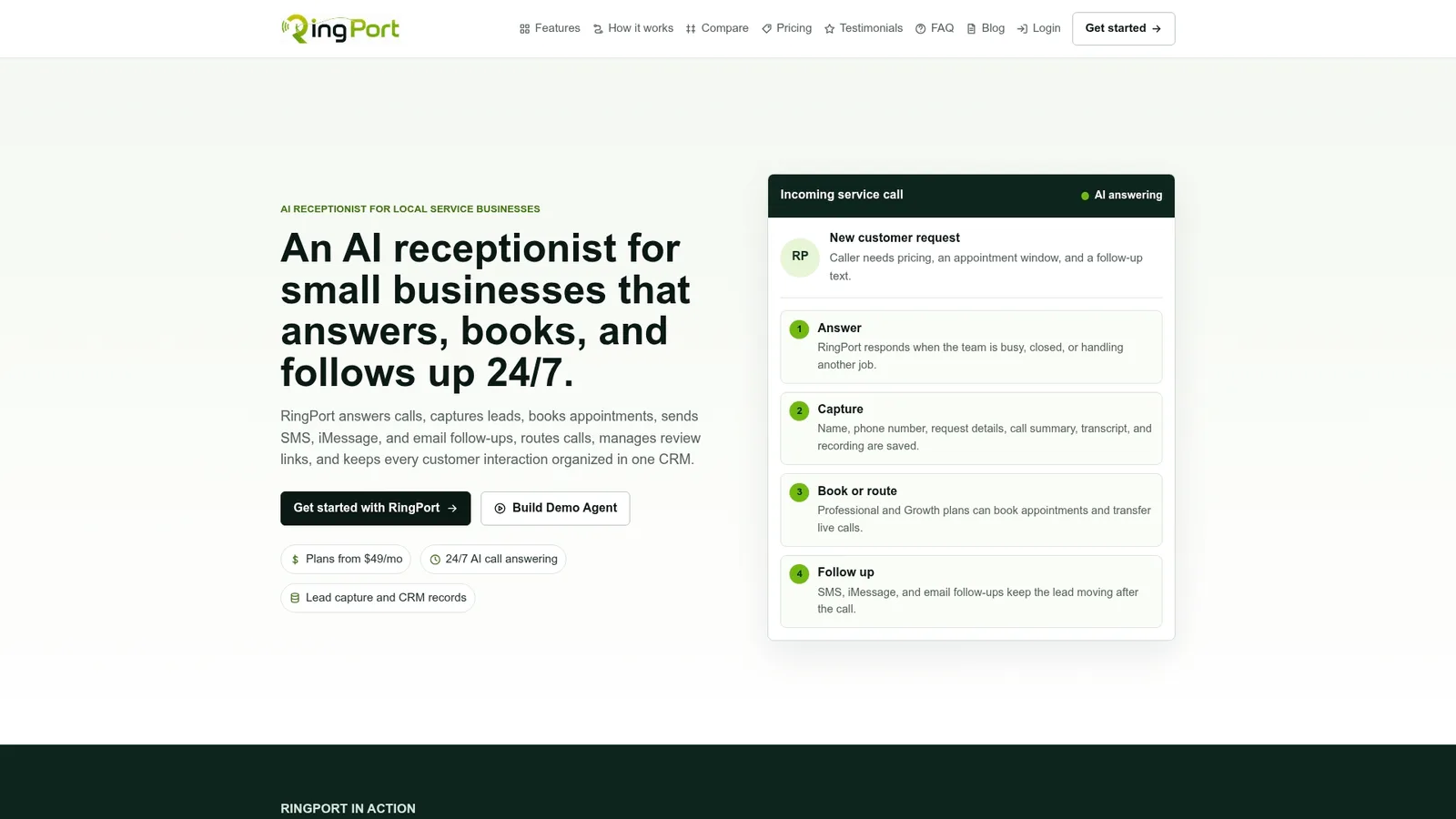
RingPort answers calls and captures leads 24/7, routes conversations to a live team member when a customer needs a human, and pushes contact and appointment data into your CRM through webhook integrations, which pairs naturally with mapping Opaque IDs to real customer records. If your team is already stretched thin answering phones, adding a new messaging channel without backup staffing is how SLAs slip within the first week. RingPort handles the initial capture and routing so your Apple Messages for Business escalations land with someone who can actually respond, instead of piling up unanswered. Start a trial at RingPort and see how automated call and message handling fits alongside your Messages for Business launch.
Frequently Asked Questions
Is Apple Messages for Business the same as iMessage? No. Consumer iMessage is a personal messaging feature, while Apple Messages for Business is a separate B2C channel that requires business registration, uses an Opaque ID instead of a phone number, and adds interactive features like List Picker and Apple Pay that consumer iMessage doesn't have.
Do I need a Messaging Service Provider to use this channel? Yes. You cannot connect directly to Apple's infrastructure. An approved MSP handles message delivery, renders interactive features, and submits your Experience Review on your behalf.
Can I fully automate customer conversations with a bot? Not entirely. Apple requires a human-in-the-loop escalation path for every automated flow, so bots can handle routine questions but must be able to hand off to a live agent.
How long does Apple's approval process take? Registration and MSP setup typically take a few days, flow building and testing run one to three weeks, and Experience Review adds several more business days per submission round, longer if Apple sends flows back for revision.
What happens if a customer's device is offline? Apple caches undelivered messages on its servers for up to 30 days, so the message still arrives once the device reconnects, but your fallback notification logic should account for that delay.
Sources
Before you build, bookmark these official references:
- Apple Messages for Business — Apple Business Register
- How to use Messages for Business — Apple Support


