
How to Get More Google Reviews Without Breaking the Rules
Discover how to gather more Google reviews ethically and effectively. Boost your business reputation with simple, proven strategies.

How many customers are slipping away before you can answer?
Answer 4 quick questions and get a simple missed-call estimate for your business.
Answer with one tap. Contact details come after your result.
Here is the estimate.
Thanks. Your result was received.
Ask every customer within 24 hours using a one-tap Google review link, automate one follow-up three to five days later, and reply to every review you get. That single loop, done consistently, outperforms every trick, hack, or paid shortcut you'll see floating around. Google's own policy bans paying or incentivizing reviews outright, so this isn't just the ethical path. It's the only one that won't get your reviews wiped out.
Text messages tend to convert faster than email for this kind of ask, largely because SMS open rates are reported to be very high and people check their phones almost immediately after a service call. Businesses that automate the ask instead of relying on staff memory usually see their first new reviews within a few days, with a visible shift in overall rating and volume within a few weeks. Here's the checklist to get there:
- Create your link or QR code through Google Business Profile and put it everywhere customers naturally look.
- Ask at the right moment, ideally within minutes to 24 hours of a completed job or purchase.
- Use short, honest scripts that name the service and never mention a star rating.
- Automate the follow-up so no customer falls through the cracks during a busy week.
- Reply to every review, good or bad, within a day or two.
- Track a few simple numbers monthly so you know if the system is actually working.
Key Takeaways
Consistent, automated, policy-compliant review requests sent within 24 hours of service produce steadier growth than any single tactic or promotion ever will.
| Point | Details |
|---|---|
| Set up your link first | Generate your Google review link or QR code and place it on receipts, invoices, and follow-up messages. |
| Ask within 24 hours | Send the first request while the experience is still fresh, then follow up once after three to five days. |
| Automate the trigger | Tie the request to a completed transaction so no customer gets missed during a busy week. |
| Reply to every review | Respond within a day or two using an acknowledge, thank, act, and offline-contact framework. |
| Track KPIs monthly | Watch review volume, velocity, average rating, and response rate to catch problems early. |
| Consider automation tools | Ringport connects booking data to SMS and email follow-ups, running the review-request workflow without extra staff. |
Where to go for the official rules and deeper how-to detail
Google's own Business Profile Help center is the only place to confirm current policy on incentives and prohibited practices, and it's worth bookmarking directly rather than trusting a summary. For the mechanics of generating your review link or QR code, Google's help page on creating and sharing review links walks through the exact steps. For deeper scripts, extended automation examples, and channel-by-channel breakdowns beyond what fits in one guide, practitioner resources like Plaudit's guide and Shopify's review guide are useful next reads.
The distinction worth remembering: Google's own pages tell you what's allowed. Practitioner guides tell you what tends to work within those rules. Treat the first as the ceiling and the second as the toolkit.
FAQ
How many reviews do I need to see a real difference in Google visibility? There's no fixed threshold, but steady weekly growth in both volume and recency matters more than hitting a specific number. A profile adding a handful of fresh reviews every month tends to outperform one with a large but stagnant total.
Is it okay to remind a customer once if they haven't left a review yet? Yes. One follow-up sent three to five days after the initial request is standard practice and generally improves response rates without feeling pushy. Sending more than one or two reminders starts to cross into nagging territory.
Can I offer a small thank-you gift after someone leaves a review, as long as I don't promise it beforehand? This sits in a gray area that's best avoided entirely. Even the appearance of a reward tied to reviews, before or after the fact, risks violating Google's policy and can lead to review removal.
Should I ask unhappy customers for a Google review at all? Yes, always ask everyone the same way. Filtering out unhappy customers is review gating, which is against policy. Instead, resolve their issue directly and let the review process play out naturally.
What's a realistic timeline for seeing more Google reviews after starting this system? Most businesses see their first new reviews within a few days of launching automated requests, with a noticeable shift in total volume and rating trend over four to eight weeks, depending on how many transactions you handle.
Table of Contents
- How to Get More Google Reviews With a Direct Link or QR Code
- When and How to Ask for a Google Review
- Building a Follow-Up Workflow That Doesn't Feel Like Spam
- Why Replying to Every Review Matters More Than Chasing Stars
- Google's Review Policy: What Crosses the Line
- Tracking What Actually Moves the Needle
- Automating the Ask Without Losing the Personal Touch
- Want Review Requests to Run Themselves?
- Sources
How to Get More Google Reviews With a Direct Link or QR Code
Friction kills review requests faster than anything else. If a customer has to search for your business, find your profile, and then hunt for the "write a review" button, most will give up halfway through. A direct link or QR code removes every one of those steps and drops the customer straight onto the review form, and that single change is often the biggest behavioral lever you can pull.
Here's how to set it up:
- Sign into your Google Business Profile and search for your business name and location.
- Click "Ask for reviews" from the profile menu (or find it under the "Get more reviews" panel).
- Copy the generated link, or select the QR code option if you want a scannable version for print.
- Test the link yourself on both a phone and a desktop browser to confirm it opens the review form directly.
- Shorten or brand the URL if you want to track clicks separately from other links you send out.
- Place the link or code everywhere a customer might see it after service, not just once.
Good placement spots include the bottom of a printed receipt, a sticker at the checkout counter, the footer of an invoice email, the closing line of a post-appointment text, and a small button on your website's thank-you page. The more natural touchpoints you use, the less any single ask feels like a demand.
Pro Tip: If you shorten your review link for tracking, avoid bundling it with a customer's personal data in the URL itself. Keep any contact information you collect (phone, email) stored securely and only for the purpose of sending the request, not for resale or unrelated marketing.
When and How to Ask for a Google Review
Timing changes everything here. Requests sent within minutes to 24 hours of a finished job convert far better than anything sent a week later, and a single reminder three to five days after the first ask meaningfully lifts response rates without feeling pushy. Wait too long and the experience has already faded from the customer's mind. Push too hard and you risk sounding desperate.
What separates an ask that works from one that gets ignored comes down to a few traits: it's short, it references the specific service performed, it includes a direct link (not a request to "search for us"), and it never mentions a star rating or a reward. Honesty beats persuasion every time. Here are three scripts you can adapt today.
In-person or phone script: "Thanks again for choosing us today. If you have a minute, we'd really appreciate a quick Google review. I'll text you the link right now so it's easy to find."
SMS template (under 160 characters): "Hi [Name], thanks for trusting us with your [service] today! Mind leaving a quick Google review? Here's the link: [URL]"
Short email template: "Hi [Name], we hope your [service/product] is working out well. If you have two minutes, a Google review helps other customers find us. Here's the link: [URL]. Thanks for your business."
Text-based requests consistently edge out email for speed of response, largely because SMS click-through happens almost immediately after delivery, while emails can sit unopened for days.
Pro Tip: Swap "leave us a review" for "share your experience." It sounds less transactional and tends to get a warmer response, especially from customers who don't leave reviews often.
Building a Follow-Up Workflow That Doesn't Feel Like Spam
Different channels suit different customers, and picking the right one at the right moment matters more than picking a favorite. Immediate SMS works best when you have a mobile number and clear opt-in, especially right after an in-person service. Email suits customers who prefer a written record or who didn't provide a phone number. QR codes shine at the point of checkout, where a customer is already standing in front of you with their phone out. Printed receipts serve as a quiet backup for anyone who wants to leave a review later, on their own time.
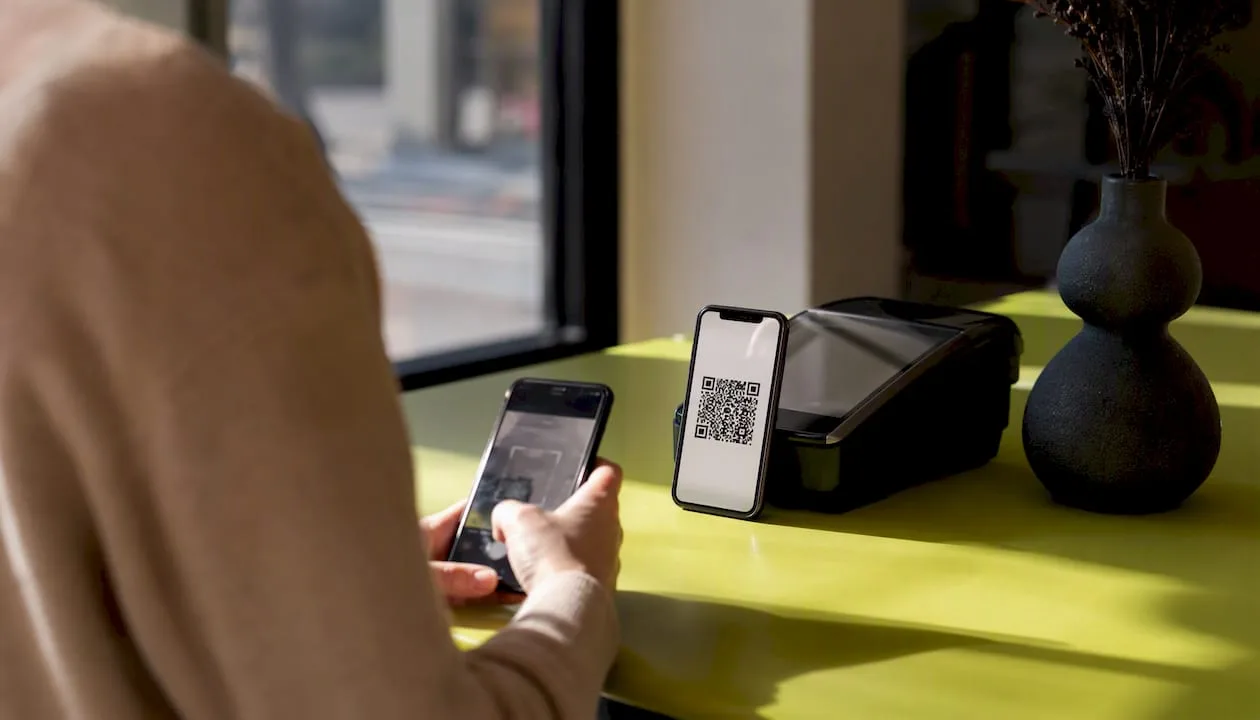
The bigger mistake most small businesses make isn't choosing the wrong channel. It's batching requests instead of triggering them. A bulk email blast to six months of old customers looks unnatural to both the recipients and to Google's spam detection, and a sudden cluster of reviews landing the same week can draw unwanted scrutiny. Triggered requests tied to an actual transaction, sent one at a time as jobs finish, produce a steadier and more believable pattern.
A simple, repeatable workflow looks like this:
- A completed transaction or appointment triggers an immediate SMS with the review link.
- If no review appears within three to five days, a follow-up email goes out automatically.
- Every incoming review, positive or negative, lands in a shared inbox or dashboard for a quick staff response.
- Historical customer lists get contacted in small batches over several weeks, never all at once.
| Approach | Best Use Case | Typical Outcome |
|---|---|---|
| Immediate SMS trigger | Mobile customers right after service | Fast response, highest short-term conversion |
| Delayed email reminder | Customers without a phone number on file | Slower response, wider reach |
| QR code at checkout | In-person retail or walk-in service | Instant capture with zero data entry |
| Bulk historical outreach | Reactivating an old customer list | Works best in small, spaced batches |
Why Replying to Every Review Matters More Than Chasing Stars
A profile full of five-star reviews with zero owner replies looks abandoned. A profile with a mix of ratings and thoughtful responses looks like a business someone actually runs. Consistent replies signal active management to both future customers reading the page and to Google's own ranking systems, which is part of why response rate has become one of the more overlooked levers in local search.
A simple four-part framework covers almost every reply you'll ever write: acknowledge what the customer said, thank them (or apologize if something went wrong), state what you're doing about it or what happens next, and offer a way to continue the conversation offline if needed.
"We had a plumber out for what we thought was a small leak, and he stayed an extra hour to check two other spots we hadn't mentioned. That kind of thoroughness is rare." A response like that, answered within a day with a genuine thank-you and an invitation to call if anything else comes up, does more to build trust with future readers than the five-star rating itself.
For a less glowing review, the same structure still applies: "Thanks for the honest feedback, and we're sorry your visit didn't go the way it should have. We'd like to make this right. Please call us at [number] so we can sort out the details directly." Prompt, personalized responses to negative feedback sometimes lead the customer to update their rating once the issue gets resolved, but even when they don't, future customers see a business that takes ownership.
Pro Tip: Never copy-paste the exact same reply on every review. Google and readers both notice repetition, and a templated-sounding response undercuts the trust you're trying to build.
Google's Review Policy: What Crosses the Line
Google's terms are specific here, and ignoring them puts your entire review profile at risk. Offering any incentive in exchange for a review, whether that's a discount, a free item, or cash, violates policy directly and can lead to review removal or account-level penalties. Review gating, meaning filtering customers so only happy ones get asked while unhappy ones get routed elsewhere, is banned for the same reason: it manufactures a fake picture of customer sentiment.
The FTC tightened its own rules on this in October 2024, making incentivized and gated reviews a legal risk on top of a platform risk. The safest system asks everyone the same way, every time, and handles unhappy customers through direct outreach rather than by hiding the review request from them.
A short list of what to avoid:
- Never offer a discount, gift card, or free product for leaving a review.
- Never filter or gate requests based on how a customer's experience went.
- Never promise or hint at a specific star rating you'd like to see.
- Never buy reviews from a third party or use fake accounts.
- Never send hundreds of historical requests in a single day; pace them out over weeks.
Tracking What Actually Moves the Needle
Five numbers tell you almost everything you need to know about how your review system is performing: how many new reviews you're getting per week, how many you've collected over the last 90 days (your review velocity), your current average rating, what share of requests turn into completed reviews, and how consistently you're replying.
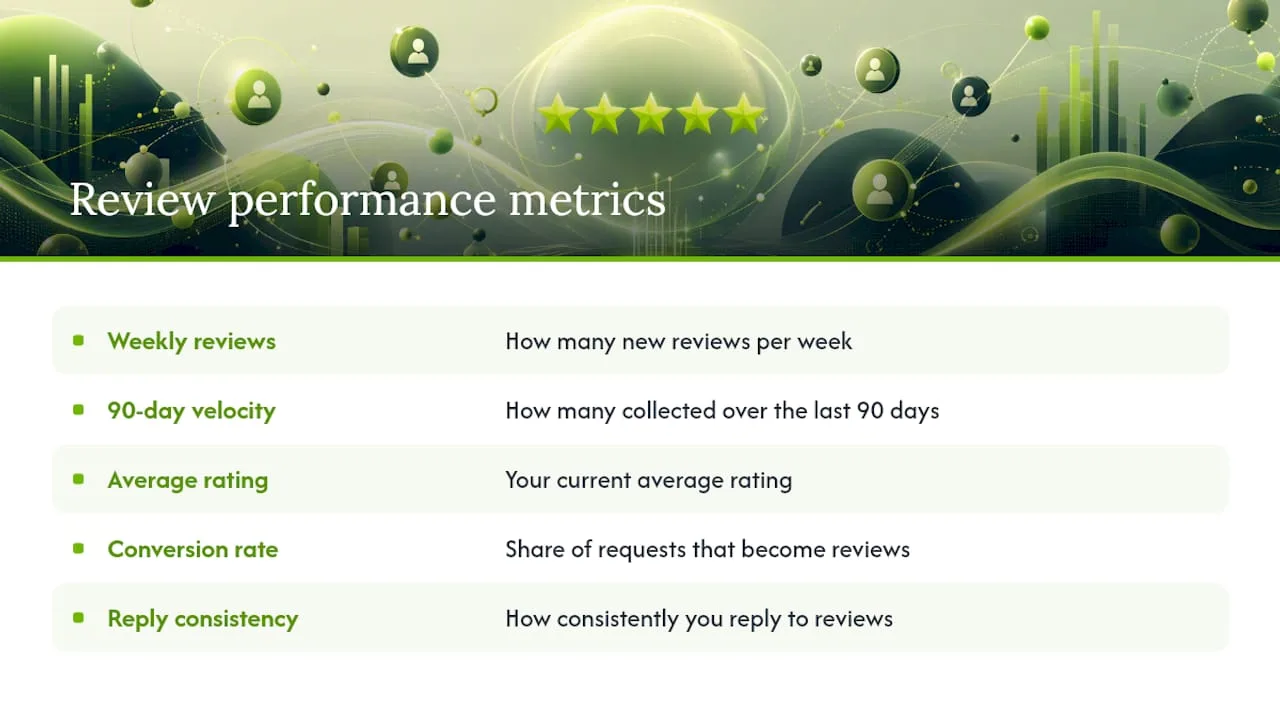
Recency carries real weight with customers browsing your profile. A large share of shoppers put more trust in reviews from the last three months than in an older stockpile, which is exactly why velocity matters as much as your total count.
Check for negative spikes weekly. One or two bad reviews landing close together usually points to a specific operational problem worth investigating right away, not a random cluster of unlucky customers. Review the bigger trend line monthly, looking at rating movement and, where useful, how you stack up against a competitor down the street.
A few signals should prompt action fast: a sudden jump in review volume that doesn't match your transaction count (a red flag for fake activity or a policy violation you didn't intend), a response rate that's quietly dropped to zero, or a noticeable shift in sentiment even if the star average hasn't moved yet. Each of those deserves a quick root-cause check rather than a wait-and-see approach.
Automating the Ask Without Losing the Personal Touch
Most small business owners already know they should be asking every customer for a review. The gap isn't intention. It's consistency, especially on a Tuesday afternoon with three jobs backed up and a phone that won't stop ringing. Automation closes that gap by turning "we should ask" into "we always ask," regardless of how busy the day gets.
A practical end-to-end workflow looks like this: a completed booking or point-of-sale transaction fires an automatic SMS with the review link within minutes. If no review shows up after three to five days, an email reminder goes out on its own. If a review comes in below four stars, a staff member gets an instant notification so they can respond and reach out before the situation cools.
Getting there requires a few pieces working together:
- A point-of-sale or booking system that can flag a completed transaction as the trigger event.
- CRM data that stores customer phone numbers and emails alongside consent to be contacted.
- A messaging layer (SMS, iMessage, or email) that can send the actual request automatically.
- A notification path so a low rating reaches a real person quickly, not a dashboard nobody checks.
Ringport was built around this exact chain of events for local service businesses, connecting call handling, booking data, and follow-up messaging so the request goes out the moment a job wraps up, without anyone on your team having to remember to send it.
Pro Tip: When you first turn on automated requests for an old customer list, send them in small batches of 20 to 30 a day instead of all at once. A sudden flood of reviews looks unnatural to Google and to anyone reading your profile.
A note from Serhii
What moves the needle most isn't the cleverness of your script or the polish of your automation. It's consistency applied to a genuinely good customer experience. Automation fixes the human problem of forgetting to ask, and a good template removes the awkwardness of asking badly, but neither one manufactures trust out of thin air. If the service itself is inconsistent, a faster follow-up just gets you more reviews saying so, sooner. The businesses that see real, lasting movement in their ratings are the ones treating the review request as the last step of good service, not a marketing tactic bolted onto the end of it. and. If you want help thinking through where your own workflow is leaking customers before they ever see a review request, that's worth a closer look.
Want Review Requests to Run Themselves?
Ringport is the difference between a review system you meant to set up and one that actually runs every day, without you or your staff remembering to send a single text. It connects to your call handling and booking flow so the moment a job finishes, an SMS or email with your review link goes out automatically, a follow-up fires if nothing comes back within a few days, and any incoming review reaches you fast enough to respond while it still matters.
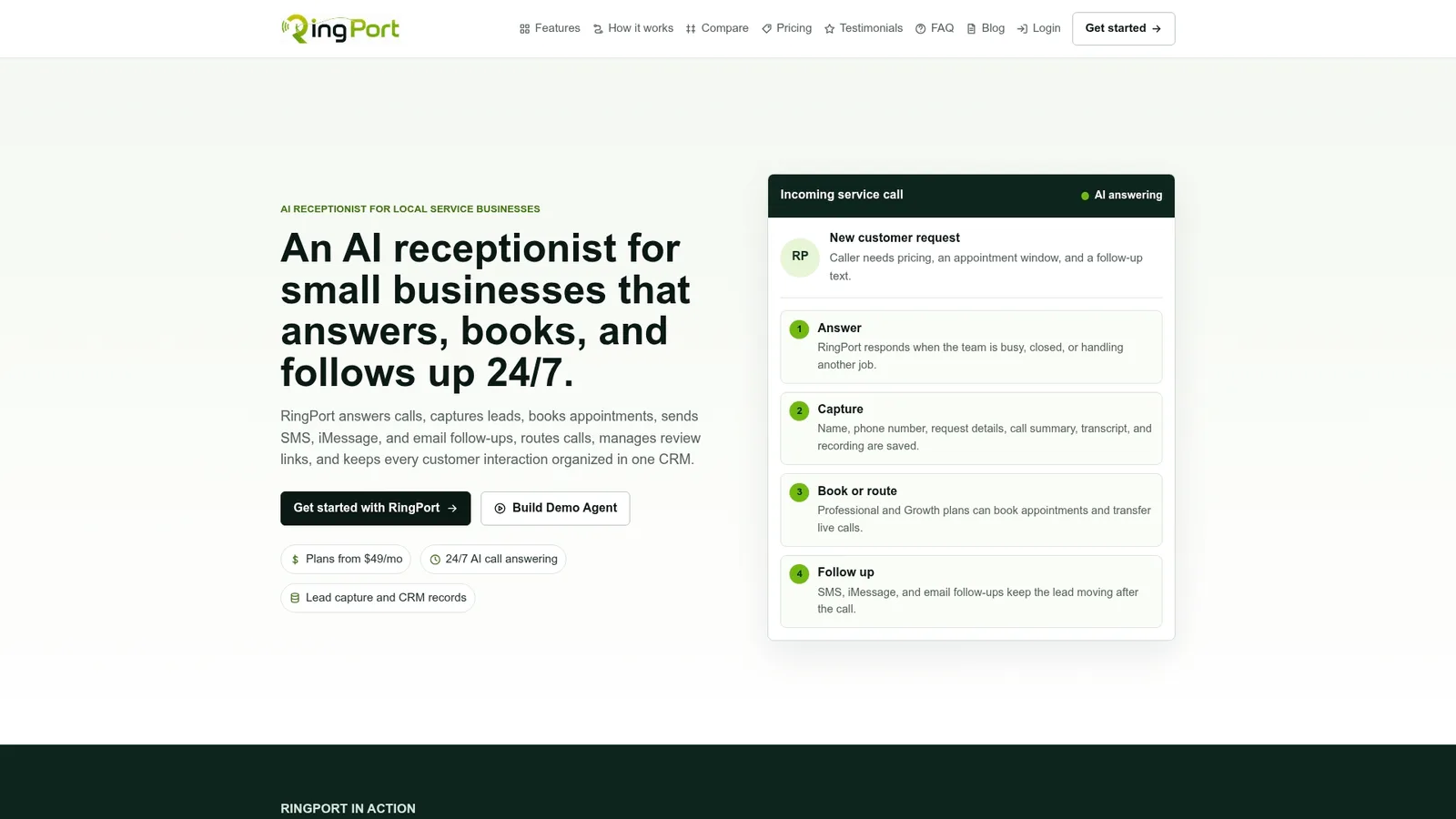
That covers most of what this guide just walked through, minus the manual work:
- Automated SMS and email triggers tied to completed appointments
- CRM data that keeps customer contact and consent organized in one place
- 24/7 call answering and booking so no lead or follow-up opportunity slips through
- Review workflows built for small teams without a dedicated marketing hire
If you're ready to see how it fits your day-to-day, visit the Ringport product page to start a trial and connect your first workflow.


