
Front Desk Automation: A Practical Guide for Business Owners
Discover how front desk automation can streamline your operations, save time, and enhance customer service with our practical guide for business owners.
How many customers are slipping away before you can answer?
Answer 4 quick questions and get a simple missed-call estimate for your business.
Answer with one tap. Contact details come after your result.
Here is the estimate.
Thanks. Your result was received.
Front desk automation uses software and AI to handle inbound calls, two-way SMS, appointment booking, visitor check-in, and CRM or PMS updates — often around the clock, without a human at the desk. The recommended next step is a focused 6-week pilot: scope your top integrations, verify security controls (including HIPAA if you handle patient data), and measure conversion and time saved before committing to a full rollout.
Before you start, run through this quick checklist:
- Identify your top 3 front-desk tasks to automate (e.g., call answering, appointment booking, visitor sign-in)
- Confirm your integrations — phone system, CRM, and PMS must connect and write back, not just read
- Set success metrics — calls handled automatically, new bookings captured, and staff hours saved per week
Key Takeaways
Front desk automation delivers real operational value when it is built on execution-capable integrations, a clear human-handoff design, and a measured pilot — not just a conversational AI layer on top of your existing workflow.
| Point | Details |
|---|---|
| Start narrow, then scale | Pilot on your highest-volume, lowest-risk task first — appointment booking or reminders, not full call triage. |
| Writeback drives real value | Confirm the system can modify records in your CRM or PMS during the demo, not just read them. |
| Compliance is a gating requirement | Medical practices must have a signed BAA and confirmed HIPAA controls before any patient data touches the system. |
| Human handoff is part of the product | Design escalation triggers and context transfer before go-live; log every handoff with a reason code for improvement. |
| Ringport for local service businesses | Ringport provides 24/7 AI call answering, appointment booking, CRM writeback, and reminders on straightforward monthly tiers. |
Table of Contents
- What is front desk automation, and what does it actually cover?
- Core features and integrations to expect from any solid solution
- What are the measurable benefits of automating your front desk?
- Industry use cases: hospitality, medical, and office settings
- How to plan and implement front desk automation step by step
- Security, privacy, and compliance: what to check before you deploy
- Limitations, UX pitfalls, and when to hand off to a human
- Why execution capability matters more than conversation quality
- An honest take on what front desk automation actually delivers
- Ringport handles the calls so your team doesn't have to
- Sources
What is front desk automation, and what does it actually cover?
Front desk automation is the collection of technologies that replace or assist the human receptionist for routine, repeatable tasks. That covers a wider range than most buyers initially expect.
The core components include:
- Inbound voice and IVR — automated call answering, routing, and triage
- AI call answering and transcription — natural-language call handling with auto-generated notes
- Two-way SMS and iMessage — automated and agent-assisted text conversations
- Appointment scheduling engine — real-time booking, rescheduling, and cancellation
- Visitor and self-check-in kiosks — digital sign-in with badge printing or access-code delivery
- Payment capture — collecting deposits or co-pays at the point of booking or check-in
- CRM and PMS writeback — updating records, not just reading them
- Webhooks and API integrations — connecting to downstream tools (calendars, smart locks, dispatch systems)
- Human-handoff channeling — escalation to a live agent with full context transfer
The most important distinction to make before you evaluate any vendor: read-only versus execution-capable. A read-only system retrieves information and answers questions. An execution-capable system writes back to your CRM or PMS, modifies bookings, triggers check-out, dispatches housekeeping, or creates tasks for staff. Front-office automation that only reads data still leaves your team doing the actual record updates — which is where most of the labor cost lives.
Core features and integrations to expect from any solid solution
Not every platform that calls itself an automated front desk actually delivers the depth of integration you need. Here is what to look for in a demo.
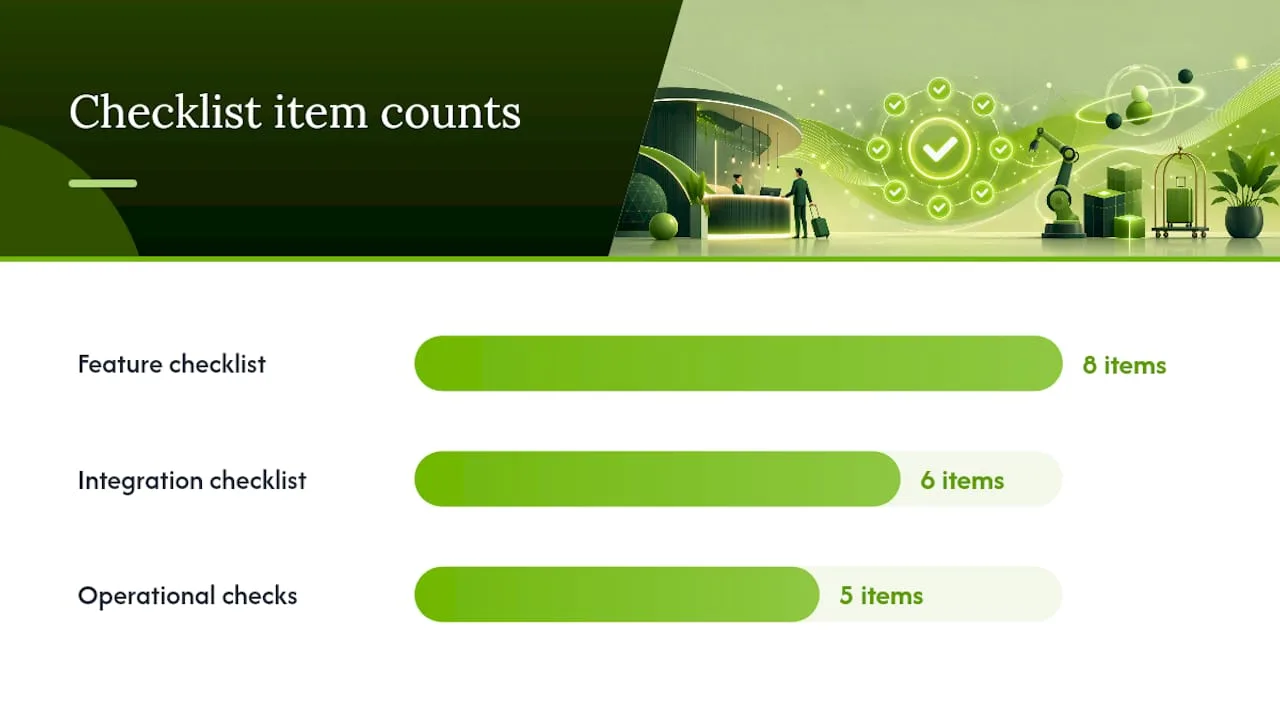
Feature checklist:
- Always-on call answering with configurable IVR menus
- Two-way SMS and email follow-up
- Appointment booking, rescheduling, and cancellation with calendar sync
- Staff allocation and availability management
- Automated reminders (pre-appointment and post-visit)
- Payment capture at booking or check-in
- Visitor kiosk with badge or access-code delivery
- Analytics dashboard showing call volume, booking conversion, and handoff rates
Integration checklist:
- Deep CRM and PMS writeback (not just read access — confirm this in the demo)
- Calendar sync with your scheduling system
- VoIP or phone system integration with screen pops and call logging
- Payment processor connection
- Smart lock or facility access integration
- Webhook and API support for custom workflows
Dental and medical practices have a particularly strong case for integrated telephony. Systems like those built for dental offices can surface patient details the moment a call arrives and auto-write AI-generated call notes directly to the patient chart, cutting manual documentation time significantly. A VoIP platform built for dental practices demonstrates the same pattern: screen pop patient context, transcribe the call, and push notes to the record without anyone typing a summary.
Operational requirements to verify during any demo:
- Can the system write back to your specific CRM or PMS, or does it only read?
- Does it deliver real-time screen pops to staff handling escalations?
- How does it log calls and generate notes automatically?
- What are the escalation triggers and handoff controls?
- What is the vendor's uptime SLA?
Pro Tip: Ask the vendor to demo a live writeback during your evaluation call — not a recorded walkthrough. If they cannot show a booking modification writing back to your CRM in real time, assume that capability does not exist yet.
What are the measurable benefits of automating your front desk?
The business case for front desk automation is straightforward when you track the right numbers. Automating routine customer-facing tasks frees your staff for higher-value work — consultations, complex problem-solving, relationship management — while the system handles the volume.
Primary benefits you should expect:
- Fewer missed calls and lost leads — 24/7 answering means no call goes to voicemail during off-hours
- Lower labor costs — fewer hours spent on repetitive call handling and manual data entry
- Faster response times — immediate acknowledgment of every inbound inquiry
- Higher booking conversion — callers who reach an automated booking flow convert at higher rates than those who leave a voicemail
- Reduced no-shows — automated reminders keep appointments on the calendar
- Consistent data capture — every call, booking, and interaction logged to CRM or PMS without manual entry
Vendor-reported stat: Automated appointment reminders can reduce no-shows by up to 50% in salon settings, according to Appointy's vendor materials. Treat this as a benchmark to test in your own pilot, not a guaranteed outcome — your no-show rate, reminder timing, and patient mix will all affect the result.
Metrics to track in your pilot:
- Calls handled automatically (without human intervention)
- New leads captured outside business hours
- Appointments booked per week, before and after
- Staff hours saved on call handling and data entry
- No-show rate, week over week
- Average time-to-answer
- Revenue per available appointment slot
Industry use cases: hospitality, medical, and office settings
The tasks that benefit most from automation vary by vertical, but the underlying logic is the same: high-volume, repeatable interactions that follow predictable patterns are the best candidates.
Hospitality
Hotels and short-term rental operators use automation for guest messaging, online check-in, room-access code delivery, upsell offers, and PMS writeback for check-in, check-out, and housekeeping dispatch. Some vendors combine automated guest messaging with native PMS access to both read and write reservation and room-status data, enabling automated check-out and housekeeping dispatch without front-desk staff involvement. The guest experience improves because responses are instant; the operator saves labor hours on every shift.
Medical and dental practices
Call triage, appointment booking and confirmation, and documentation of calls in patient records are the highest-volume tasks. Practices using integrated phone systems can surface patient context on every inbound call and push AI-generated notes to the EHR or PMS automatically. Insurance eligibility checks are possible where the integration supports it. HIPAA controls are non-negotiable here — covered entities must verify that any vendor handling protected health information provides a Business Associate Agreement and meets all required safeguards before going live.

Offices and professional services
Visitor management, appointment scheduling, two-way business texting, and voicemail-to-task automation are the primary use cases. CRM integration for lead routing means every inbound inquiry is logged and assigned without manual intervention. Scheduling platforms that act as a 24/7 digital receptionist — enabling self-scheduling, automated reminders, and staff allocation — are well-suited to professional service firms with predictable appointment patterns.
Pro Tip: Start your pilot with the single highest-volume, lowest-risk task. For most businesses, that is appointment booking or confirmation reminders. Get that working cleanly before adding call triage or visitor management.
How to plan and implement front desk automation step by step
A structured pilot protects you from the two most common mistakes: deploying too broadly before integrations are stable, and going live without measuring anything.
Pre-pilot preparation:
- Map your current front-desk workflows in detail — every call type, every booking path, every data entry point
- Identify the top 2–3 tasks to automate first, ranked by volume and risk
- List every required integration: phone system, calendar, CRM or PMS, payment processor
- Define success metrics before you start (bookings per week, calls handled, hours saved)
- Assign an internal owner for the pilot who has access to all relevant systems
Vendor selection checklist (questions to ask during demos):
- Can you demo a live writeback to our CRM or PMS?
- Do you provide a BAA for medical or healthcare clients?
- What is your uptime SLA and how do you handle outages?
- How does the system escalate to a human, and what context does the agent receive?
- Where is data stored, and what are your data retention and deletion policies?
- Do you provide audit logs, and how granular are they?
- What does onboarding and training look like for a team of our size?
Pilot timeline:
- Week 0 — Contract signed, sandbox environment set up, integrations scoped
- Weeks 1–2 — Integration build, staff training, test call flows in sandbox
- Weeks 3–6 — Live pilot with monitoring; log every handoff and every failure
- Week 6 — Evaluate metrics against baseline; decide to scale, adjust, or pivot
Red flags to watch for:
- Vendor cannot demo writeback in a live environment
- No clear escalation or handoff mechanism
- No audit trail for calls or data changes
- Vague answers about PHI handling or data residency
- Pricing that scales unpredictably with normal call volume increases
Security, privacy, and compliance: what to check before you deploy
Security is not a checkbox you complete after the pilot. For any business handling sensitive customer data — and especially for medical practices — it is a gating requirement.
HIPAA baseline for medical settings:
Any vendor that processes, stores, or transmits protected health information (PHI) on your behalf is a business associate under HIPAA rules. That means you need a signed BAA before any PHI touches their system. Without it, you are exposed to breach liability regardless of the vendor's actual security posture.
Security checklist:
- BAA availability confirmed in writing (medical and dental practices)
- SOC 2 Type II or equivalent attestation
- Encryption in transit (TLS 1.2 or higher) and at rest (AES-256 or equivalent)
- Data retention and deletion policies documented
- Role-based access controls so staff see only what they need
- Breach notification commitments and timelines
- Audit logs covering all data access and changes
Operational controls to require:
- Human-handoff for any conversation involving sensitive disclosures
- Masking of personal data in call logs where technically feasible
- A tested data deletion and export process before you sign
Pro Tip: Send a one-page security questionnaire to every vendor before the demo. Ask specifically for their BAA template, their most recent SOC 2 report, and a live walkthrough of audit logs and data export. Vendors who hesitate on any of these are telling you something important.
Limitations, UX pitfalls, and when to hand off to a human
Automation handles volume well. It handles nuance poorly. Knowing where the boundary sits keeps your customers from having a bad experience.
Common limitations:
- Ambiguous language and regional accents can trip up voice recognition
- Emotionally charged conversations (complaints, urgent medical concerns) require human empathy
- Edge-case workflows that fall outside the trained call flows often produce unhelpful responses
- Complex multi-step requests that span several systems may require human coordination
UX pitfalls to avoid:
- Poor failure messages that leave callers confused about what happened
- Abrupt transfers that force the caller to repeat everything from the start
- Over-automation that removes the human option entirely
- Hidden costs from fallback human handling that inflate the real cost per interaction
Human-handoff best practices:
- Transfer the full conversation transcript and caller context to the agent before the call connects
- Define clear escalation triggers (specific keywords, emotional tone, request type)
- Make the "speak to a person" option visible and easy to reach at any point
- Train staff on what to expect when a handoff arrives — they should see context, not a cold transfer
Pro Tip: Log every handoff with a reason code: "ambiguous request," "emotional caller," "billing dispute," and so on. After 6 weeks, those reason codes tell you exactly which call types need better automation design and which ones should always go to a human.
Why execution capability matters more than conversation quality
Most buyers evaluate AI front-desk tools on how natural the conversation sounds. That is the wrong primary criterion.
The real differentiator is whether the system can execute actions — not just answer questions. A retrieval-only bot that reads your calendar and tells a caller "your appointment is Tuesday at 2 PM" is useful. An execution-capable system that modifies that appointment, sends a confirmation, updates the PMS record, and triggers a reminder sequence is operationally transformative.
Agentic, multi-agent AI architectures delegate specialized operational domains — reservations, check-in, room service, payments, housekeeping — to purpose-built agents that can write back to the PMS rather than only retrieve data. Each agent operates with specific permissions and tools, coordinated by a supervisor layer, so execution happens safely within defined boundaries.
The operational benefits of this architecture:
- Fewer manual follow-ups because the system completes the action, not just the conversation
- Immediate status updates in PMS or CRM without staff intervention
- Real-time task creation for housekeeping, dispatch, or follow-up teams
- Higher booking conversion because the caller books during the interaction, not after a callback
For local service businesses, the practical implication is clear: ask every vendor whether their system can modify a booking and write the change to your CRM in a single interaction. If the answer is no, you are buying a sophisticated voicemail replacement, not a front-desk replacement.
An honest take on what front desk automation actually delivers
There is a gap between what automation vendors promise and what most businesses actually need to do to get there.
The technology works. AI call answering, appointment booking, CRM writeback, and automated reminders are all mature enough to deploy in production today. What fails is not the technology — it is the implementation. Businesses that skip the integration audit, deploy without clear escalation paths, or go live without measuring a baseline end up with a system that handles easy calls well and creates chaos for everything else.
The businesses that get the most out of front desk automation share three habits: they start narrow (one task, one integration), they measure obsessively (every call, every handoff, every booking), and they treat the human-handoff design as seriously as the automation design. The handoff is not a fallback. It is part of the product.
For medical practices specifically, the compliance piece is not optional and not something to revisit after the pilot. HIPAA controls, BAA, audit logs, and data residency need to be confirmed before a single patient call touches the system. That is not bureaucracy — it is the minimum viable protection for your patients and your practice.
Ringport is built for exactly the kind of local service business that benefits most from this approach: small teams, high call volume, and a real need for 24/7 availability without the cost of a full-time receptionist. The onboarding path is designed for operators who are not IT departments, and the feature set covers the core use cases — call answering, appointment booking, CRM logging, and reminders — without requiring a six-month implementation project.
Start with a narrow pilot. Protect your data. Measure what changes.
Ringport handles the calls so your team doesn't have to
Most small service businesses lose leads the same way: a call comes in after hours, goes to voicemail, and the caller books somewhere else before you call back. Ringport closes that gap with a 24/7 AI receptionist that answers calls, books appointments, logs leads into your CRM, sends reminders, and supports webhook integrations — all without a full-time staff member at the desk.
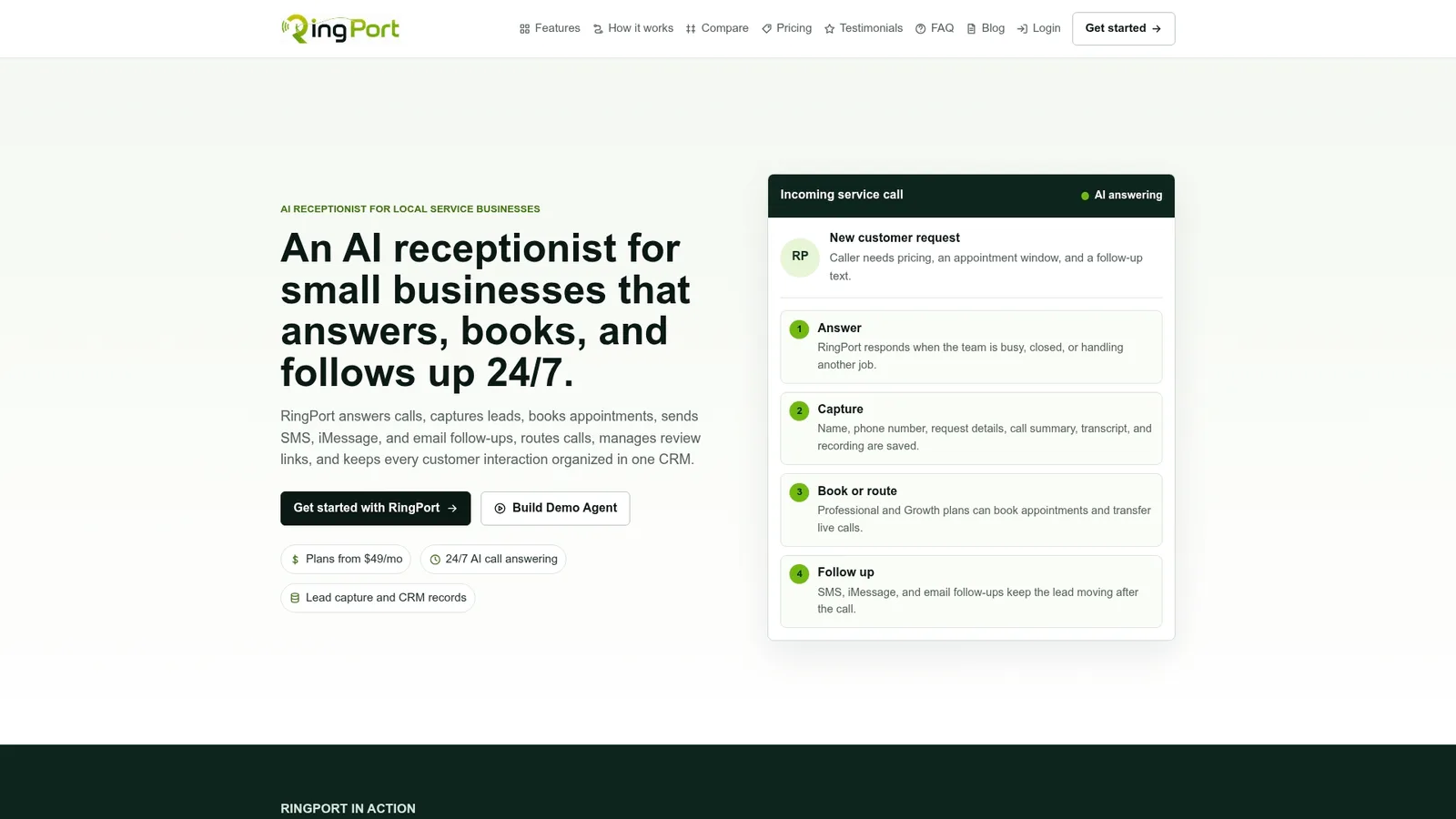
The pricing structure is built for small businesses: monthly subscription tiers (Starter, Professional, Growth) with optional pay-as-you-go add-ons for extra call minutes, outbound calling, and messaging credits. You pay for what you use, and you can scale up as call volume grows. Before your demo, prepare three things: a sample of your most common call types, your current calendar or scheduling tool, and the name of your CRM or PMS. That 15-minute prep makes the integration conversation faster and the pilot timeline shorter.
Start your Ringport pilot and see how many calls your team is currently missing.


