
Capture 80% of Replies with Email Follow Up Automation for Small Teams
Platform-agnostic, technical setup for small teams to get more replies: enable reply detection, CRM sync, deliverability checks, and a tested five touch...

How many customers are slipping away before you can answer?
Answer 4 quick questions and get a simple missed-call estimate for your business.
Answer with one tap. Contact details come after your result.
Here is the estimate.
Thanks. Your result was received.
Email follow-up automation increases reply rates and stops leads from slipping through the cracks by sending timed, triggered messages without someone manually tracking every thread. For a solo owner or a small team, that means more booked calls, fewer forgotten prospects, and a follow-up cadence that runs whether you're at your desk or on a job site. The rest of this guide covers the triggers, templates, technical setup, and measurement approach that make it work.
TL;DR:
- Most effective follow-up sequences include three to six emails, with about 80% of replies coming from follow-ups rather than initial messages.
- Trigger types include event-based actions like clicks or form submissions, and time-based schedules such as days of inactivity, often combined within the same sequence.
- Personalization beyond first names, clear next steps, and working backward from the final CTA improve reply rates, while technical setup must ensure reply detection and proper CRM integration.
- Regularly review reply, conversion, delivery, and unsubscribe rates each month, and test one variable at a time to optimize sequence performance.
- Combining email automation with phone and messaging services addresses the gaps for leads who call, text, or don’t respond to emails, boosting overall lead coverage.
Table of Contents
- What Does Email Follow-Up Automation Actually Do?
- How Many Follow-Ups Do You Actually Need?
- How Do You Write Follow-Up Emails That Get Replies?
- Technical Checklist: Setting Up Follow-Up Automation Correctly
- Which Metrics Actually Tell You a Sequence Is Working?
- Why Phone and Messaging Integration Fills the Gaps Email Automation Leaves Open
- What's the Fastest Way to Start Without Overcomplicating It?
- Keep Every Lead Covered, Not Just the Ones Who Email Back
- Sources
What Does Email Follow-Up Automation Actually Do?
Automated email sequences run on two kinds of triggers. Event-based triggers fire when someone takes an action: they click a link, book a demo, submit a form, or abandon a cart. Time-based triggers fire on a schedule: three days after signup, seven days of inactivity, or two weeks after a quote goes unanswered. Most platforms support both trigger types and let you combine them in one sequence.
Common sequence types map to specific business moments:
- Welcome sequences greet new subscribers or customers and set expectations.
- Nurture sequences educate a lead over weeks before they're ready to buy.
- Sales follow-up sequences chase a quote, proposal, or demo request.
- Cart or re-engagement sequences recover an abandoned purchase or a cooling relationship.
- Win-back sequences target customers who've gone quiet for months.
A home services company might run a sales follow-up after every estimate; a salon might run a re-engagement sequence for anyone who hasn't booked in 90 days.
How Many Follow-Ups Do You Actually Need?
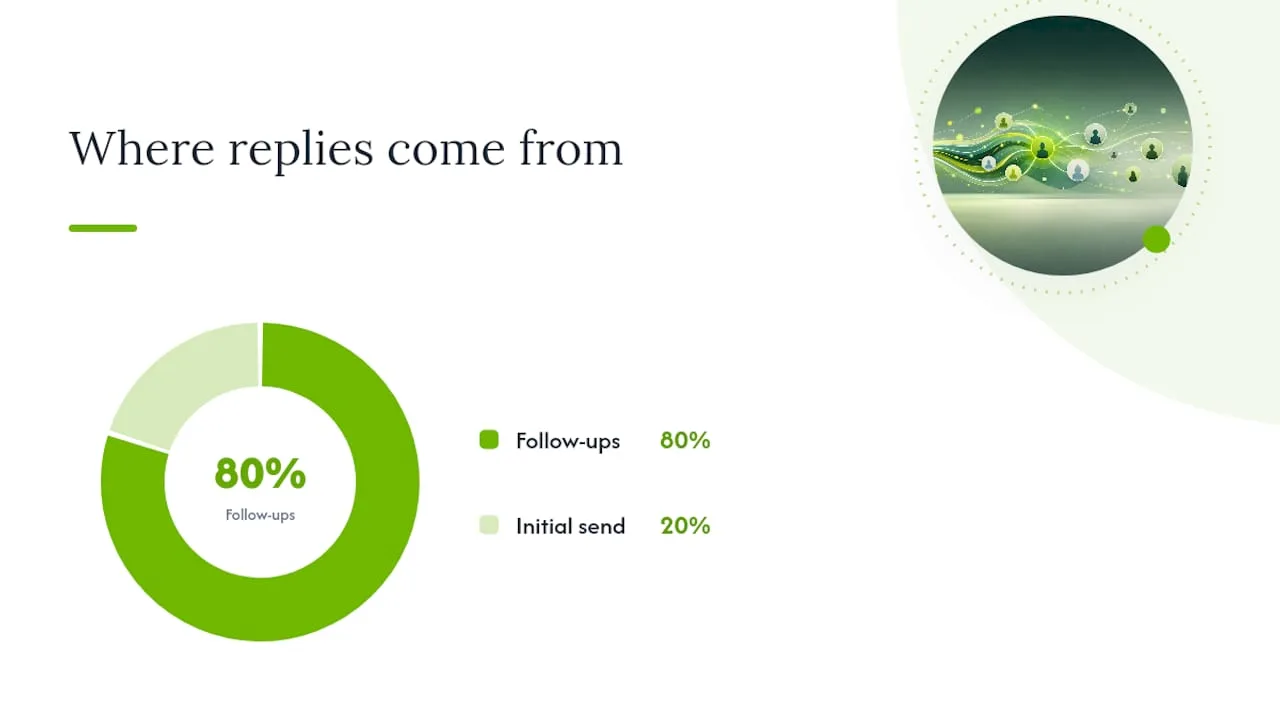
Most effective sequences are shorter than people assume. Marketing flows like welcome or nurture sequences typically run three to six emails, while sales follow-up sequences for a quote or proposal often stretch to several touches before you write someone off. That range matters because most replies don't come from the first email at all. Roughly 80% of eventual replies come from follow-ups, not the initial send, which means skipping follow-up automation is closer to leaving four out of five conversations on the table.
A workable pattern looks like this:
- Touch 1 (day 0): the original message or quote.
- Touch 2 (day 2 to 3): a short reminder, no new information.
- Touch 3 (day 5 to 7): add value, such as a case example or answer to a common objection.
- Touch 4 (day 10 to 12): address urgency or a deadline if one exists.
- Touch 5 to 8 (spaced 5 to 10 days apart): alternate check-ins and final-notice messages for sales sequences only.
Branching matters as much as touch count. When a contact opens multiple emails or clicks a link, dynamic sequences can pull them into a rep-led flow instead of continuing the automated cadence, so a warm prospect gets a human, not another template.
How Do You Write Follow-Up Emails That Get Replies?
Three template skeletons cover most situations. Adjust the specifics per touch, not the structure.
- Reminder template: one line referencing the original message, one line restating the ask, no new pitch. Best for touch 2.
- Value-add template: reference the thread, then offer something new: a quick answer, a relevant example, or a helpful resource. Best for touch 3 or 4.
- Final CTA template: short, direct, states this is the last check-in, and gives one clear next step (a link, a reply option, or a call time). Best for the last touch in the sequence.
Personalization works best when it goes beyond a first name. Reference what the person actually did: the page they viewed, the service they asked about, or something specific from an earlier email thread. AI agents can now handle much of this automatically, drafting personalized follow-ups and routing high-intent replies to the right person based on behavior signals rather than a fixed schedule.
Keep copy short. Reference the prior message so the thread feels continuous, and always give one explicit next step, not three options.

Pro Tip: Write your final CTA email first. Working backward from the one clear action you want makes every earlier touch easier to write, because you already know what you're building toward.
Technical Checklist: Setting Up Follow-Up Automation Correctly
Getting the copy right doesn't matter if the technical setup fails quietly in the background. Before turning on any sequence, confirm these items:
- Reply detection with real-time inbox sync. Sequences need to stop the instant someone replies. Tools relying on delayed polling instead of real-time detection risk sending a follow-up after the prospect already responded, which looks careless and damages trust fast.
- CRM integration for accurate enrollment. Connect your CRM or source list so contacts enter the right sequence and handoffs to a rep happen automatically when they engage.
- Domain authentication. Set up SPF and DKIM records before sending volume through automation; unauthenticated domains land in spam far more often.
- Throttling and send-time optimization. Space sends to avoid spam-filter triggers, and test in a sandbox account before turning a sequence loose on real contacts.
- Suppression and opt-out handling. Confirm unsubscribes, bounces, and manual suppressions sync correctly, and that opt-out requests are honored immediately under GDPR and CAN-SPAM.
Test reply detection with multiple email clients and edge cases, including threaded replies and alternate reply-to addresses, since that's where auto-stop logic most often breaks.
Which Metrics Actually Tell You a Sequence Is Working?
Track four numbers, in this order of importance: reply rate, conversion to the next step (a booked call, a signed contract), deliverability rate, and unsubscribe rate. Reply rate matters most because it's the earliest signal that your copy and timing are landing.
Automated emails make up roughly 2% of total send volume but drive about 37% of sales for the businesses that use them well. That gap is the whole argument for setting sequences up properly instead of treating them as an afterthought.
Run A/B tests on one variable at a time: subject line, send time, or CTA wording. Give each test sufficient duration or volume to discern a real pattern, not a coincidence from a handful of sends.
- Review sequence performance monthly, not quarterly.
- Prune contacts who haven't engaged after the full sequence rather than looping them endlessly.
- Change one variable per test cycle so you know what actually moved the number.
Why Phone and Messaging Integration Fills the Gaps Email Automation Leaves Open
Email sequences catch a lot, but they miss the lead who calls instead of emailing, or the one who texts back at 9 p.m. after your team has gone home. That's where combining channels matters more than perfecting any single one.
Ringport was built around that gap for local service businesses. It answers calls 24/7, books appointments automatically, and keeps SMS, iMessage, and email follow-up running from the same CRM record, so a missed call doesn't become a missed lead just because it arrived outside business hours. Smart call routing sends the right calls to the right person, while automated messaging keeps a prospect warm between touches instead of going silent until the next scheduled email.
For a business already running email sequences, adding phone and SMS coverage closes the exact hole automation can't fill on its own: the contact who never opens the email in the first place.
What's the Fastest Way to Start Without Overcomplicating It?
Pick one sequence, not five. Run it for 30 days, watch reply rate and conversion, and adjust from there. The pitfalls that trip up most small teams are predictable: forgetting to confirm reply detection actually stops sends, over-personalizing to the point where nothing ships, and ignoring deliverability until messages start landing in spam. Pair automation with a simple rule for when a rep steps in, and the system does its job without losing the personal touch that closes deals.
— Serhii
Keep Every Lead Covered, Not Just the Ones Who Email Back
Email sequences handle the leads who read and respond in their inbox. Ringport handles what happens the moment someone calls instead, texts after hours, or goes quiet before your first follow-up even sends. It's the layer that catches what automation alone leaves on the table for local service businesses that can't staff a phone line around the clock.
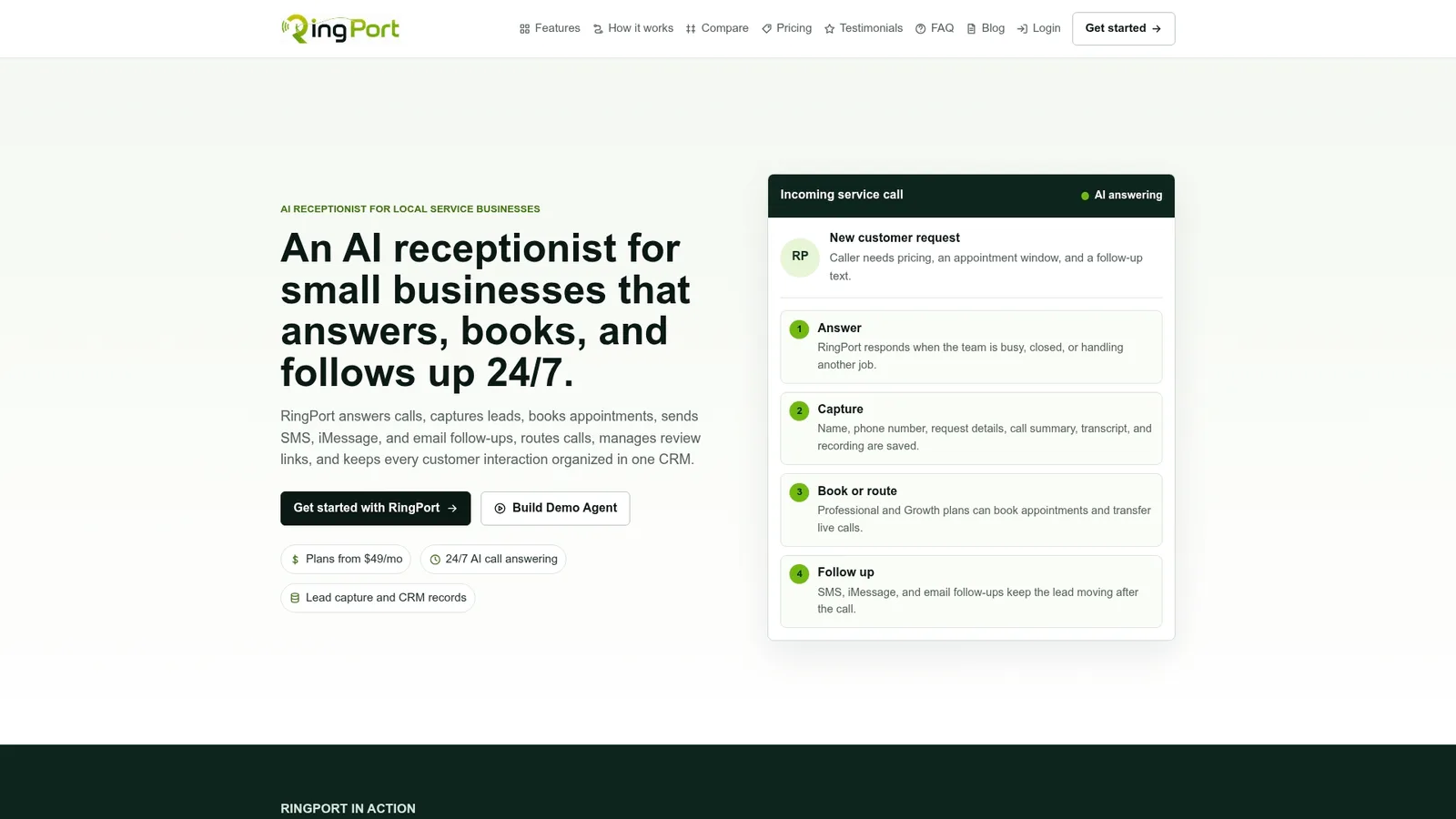
Ringport combines 24/7 call answering, appointment booking, and automated SMS and email follow-up in one system, connected through webhooks so your existing tools stay in sync instead of working in isolation. Every call, text, and email thread lands in one CRM record, so a rep picking up a warm lead sees the full history instead of piecing it together from three inboxes. If missed calls or inconsistent follow-up have been costing you booked jobs, see how it works on the Ringport landing page and check whether it fits your setup.


