
Go Live in a Week: Customer Communication Automation for Local Teams
Vendor neutral steps to pick, pilot, and measure customer communication automation for local service teams, with timelines, KPIs, and Ringport examples.
How many customers are slipping away before you can answer?
Answer 4 quick questions and get a simple missed-call estimate for your business.
Answer with one tap. Contact details come after your result.
Here is the estimate.
Thanks. Your result was received.
Customer communication automation uses software, rules, and often AI to send the right message through the right channel at the right moment, with minimal manual work. The right approach is to orchestrate your customer data first, pilot one measurable workflow before scaling, and always design a clean human handoff for anything that goes wrong. For phone and appointment-heavy local service businesses, an AI receptionist like Ringport is often the most direct fit, since it automates the exact calls and bookings that eat up staff time.
TL;DR:
- Most small service businesses will see the fastest ROI by starting with telephony automation, focusing on answering, routing, booking, and follow-up workflows.
- Automated response times reduce missed calls and no-shows, with three out of four CCM users reporting a 25 to 50 percent decrease in production time.
- Use a pilot of appointment reminders for two to four weeks to gather measurable data before scaling to other workflows, with the initial setup taking around four weeks.
- Integration complexity depends on the number of systems, but purpose-built telephony platforms generally offer quicker setup with pre-built integrations for call handling and scheduling.
- Cost models vary: usage-based subscriptions suit predictable volumes, while per-seat licensing and flat-rate plans are better for fluctuating or smaller-scale needs.
Table of Contents
- What Is Customer Communication Automation (and How Is It Different From CRM)?
- What Are the Business Benefits and ROI of Automating Communication?
- Which Type of Automation Tool Fits Your Business?
- How Do You Roll Out Customer Communication Automation Step by Step?
- How Do You Evaluate and Choose the Right Vendor?
- How Do You Measure Whether Automation Is Actually Working?
- How Does Ringport Apply These Principles in Practice?
- What Does Customer Communication Automation Cost?
- What Should Small Teams Automate First, and What Should Wait?
- Get Your Phones Automated Without Hiring Another Front Desk Person
- Sources
What Is Customer Communication Automation (and How Is It Different From CRM)?
Three terms get tangled together constantly: CCM, CRM, and communication automation. They solve different problems, and knowing which one you actually need saves months of wasted procurement.
Customer Relationship Management (CRM) software is your system of record. It stores contact history, deal stages, and notes about who talked to whom and when. A CRM does not send messages on its own; it holds the data other tools act on.
Customer Communication Management (CCM) platforms generate and deliver personalized content, historically document-heavy work like statements, policy renewals, and billing notices. PartnerStack describes automated communication as the broader strategic use of technology to streamline messaging between a business and its customers, partners, or teams, and CCM sits inside that category as the document and content engine.
Communication automation (sometimes called customer experience automation, or CXA) is the connective layer. Mailchimp frames it as journey and trigger based automation that fires messages when a customer takes an action, such as booking, canceling, or going quiet for 30 days, using integrations rather than manual sends.
Channels worth mapping before you pick a tool:
- Voice — inbound call answering, IVR, and outbound reminder or follow-up calls
- SMS and iMessage — confirmations, reminders, review requests
- Email — receipts, nurture sequences, longer-form updates
- Web chat and in-app messaging — real-time support and lead capture
- Push notifications — mobile app engagement for businesses with a consumer app
Omnichannel orchestration means those channels share one customer record and one set of triggers, so a missed call and an unanswered text do not trigger two contradictory follow-ups. If your core need is generating compliant, personalized documents at scale, you want document-centric CCM. If your core need is answering calls, booking appointments, and following up in real time, you want conversational automation, which is where most local service businesses actually live.
What Are the Business Benefits and ROI of Automating Communication?
The efficiency case is not theoretical. OpenText reports that many CCM users cut production time substantially, a range wide enough to cover both a small solo practice automating confirmations and a larger operation automating renewal notices.
By the numbers: Three out of four organizations using CCM tools report production time reductions of 25 to 50 percent or greater, according to OpenText, largely by removing manual drafting and repetitive sending from the workflow.
Faster response time is the second lever, and it compounds. A missed call after hours, answered instantly by an automated system instead of the next morning, often converts a lead that would otherwise call the next available competitor. Automated confirmations and reminders reduce no-shows for appointment-based businesses, a direct revenue protection play rather than a nice-to-have.
Track these KPIs from week one of any rollout:
- First response time — how fast an inbound call, text, or chat gets a reply
- No-show rate — before and after automated reminders go live
- Booking conversion rate — inquiries that turn into scheduled appointments
- Automation resolution rate — percentage of interactions closed without a human
- Customer satisfaction (CSAT) on automated touchpoints — not just overall CSAT
The main risk is over-automating the moments that need a human ear. Complex complaints, cancellations tied to a personal emergency, or anything emotionally charged should route to a person quickly rather than loop through a bot. Vendor documentation on omnichannel design consistently recommends pairing AI handling with clear human handoff rules rather than building a fully autonomous system, because that hybrid pattern tends to produce faster ROI and better satisfaction scores than an all-or-nothing approach.
Which Type of Automation Tool Fits Your Business?
Vendors market themselves in overlapping ways, but the underlying categories are distinct enough to guide a real decision. Match your primary use case to the category below before you start comparing brand names.
- CCM/orchestration platforms generate and deliver personalized documents (statements, renewals, policy updates) across channels. Strongest for regulated, document-heavy industries; implementation often takes months because of template migration and compliance review.
- Conversational AI agents handle live back-and-forth over voice, chat, or SMS, answering questions, booking appointments, or qualifying leads without a human on the line. Implementation can run days to a few weeks for a narrow use case.
- Unified inbox/helpdesk tools centralize email, chat, and social messages for human agents, with automation limited to routing and canned responses. Good fit when your volume still needs mostly human replies but is scattered across too many inboxes.
- Workflow automation platforms (the "if this happens, do that" category) connect other tools together, triggering a text when a form is submitted or an email when a deal stage changes. Flexible, but you are assembling the pieces yourself.
- Telephony and virtual receptionist platforms answer and route calls, book appointments, and follow up by text automatically, purpose-built for businesses where the phone is the primary lead channel.
Integration complexity scales roughly with how many systems a tool needs to touch. A workflow automation platform might need five or six connections wired manually. A purpose-built telephony platform like automated call answering software typically ships with calendar and CRM integrations already built, cutting setup time significantly.
For appointment booking specifically, a telephony-first tool wins on speed to value. For mass statement delivery to thousands of accounts, document-centric CCM is the only category built for that job. Gartner's CCM market comparisons show buyers weighing dozens of vendors on integration depth and peer ratings, a signal that category fit matters more than brand recognition when you start evaluating.
How Do You Roll Out Customer Communication Automation Step by Step?
Skipping the preflight work is the single most common reason automation projects stall after launch. Here is the order that actually works.
1. Map the journey before you touch a tool. Write down every step a customer takes from first contact to service completion, and mark where delays or drop-offs happen today. This usually takes a single afternoon with your front-line staff.
2. Audit your data. Confirm your customer records, appointment calendar, and CRM fields are clean enough to trigger on. Automation built on messy phone numbers or duplicate contacts fails quietly and expensively.
3. Align stakeholders and define one KPI. Pick the metric that matters most, usually no-show rate or missed-call rate, and get agreement on what "success" looks like before launch.
4. Choose a single pilot use case. Do not automate five workflows at once. Appointment confirmations or missed-call follow-up are common low-risk starting points because the messaging is predictable and the value is easy to measure.
5. Finish the integrations the pilot needs, and only those. Calendar sync and one messaging channel are usually enough to start.
6. Set test criteria and a fallback. Decide in advance what "working" looks like (response rate, no-show reduction) and build a simple rule-based fallback, such as routing to voicemail or a live agent, before adding any AI layer on top.
7. Run the pilot for two to four weeks, then review the numbers. A/B test message wording if volume allows; small changes in reminder timing move no-show rates more than most teams expect.
8. Scale with governance. Once the pilot proves out, build a template library, document escalation rules, and set a recurring review cadence before adding the next workflow.
Pro Tip: Start your pilot with appointment reminders, not general customer service. The volume is predictable, the message is simple, and the KPI (no-shows) is measurable within days, not months.
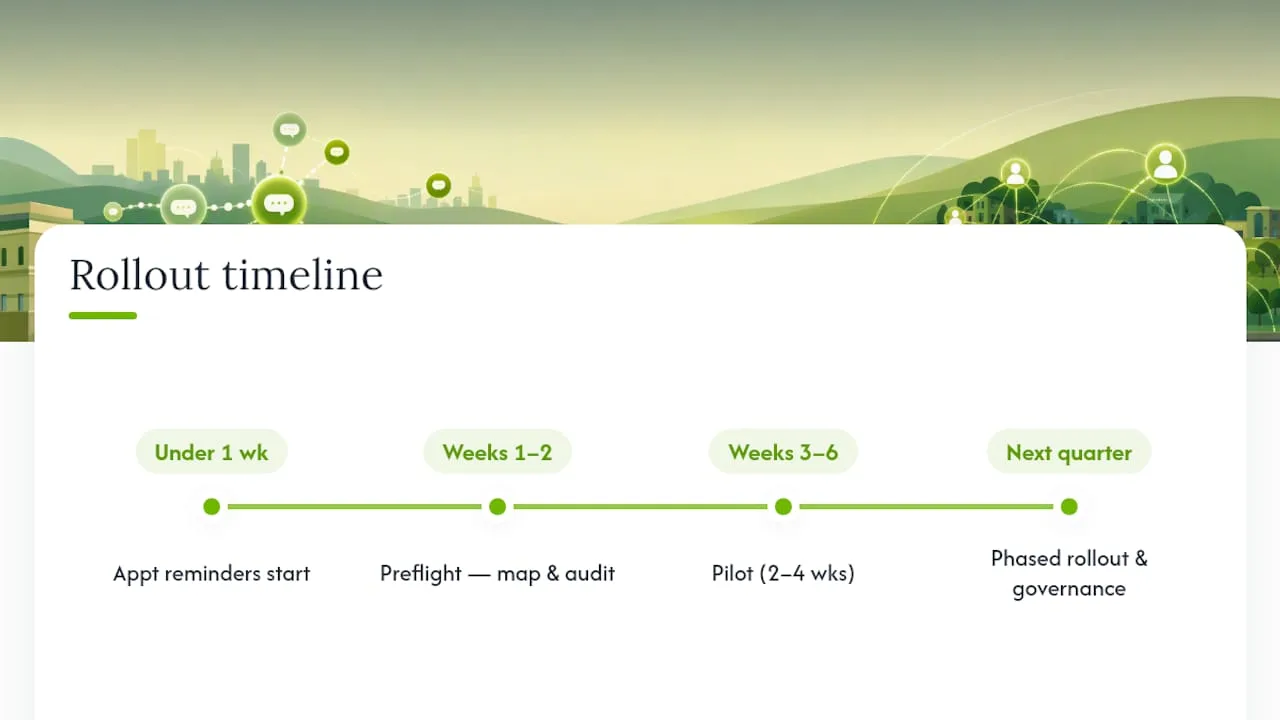
A realistic timeline for a small team: two weeks of preflight, two to four weeks of piloting, then a phased rollout of additional workflows over the following quarter. Businesses with tight budgets often start with appointment reminder texts alone, since that single workflow can be live in under a week and produces a clean before-and-after comparison.
How Do You Evaluate and Choose the Right Vendor?
Procurement conversations go sideways when they focus on feature lists instead of fit. Use this checklist on every vendor call.
Technical requirements:
- Does the platform offer open APIs and webhooks, or does every integration require the vendor's own engineering team?
- Can it connect directly to your existing calendar, CRM, and telephony provider without a middleman tool?
- Can you export your data cleanly if you switch platforms later?
Operational needs:
- Is the admin interface something a non-technical staff member can manage, or does every template change require a support ticket?
- Are escalation and human handoff rules configurable, so a frustrated caller reaches a person quickly?
- Does it support multiple user roles if more than one person needs access?
Commercial considerations:
- Is pricing based on usage tiers, per-seat licensing, or a flat monthly rate, and does that match how your volume actually fluctuates?
- What happens on overage, call minutes, message credits, are you billed automatically or does service pause?
- What is included in onboarding, and is ongoing support part of the base plan or a paid add-on?
Common integration needs for local service businesses specifically include calendar systems, SMS or telephony providers, and booking software; confirm all three work together before signing anything.
Watch for these red flags during the sales process: vague answers about data export, reluctance to share a peer reference, pricing that only appears after a demo, and contracts that lock you in for a year with no pilot period. Gartner's peer review data is useful here precisely because it surfaces real user complaints that a sales deck will not. Negotiate for a shorter initial term or a usage-based trial tier whenever a vendor offers one; it costs them little and protects you if the fit turns out wrong.
If routing and call handling are central to your evaluation, review how smart call routing actually cuts wait time and lifts first-call resolution before comparing pricing, since routing quality affects every downstream metric.
How Do You Measure Whether Automation Is Actually Working?
Instrumentation should be in place before launch, not bolted on afterward once someone asks for a report.
Primary KPIs to put on a dashboard from day one:
- No-show rate (weekly)
- First response time across automated channels
- Booking or conversion rate from automated touchpoints
- Automation resolution rate versus human handoff rate
- Customer satisfaction on automated interactions specifically
Secondary indicators worth tracking once the pilot stabilizes include cost per interaction and staff hours reclaimed, both of which feed directly into the ROI conversation with leadership.
A workable cadence: review pilot metrics weekly for the first month, since early data reveals message-timing problems fast, then shift to monthly reporting once a workflow is stable. Monthly reports should tie the automation directly to revenue protected (no-shows avoided) and hours saved, not just activity volume. OpenText's efficiency data on production time reductions gives a useful benchmark range to compare your own results against.
Attribution gets murky when a customer interacts with three channels before booking. The simplest honest approach: credit the automation with the final action it triggered (a reminder that led to a confirmed booking) rather than trying to build a perfect multi-touch model on day one.
How Does Ringport Apply These Principles in Practice?
Small service businesses rarely have the bandwidth to build a five-tool automation stack, which is why the highest-impact automations for this segment tend to be telephony-first: answering the phone, routing the call, booking the appointment, and following up afterward.
Ringport's core workflows map directly onto that priority list:
- 24/7 automated call answering so no inbound lead reaches voicemail
- Smart call routing and transfers to get urgent calls to a person fast
- Appointment booking synced to the business calendar in real time
- SMS, iMessage, and email follow-up for confirmations, reminders, and review requests
- CRM management so every call and booking lands in one record instead of scattered notes
The pattern shows up consistently in appointment-driven businesses: the workflows that move the needle fastest are not the clever ones, they're the boring ones. Answer the call. Confirm the booking. Send the reminder. Follow up after the visit.
A typical missed-call recovery workflow for a home services business looks like this: the call is answered automatically after hours, the caller books a slot on the spot, a confirmation text goes out immediately, a reminder follows a day before the appointment, and a review request goes out once the job is marked complete. Guides on front desk automation and automating Google reviews walk through both ends of that workflow in more detail.
This article draws on Ringport's own implementation experience across local service teams, from solo operators to small multi-location businesses managing high call volume.
What Does Customer Communication Automation Cost?
Pricing for automation tools generally falls into three shapes, and the right one depends on how predictable your volume is.
Usage-tiered subscriptions charge a monthly base fee that scales with call volume, message count, or number of contacts, often split into named tiers like starter, professional, and growth. This model rewards businesses whose volume is stable and punishes ones with sharp seasonal spikes, unless the vendor offers a pay-as-you-go add-on for overage.
Per-seat licensing charges by the number of staff accessing the platform, common in unified inbox and helpdesk tools. It scales predictably as a team grows but can get expensive fast if many people need occasional access rather than daily use.
Flat-rate platforms charge one price regardless of volume, simplest to budget but rare for anything call or message heavy, since providers need to cover the underlying telephony or messaging costs somehow.
Beyond the sticker price, factor in setup and onboarding costs (sometimes bundled, sometimes billed separately), the cost of add-on minutes or message credits once you exceed a plan's included volume, and whether ongoing support requires a separate contract. A tool that looks cheaper on the surface can cost more in month three once overage fees and a paid support tier get added in. Ask every vendor for a worst-case monthly bill based on your actual peak volume, not just the advertised starting price, before comparing two quotes side by side.
What Should Small Teams Automate First, and What Should Wait?
The trade-off every small team faces is complex customization versus a quick, measurable win. Chasing a fully custom, branded automation flow on day one usually delays launch by months for marginal gain. Start with the boring, high-volume, low-emotion interactions: answering calls, sending confirmations, and firing reminders. Save the nuanced stuff, complaint handling, refund conversations, anything emotionally loaded, for a human, at least until you have months of clean data on how automation performs elsewhere.
My one concrete recommendation: automate the phone before you automate anything else. It is the channel most local businesses bleed leads through daily, and it is the easiest one to measure improvement on within a single billing cycle.
— Serhii
Get Your Phones Automated Without Hiring Another Front Desk Person
For call and appointment-driven local service businesses, Ringport replaces the cost of a full-time front desk hire with software that answers every call, day or night, and books the appointment on the spot.
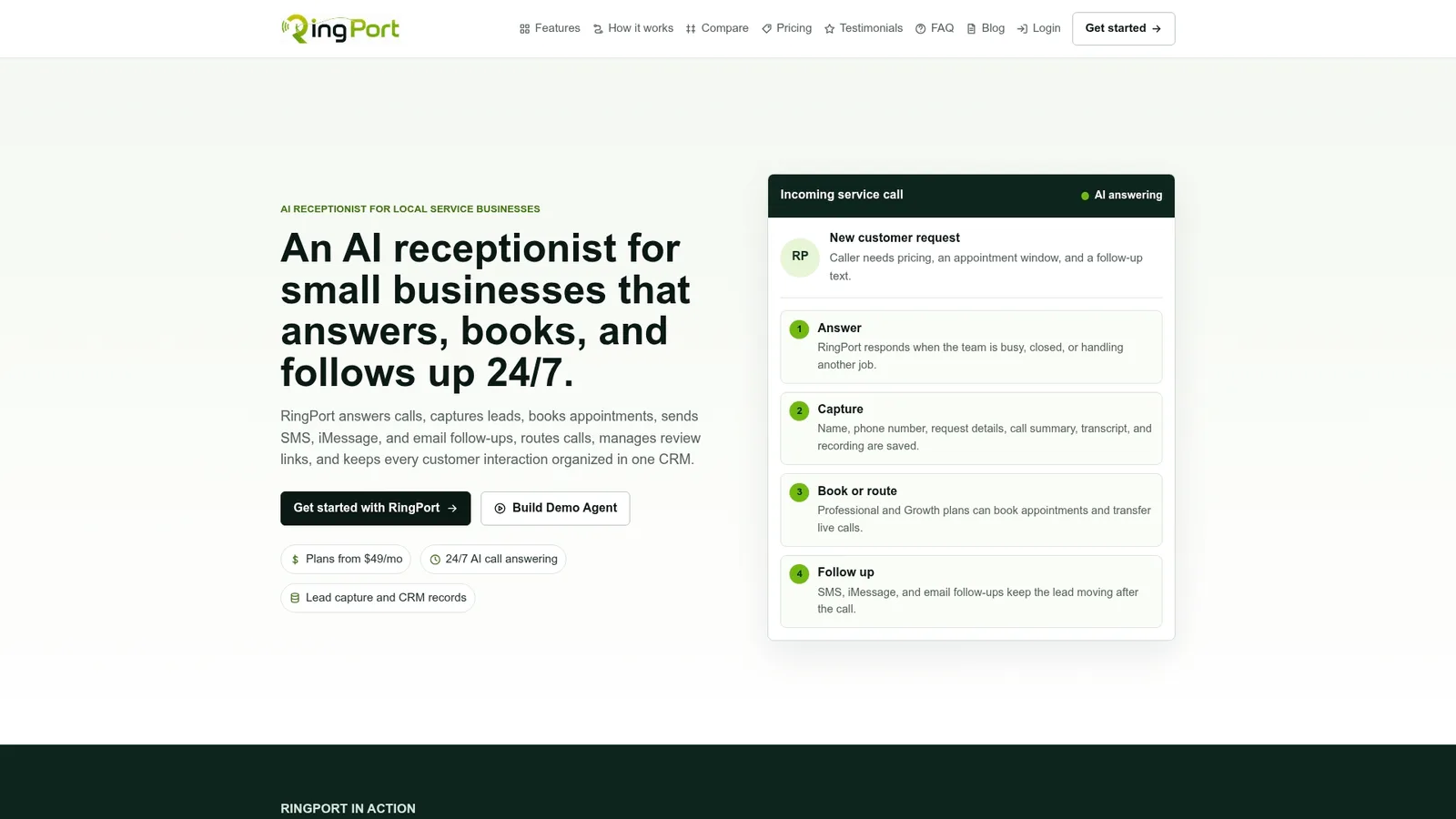
Ringport handles the exact workflows this guide covers: 24/7 automated call answering, smart routing for urgent calls, real-time appointment booking synced to your calendar, and automated SMS or email follow-up for confirmations, reminders, and review requests. Everything lands in one CRM record instead of scattered sticky notes and missed voicemails. If your team is stretched managing calls on top of the actual work, this is the workflow this article recommends starting with.
Getting started takes less time than writing a job posting. Try Ringport Fast Agent to see automated answering and booking running on your own number, or visit the Ringport homepage to compare plans and pick the tier that matches your call volume.
Sources
The following sources back the specific figures and frameworks used throughout this guide:
- Customer Communication Management Reviews and Ratings - Gartner
- What Is Customer Experience Automation? - Mailchimp


