
Send This Appointment Confirmation Text to Cut No-Shows
Discover how to craft effective appointment confirmation texts that reduce no-shows. Enhance client communication and boost attendance with this guide.
How many customers are slipping away before you can answer?
Answer 4 quick questions and get a simple missed-call estimate for your business.
Answer with one tap. Contact details come after your result.
Here is the estimate.
Thanks. Your result was received.
Send this the moment someone books: "Hi [First Name], this confirms your appointment with [Business Name] on [Date] at [Time] at [Location/link]. Reply YES to confirm or CALL to reschedule. Cancellation policy: [brief policy]. Reply STOP to opt out." That single message covers the seven things a confirmation text needs to do its job.
Every solid appointment confirmation text includes:
- The client's first name
- Your business name
- The date and time
- The location or a virtual meeting link
- One clear call-to-action (confirm, cancel, or reschedule)
- A short mention of your cancellation policy
- An opt-out line (STOP)
Keep it under 160 characters when you can. Longer texts split into multiple segments, which looks sloppy and costs you more per send. If you need to include detailed instructions or a map, link out instead of stuffing it all into the SMS body.
TL;DR:
- Sending an immediate confirmation text at booking with all seven key elements reduces errors and doubles as a proof of appointment.
- A three-message sequence, including a confirmation, a 24 to 48-hour reminder, and a same-day nudge, significantly decreases no-shows.
- Automated two-way reply handling ensures rescheduling or cancellations are managed in real time, preventing missed opportunities.
- Compliance requires capturing opt-in consent, honoring STOP requests, and avoiding clinical details in SMS for healthcare providers.
- RingPort automates the entire process, from booking capture to reply management, streamlining small team workflows and reducing manual effort.
Table of Contents
- What Is an Appointment Confirmation Text, and How Is It Different From a Reminder?
- What Elements Does Every Confirmation Text Need?
- When Should You Send Each Confirmation Message?
- Copy-Paste Confirmation Templates by Industry
- How Do You Set Up Automated Appointment Confirmations?
- What Makes RingPort a Practical Fit for This Workflow?
- What Should You Know About TCPA, STOP, and HIPAA Rules for SMS?
- What I've Learned Watching Small Teams Roll This Out
- Ready to Automate the Whole Sequence?
- Key Takeaways
- Sources
What Is an Appointment Confirmation Text, and How Is It Different From a Reminder?
An appointment confirmation text and a reminder text do two different jobs, even though owners often lump them together. A confirmation locks in the booking right after it's made, giving the client a chance to catch an error (wrong date, wrong service) while the details are still fresh. A reminder shows up closer to the appointment, when the goal shifts from accuracy to attendance.
Sending both, spaced apart, catches different failure points. A confirmation catches booking mistakes early. A reminder catches forgetfulness later, when a client's week has filled up and the appointment has slipped their mind.
Here's the contrast in practice:
- Confirmation (sent at booking): "This confirms your 2:00 PM cut with Maria on Thursday."
- Reminder (sent 24 hours out): "Reminder: You're booked with Maria tomorrow at 2:00 PM. Reply C to cancel."
Skip the confirmation and you'll catch double-bookings and typos too late. Skip the reminder and you're relying on a client's memory a week later, which is exactly where no-shows come from.
What Elements Does Every Confirmation Text Need?
A confirmation text isn't complete just because it mentions a date and time. According to Sinch's template guide, effective confirmations consistently include seven elements, and skipping any one of them creates friction, confusion, or missed appointments.
- First name — personal, not generic, so the text doesn't read like spam.
- Business name — reminds the client who they booked with, especially if they scheduled with multiple providers that week.
- Date — spelled out, not abbreviated in a way that could be misread.
- Time — including AM/PM, and time zone if you serve remote or virtual clients.
- Location or link — a physical address or a virtual meeting URL.
- One clear CTA — "Reply YES to confirm" beats offering three different reply options.
- Cancellation policy reference — even a short line like "24hr notice required" sets expectations.
Statistic Callout: Industry surveys show SMS messages get read within minutes of arriving, with open rates far outpacing email. That's exactly why a confirmation sent immediately at booking works. The client is still looking at their phone.
Stick to 160 characters where you can. That's the standard single-segment SMS limit, and texts longer than that get split into multiple messages, which can arrive out of order and costs you more per send. If you need to share parking instructions, a map, or intake paperwork, link to a page instead of cramming it into the text.
Here's an annotated example: "Hi Sarah [name], this confirms your appointment with Bright Smile Dental [business] on March 12 at 2:00 PM [date/time] at our Elm Street office [location]. Reply Y to confirm [CTA]. 24hr cancellation notice required [policy]."
Pro Tip: Test your reply keywords with a coworker's phone before you launch. "Y" and "N" are easy to type but easy to fat-finger. Something like "YES" and "CANCEL" reduces mistaken replies.
When Should You Send Each Confirmation Message?
Sending one message and calling it done leaves a gap. A three-message sequence, sent at the right intervals, is the most practical cadence for cutting no-shows across almost every service industry.
| Message | Timing | Purpose |
|---|---|---|
| Booking confirmation | Immediately at booking | Catches errors while details are fresh; client attention is highest right after booking |
| Reminder | 24 to 48 hours before | Gives enough runway to reschedule if a conflict has come up |
| Day-of nudge | 2 to 4 hours before | Final check on attendance, parking, or last-minute logistics |
The immediate confirmation matters because the client just finished the booking action. They're still holding their phone, still thinking about the appointment. Wait a day to confirm and you've lost that window.
The 24 to 48 hour reminder gives clients enough lead time to actually do something if they need to cancel or move the slot, instead of leaving you scrambling for a same-day replacement. The final nudge, sent a few hours out, catches the person who forgot despite the earlier reminder and gives you one last shot at filling an open slot if they don't show interest.
For same-day bookings, compress the sequence: send the confirmation immediately, then skip straight to a nudge an hour or two before. For appointments booked weeks out, consider adding a fourth touch a week ahead, especially for higher-value services like medical procedures or consultations.
- Same-day booking: confirmation + one nudge (skip the 24 to 48 hour step)
- Standard booking: confirmation + 24 to 48 hour reminder + day-of nudge
- Long lead-time booking: confirmation + one-week check-in + 24 to 48 hour reminder + day-of nudge
Copy-Paste Confirmation Templates by Industry
Grab any of these, swap in your details, and send. Each one includes the reply CTA the earlier section covers.
Healthcare and medical offices:
- "Hi [First Name], this confirms your appointment with Dr. [Last Name] on [Date] at [Time]. Reply C to confirm. Please arrive 10 minutes early for check-in."
- "Reminder: Your appointment at [Practice Name] is tomorrow at [Time]. Reply R to reschedule or C to cancel. Questions? Call [phone]."
- "Your visit with [Provider Name] is confirmed for [Date] at [Time], [Location]. Reply Y to confirm your spot."
Keep healthcare texts free of diagnosis details, test results, or treatment specifics. Reference a secure patient portal or direct phone line for anything clinical, and stick to logistics in the SMS itself.
Salon and beauty:
- "Hi [First Name]! Your [service] with [Stylist Name] is booked for [Date] at [Time]. Reply YES to confirm."
- "See you soon! Your appointment at [Salon Name] is tomorrow at [Time]. Running late? Reply L. Need to cancel? Reply C."
- "Confirmed: [Date] at [Time] for [service] with [Stylist Name]. Reply STOP to opt out of texts."
Home services (plumbers, electricians, cleaners):
- "Hi [First Name], [Company Name] confirms your [service] appointment on [Date] between [Time Window]. Reply C to confirm."
- "Reminder: Your technician is scheduled for tomorrow between [Time Window]. Reply R to reschedule. Someone 18+ must be present."
- "[Company Name]: We're on our way! Estimated arrival [Time]. Reply Y if you'll be home."
Fitness studios and personal training:
- "Hi [First Name], your session with [Trainer Name] is confirmed for [Date] at [Time]. Reply YES to hold your spot."
- "Class reminder: [Class Name] starts tomorrow at [Time] at [Studio Name]. Reply C to cancel your spot for someone on the waitlist."
- "Your spot in [Class Name] is booked. Reply STOP anytime to unsubscribe from reminders."
Professional services (consultants, accountants, attorneys):
- "Hi [First Name], this confirms your consultation with [Firm Name] on [Date] at [Time], [Location/link]. Reply C to confirm."
- "Reminder: Your appointment with [Advisor Name] is tomorrow at [Time]. Reply R if you need to reschedule."
- "Your meeting is confirmed for [Date] at [Time]. Please have [documents needed] ready. Reply Y to confirm."
Pro Tip: Pick one reply keyword per message type and stay consistent across every template. If "C" means confirm in one text and cancel in another, you'll create the exact confusion these texts are supposed to prevent.
How Do You Set Up Automated Appointment Confirmations?
You have three realistic options for sending these texts, and each comes with a different trade-off between cost, control, and reliability.
- Manual texting from a personal phone works fine at a handful of appointments a week, but it doesn't scale, and it's easy to forget a send when you're busy with a client.
- One-way scheduled sends through basic scheduling software automate the timing but can't handle replies. If a client texts back "can we move to 3pm?" nobody sees it until someone happens to check that inbox.
- Automated two-way texting sends the sequence and routes replies to a person or system that can act on them. This is the version that actually closes the loop, since a client rescheduling inside the thread gets handled in real time instead of falling through the cracks.
Before you flip the switch on any automated system, run through this checklist:
- Capture opt-in consent at booking (a checkbox or verbal confirmation logged in your system)
- Register your business number for higher-volume texting (10DLC registration improves deliverability for U.S. business SMS)
- Map each reply keyword (YES, C, R, STOP) to the action it should trigger
- Test the full sequence with a staff member's phone before going live with real clients
Pro Tip: If you're short-staffed, set up an internal alert so any incoming reply triggers a notification and gets a human response within 30 minutes. Rescheduling requests that sit unanswered for hours often turn into no-shows anyway.
Log every sent message and reply in your booking or CRM system so staff handing off a shift can see what's already been confirmed, without calling the client to ask again.
What Makes RingPort a Practical Fit for This Workflow?
Everything above works whether you send texts by hand or through software, but the gap most small teams hit is replies. Someone books, gets the confirmation, then texts back "can we do 4pm instead?" and that message sits unread in a business line nobody's watching.
RingPort is built around that exact gap. It runs as an AI receptionist for local service businesses, and the features map directly onto the workflow this article walks through:
- 24/7 booking capture so appointments and confirmations go out immediately, even outside business hours
- Two-way SMS handling so a client's reply (confirm, cancel, reschedule) gets read and acted on instead of sitting in an inbox
- Calendar and CRM integration so confirmations, reminders, and reply logs stay attached to the client record automatically
- Smart call routing for the clients who'd rather call than text back
For a solo owner or a two-person office, that's the difference between chasing replies between appointments and letting the sequence run itself.
What Should You Know About TCPA, STOP, and HIPAA Rules for SMS?
Appointment confirmations count as transactional messages under U.S. texting rules, which puts them in a different bucket than marketing texts. The Telephone Consumer Protection Act still requires documented consent before you text a client, and mixing promotional content into a confirmation thread blurs that line in a way that can create compliance headaches.
Follow these basics before you send your first automated batch:
- Get and log opt-in consent at booking, whether that's a checkbox online or a verbal "yes, text me" you note in your system
- Include an opt-out line (Reply STOP) even on purely transactional confirmations, since it costs you nothing and keeps you clearly compliant
- Honor STOP requests immediately and permanently for that number
- For healthcare practices, keep protected health information out of SMS entirely. Reference a secure patient portal or a direct callback line for anything clinical, and use the text only for logistics like date, time, and location
Statistic Callout: SMS open rates run far higher than email, which is exactly why confirmations work as a channel. It's also why sloppy compliance on that same channel gets noticed fast.
What I've Learned Watching Small Teams Roll This Out
Most small teams overbuild this on day one. Start manual, move to scheduled sends once volume justifies it, then add two-way automation when reply-handling becomes the bottleneck, not before.
The two mistakes I see most: skipping opt-in capture at booking, which creates compliance risk later, and setting up sends without a plan for replies, which just moves the no-show problem from "forgot" to "wanted to reschedule and gave up." Pick two or three templates from this guide, run them for a month, and track how many replies you're actually catching.
— Serhii
Ready to Automate the Whole Sequence?
Manually managing three-message sequences across dozens of weekly appointments eats hours you don't have, and one-way scheduling tools still leave replies unread in an inbox nobody checks. RingPort handles both problems at once, built specifically for local service businesses that can't staff a full-time front desk.
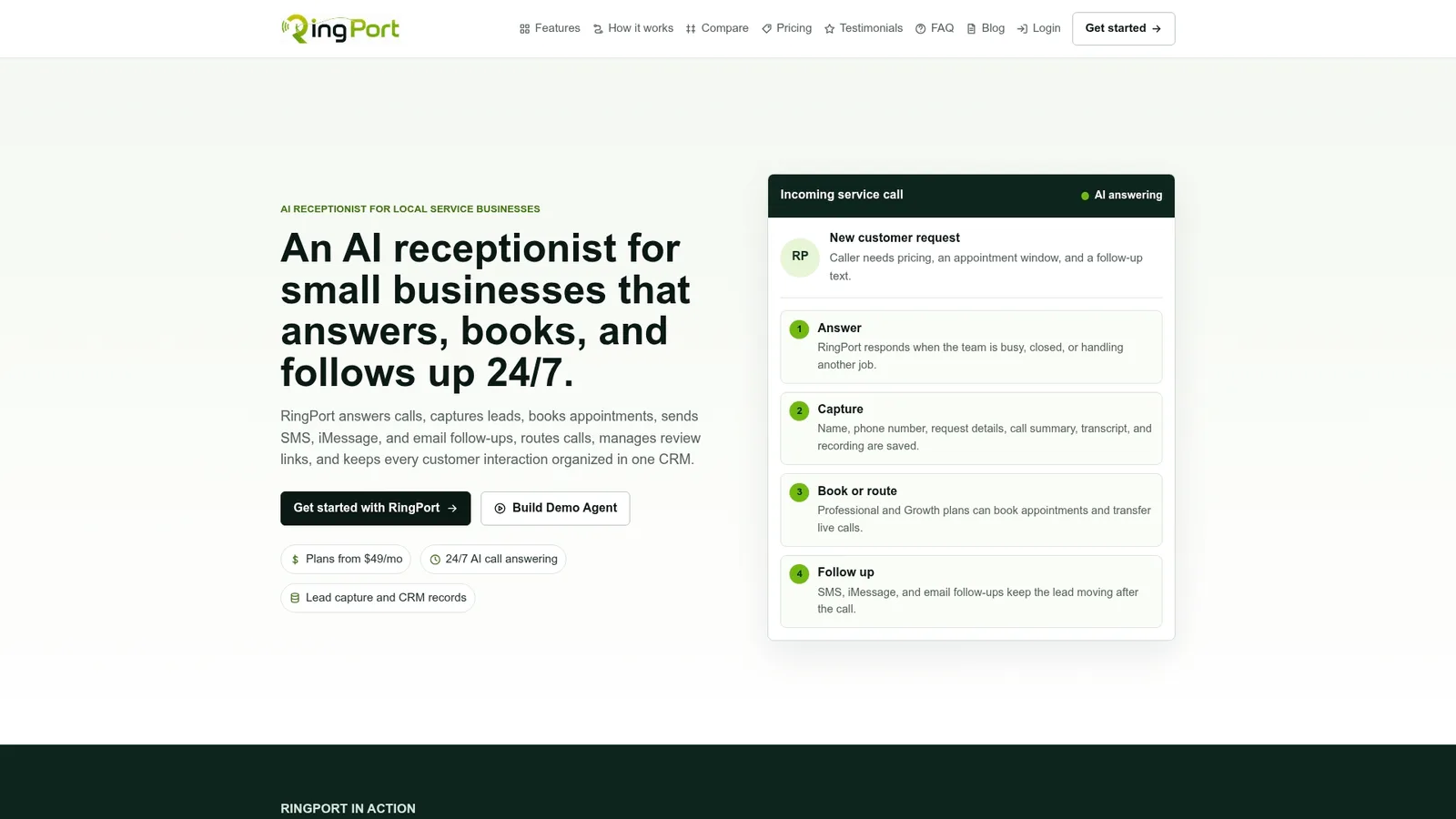
Three things it does for the workflow this guide covers: it sends your confirmation and reminder sequence automatically at the intervals that actually reduce no-shows, it reads and acts on client replies in real time so a "can we reschedule?" text gets handled instead of ignored, and it captures new bookings 24/7 so a call or text that comes in after hours doesn't wait until morning to get answered. If you're running this process by hand right now, start a trial at the RingPort landing page and connect it to your existing calendar the same day.
Key Takeaways
A complete appointment confirmation text needs seven specific elements, a three-message timing sequence, and two-way reply handling to meaningfully cut no-shows.
| Point | Details |
|---|---|
| Include all seven elements | Name, business, date, time, location, one CTA, and cancellation policy in every confirmation. |
| Send confirmation immediately | Message clients right at booking, when their attention on the details is highest. |
| Use the three-message sequence | Pair the instant confirmation with a 24 to 48 hour reminder and a same-day 2 to 4 hour nudge. |
| Keep transactional texts compliant | Log opt-in consent, honor STOP requests, and keep clinical details off SMS in healthcare. |
| Automate replies, not just sends | RingPort handles the full sequence and reads client replies in real time, closing the gap one-way tools leave open. |
Where This Guide's Numbers Come From
The Sinch template guide supports the seven essential elements, character-limit guidance, and single-CTA design used throughout the industry templates. The CTIA annual survey backs the SMS open-rate and read-speed figures that explain why texting works faster than email for time-sensitive confirmations.
Sources
- Appointment confirmation text: 25+ templates by industry - Engage
- CTIA — 2022 annual survey highlights


