Get CRM Call Logging Right: Manual to CTI to AI Pilot for Small Teams
Match CRM call logging to your team's volume. Map fields, run a 5–10 rep, 2–3 week pilot, then move from manual to CTI to AI while avoiding AI and...

How many customers are slipping away before you can answer?
Answer 4 quick questions and get a simple missed-call estimate for your business.
Answer with one tap. Contact details come after your result.
Here is the estimate.
Thanks. Your result was received.
CRM call logging captures every phone conversation as a structured record in your contact timeline. There are three ways to do it: manual entry, CTI (telephony) integration, and AI-assisted extraction. Small teams should start manual, medium-volume teams should add CTI integrations, and teams that want automatic summaries or coaching insights should pilot AI extraction on top of CTI, not instead of it.
TL;DR:
- AI-assisted extraction, while useful for summaries and action items, requires human validation to avoid hallucinated commitments or misattributions.
- Combining manual, CTI, and AI call logging improves data completeness and accuracy, especially during initial rollout and pilot phases.
- Proper field mapping and small-scale testing are essential to prevent silent failures and ensure reliable automatic call logging.
- Small businesses with low call volume can start with manual logging, while larger teams benefit from CTI or AI integration, provided they monitor error rates closely.
Table of Contents
- What Does CRM Call Logging Actually Capture?
- Three Ways to Log Calls in a CRM
- How Does Automatic Call Logging Work Behind the Scenes?
- Manual Call Logging: Fast Workflows Reps Will Actually Use
- AI-Assisted Call Logging: What It Adds and What Can Go Wrong
- Implementation Checklist: Field Mapping, Pilot Testing, and Metrics
- Which Call Logging Method Fits Your Team?
- Compliance and Privacy Considerations for Call Recording
- Common Integration Challenges Across CRM and Telephony Systems
- Why Accurate Call Logging Improves Sales and Service Outcomes
- Troubleshooting Common Call Logging Problems
- Author Perspective: What Actually Breaks Call Logging Rollouts
- Let RingPort Handle Call Capture So Your CRM Stays Clean
- Sources
- FAQ
What Does CRM Call Logging Actually Capture?
A logged call record is only useful if it holds the right fields. Skip one, and you create blind spots in forecasting, coaching, and compliance later. Most CRMs let you customize the layout, but the fields below show up in nearly every serious setup, whether you're running Salesforce, HubSpot, or a smaller platform.
- Timestamp — when the call started, used for SLA tracking and response-time reporting
- Duration — length of the call, a rough proxy for engagement depth
- Call type — inbound or outbound, which affects how reps get measured
- Subject line — a short label reps scan when reviewing a contact's history
- Notes or summary — the actual substance of the conversation
- Recording link — the audio file, when your telephony provider stores one
- Disposition — the outcome (booked, no answer, not interested, follow-up needed)
- Owner — which rep handled the call, for accountability and coaching
Each field earns its place. Timestamp and duration feed forecasting models that predict close dates based on activity cadence. Disposition and owner feed coaching dashboards, letting managers spot which reps convert calls into next steps and which ones let leads go cold. Recording links matter most during audits, when a manager needs to verify what was actually promised on a call, not just what got typed into the notes field.
Quick fact: call logging exists specifically because logged activity feeds the same activity timelines used for forecasting and coaching — a rep who skips logging isn't just creating messy data, they're erasing their own pipeline visibility.
One implementation note before you build anything: decide your consent and retention rules for recordings before you turn on capture, not after legal asks about them.
Three Ways to Log Calls in a CRM
Every team lands on one of three methods, and the right choice depends almost entirely on call volume and how much conversation intelligence you actually need. Field mapping should come before any of them, because the method you pick only works as well as the schema underneath it.
- Manual logging. A rep hangs up and types the call into the CRM by hand, using a quick-action button, the activity timeline, or a mobile app. It costs nothing to set up and works fine for teams making a moderate number of calls per day per rep. The tradeoff is obvious: it depends entirely on rep discipline, and discipline slips during busy weeks.
- CTI and softphone integration. A telephony system connects directly to the CRM through an embedded softphone or a computer telephony integration layer. The moment a call ends, the system auto-captures timestamp, duration, and a recording link, then creates an activity record by matching the caller's number to an existing contact. What it does not do is understand the conversation. CTI logs that a call happened; it has no idea what was said.
- AI-assisted extraction. This layer sits on top of a recording or live transcript, using speech-to-text and natural language processing to write structured fields directly into the CRM: a summary, action items, even a qualification flag. It adds real intelligence, but it introduces latency (the summary usually lands a few minutes after the call ends) and it needs validation, because AI can misattribute a speaker or invent a commitment that was never made.
Most mature sales organizations run all three simultaneously. Manual logging fills gaps CTI misses, CTI handles the mechanical capture at scale, and AI extraction adds the layer of intelligence neither manual notes nor raw metadata can provide on their own.
How Does Automatic Call Logging Work Behind the Scenes?
Automatic logging depends on record matching, and record matching depends on getting phone numbers into a consistent format. When a call comes in or goes out, the system checks the number against existing CRM records, usually contacts or leads, and creates an association if it finds a match. Some platforms extend that matching to calendar events, tying a call to a scheduled meeting instead of just a contact record.
The technical backbone is an API. HubSpot's Calls API, for example, defines how a call engagement object gets created, retrieved, and updated, including standard properties for direction, duration, and recording URL. Every major CRM has an equivalent engagement or activity endpoint, and understanding that endpoint's schema is the first real step toward reliable automatic logging.
Here's where it breaks in practice:
- Unmapped fields. The telephony system sends a field the CRM doesn't recognize, and the data silently disappears instead of eroding out.
- Format mismatches. A phone number formatted as (555) 123-4567 on one side and +15551234567 on the other fails to match, even though they're the same number.
- Unmatched numbers. Calls from numbers not yet in the CRM get logged as orphaned activities with no contact attached.
- Webhook and API rate limits. High call volume can outpace what the integration is allowed to send per minute, causing dropped or delayed records.
- Sync latency. A call logs correctly but doesn't appear in the CRM for several minutes, which looks like a failure to a rep checking immediately after hanging up.
Pro Tip: Normalize every phone number to the E.164 international format (+15551234567) before it ever reaches your CRM. It's the single fix that prevents the largest share of unmatched-record errors, and it takes one field-mapping rule to implement.
Manual Call Logging: Fast Workflows Reps Will Actually Use
Manual logging fails for one reason almost every time: it takes too many clicks. Fix the friction and reps will actually do it consistently.
- Use the quick-action button on the contact record. Most CRMs, including Zoho's activity logging flow, put a one-click "Log a Call" action directly on the timeline. That beats navigating through menus every time.
- Log from mobile immediately after hanging up. A rep standing in a parking lot after a site visit can log the call from a phone before getting back in the car, while the details are still fresh.
- Use global search for stray calls. If a call happens outside a scheduled flow, typing the contact's name into global search and hitting "Log a Call" takes under 10 seconds.
Standardize the note itself with a two-line template: line one states the purpose of the call, line two states the outcome plus the next step, including who owns it and when it's due. That structure alone eliminates most of the vague, unusable notes that make CRM data worthless six months later.
Log immediately for anything with a firm next step or a dollar figure attached. Save the full write-up for later only when the call was purely informational and nothing urgent hangs on it.
AI-Assisted Call Logging: What It Adds and What Can Go Wrong
AI extraction is the layer that turns a recording into something a manager can actually read in ten seconds instead of listening to a 20-minute call. The typical output includes a one-paragraph summary, a list of action items, a qualification flag using a framework like BANT or MEDDIC, and sometimes a draft follow-up email ready for the rep to review and send.
AI meeting-summary tools show four outputs teams consistently rely on: summaries, action items, decisions, and follow-up drafts. Those same categories map almost directly onto what a CRM needs from a logged call, which is why AI extraction has become the natural next step after CTI for teams handling real volume.
The risks are real, though, and worth naming plainly:
- Speaker misattribution. The model assigns something the customer said to the rep, or vice versa, which corrupts the record's meaning.
- Hallucinated commitments. The summary states a discount or a deadline that was never actually offered on the call.
- Schema drift. The AI writes a field the CRM wasn't built to hold, or formats a date in a way the reporting layer can't parse.
The fix isn't to avoid AI extraction. It's to gate it. Set a confidence threshold below which the AI writes to a draft field instead of the canonical record. Keep a human reviewing anything below that threshold before it becomes permanent. Log every AI write to an audit trail so a bad entry can be rolled back without guesswork.
Pro Tip: Treat every AI-generated call summary as a draft by default. Write it to a separate note field first, and only promote it to the canonical record after a human accepts it or it clears your confidence threshold.
Implementation Checklist: Field Mapping, Pilot Testing, and Metrics
Rollouts fail almost always for the same reason: teams turn on automation before they've documented what their data is supposed to look like. Field mapping comes first, every time, no exceptions.
Step one: map the fields. Inventory every call source, your main line, individual rep cell numbers, any click-to-call widget, then map each telephony field to its CRM counterpart. Write the schema down. If your telephony system calls it "call outcome" and your CRM calls it "disposition," that mapping needs to exist somewhere other than in one engineer's head.
Step two: run a small pilot. Five to ten reps, a two- to three-week window, is enough to surface real problems without risking your whole pipeline. During that window, run a weekly sample check: pull 20 random logged calls, compare each one against its actual recording, and track what kind of errors show up and how often.
Step three: measure before you scale. Three numbers matter most during a pilot:
- Percent of calls logged — the gap between calls made and calls actually recorded in the CRM
- Completeness score — how many of your required fields got filled in against the template you built in step one
- AI error rate — the share of AI-written summaries that failed the weekly sample check
Coach reps using these numbers directly instead of vague reminders to "log more consistently." A rep with a 60% completeness score needs a different conversation than one sitting at 95% with occasional missing dispositions.
Which Call Logging Method Fits Your Team?
Match the method to your actual call volume and staffing, not to whichever tool looks most impressive in a demo.
- Under 10 to 15 calls a day per rep, no dedicated IT support. Start manual. Setup effort is close to zero, and the two-line note template covers most of what you need.
- Steady volume, multiple reps, a phone system already in place. Move to CTI integration. Expect a setup window measured in days, usually involving whoever manages your telephony vendor account, plus a CRM admin to configure the matching rules.
- High volume, or a genuine need for conversation intelligence. Pilot AI-assisted extraction on top of your existing CTI setup. Budget more time here, several weeks, since validation against real recordings is what makes or breaks trust in the output.
Keep a fallback plan ready at every stage. If an AI pilot produces an error rate your team isn't comfortable with, roll it back to CTI-only logging, tighten your field mapping, and re-pilot instead of pushing forward on a shaky foundation.
Compliance and Privacy Considerations for Call Recording
Call recording consent laws vary by state, and several states require two-party consent, meaning both people on the call have to agree to being recorded, not just one. Federal law only requires one-party consent, but state law controls when it's stricter, so a business operating across multiple states needs to default to the strictest applicable rule rather than assuming federal law covers it.
Build a consent notice into your call flow itself, whether that's an automated message at the start of a call or a documented verbal disclosure your reps use consistently. Don't leave consent as an assumption baked into your telephony contract; make it audible.
Retention policy matters just as much as consent. Decide upfront how long recordings and transcripts stay in your system, who can access them, and how they get deleted when that window closes. A recording sitting in storage two years past your stated retention policy is a liability with no corresponding benefit.
If your business handles healthcare, financial, or other regulated data on calls, your retention and access rules likely need to satisfy industry-specific frameworks on top of general state consent law. That's a conversation for legal counsel familiar with your specific industry, not a policy to improvise internally.
Data residency deserves a mention too if you use a cloud-based CRM or telephony provider. Know where your call recordings and transcripts are physically stored, and confirm that storage location fits any contractual or regulatory obligations tied to your customer base.
Common Integration Challenges Across CRM and Telephony Systems
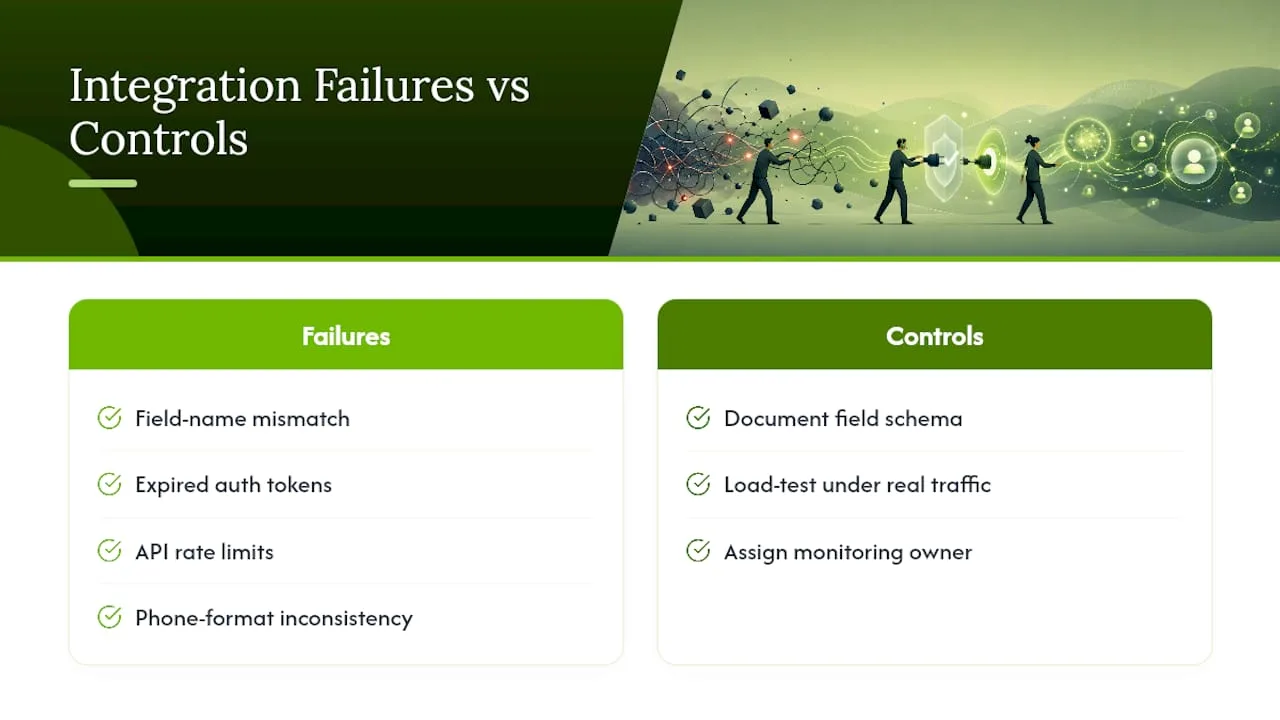
Every CRM and telephony platform speaks a slightly different technical dialect, and that mismatch is where most integration headaches start. A field labeled "call disposition" in one system might be called "outcome" or "result" in another, and if nobody translates that mapping explicitly, data quietly falls through the cracks.
Authentication adds a second layer of friction. Some CRMs use OAuth tokens that expire and need refreshing; others use API keys that break silently when rotated without updating every connected system. An integration that worked perfectly for six months can stop logging calls overnight because a token expired and nobody noticed until reps started asking where their call history went.
Rate limits create a third problem, particularly for teams with high call volume. A CRM's API might cap how many records it accepts per minute, and a busy call center pushing hundreds of calls through that window can hit throttling that delays or drops records during peak hours.
Multi-location businesses face an additional wrinkle: number portability and local presence dialing. If your business uses different numbers across regions, your CRM's record-matching logic needs consistent normalization across all of them or contacts start splintering into duplicate records tied to slightly different number formats.
The practical fix across all of these is the same one that solves most call-logging problems: document your field schema, test the integration under real load before rolling it out to your whole team, and assign one person ownership of watching for silent failures like expired tokens or dropped webhooks.
Why Accurate Call Logging Improves Sales and Service Outcomes
Clean call data changes what a sales or service team can actually see. A manager reviewing a rep's pipeline without reliable call history is guessing at deal momentum. A manager with accurate timestamps, dispositions, and notes can spot exactly where a deal stalled and why.
Forecasting accuracy improves directly with logging accuracy, since most forecasting models weight recent activity as a signal of how likely a deal is to close on schedule. Missing or vague call records don't just create a data gap, they skew the forecast itself toward whatever assumptions the model defaults to when it has nothing else to work with.
Coaching gets sharper too. A sales manager who can pull up an actual call recording alongside the logged summary can coach on specific moments, not general impressions. That distinction shows up fastest with new reps, who improve faster when feedback ties to a real conversation instead of a manager's vague sense that "calls could go better."
Customer service teams see a parallel benefit. A support rep picking up a case mid-thread can read the full call history instantly instead of asking the customer to repeat themselves, which cuts resolution time and noticeably improves how the interaction feels on the customer's end.
None of this requires exotic technology. It requires consistent logging, applied the same way across every rep, every call, every day.
Troubleshooting Common Call Logging Problems
Most call logging errors trace back to a small set of repeat offenders, and knowing the pattern speeds up the fix considerably.
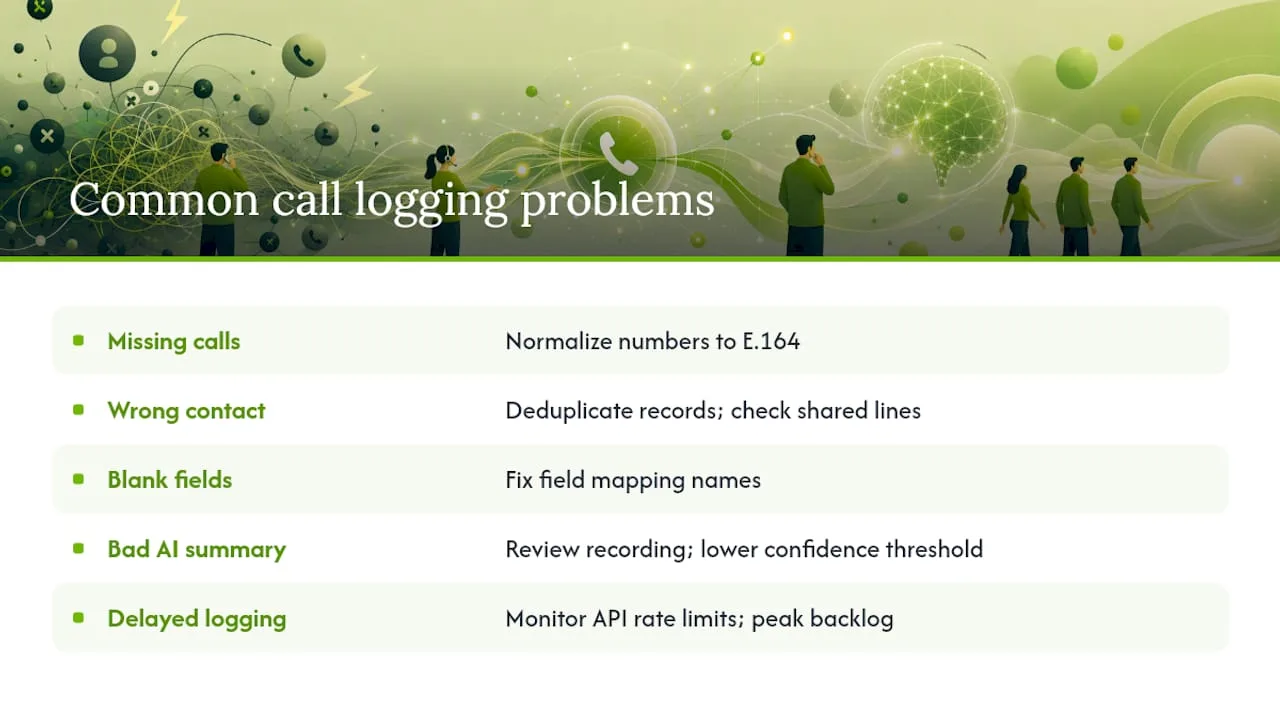
Calls not appearing at all. Check phone number formatting first. A number saved as (555) 123-4567 in the CRM won't match an incoming call formatted as +15551234567, so the system creates an orphaned record instead of an association. Normalize every number to E.164 format and this problem mostly disappears.
Calls attached to the wrong contact. This usually means duplicate contact records exist with slightly different number formats, or a shared line, like a front-desk number, is getting matched to whichever contact happened to be edited most recently.
Fields showing up blank. Confirm your field mapping actually matches on both sides. A telephony field named differently than its CRM counterpart won't populate, and it typically fails silently rather than throwing a visible error.
AI summaries that don't match the actual call. Pull the recording and compare it directly. If misattribution or a fabricated detail shows up, lower your confidence threshold so more calls route to human review before they hit the canonical record.
Delayed logging. Check whether you're hitting API rate limits during peak call hours. If your CRM caps how many records it accepts per minute, high-volume periods can create a backlog that clears itself once volume drops, which looks alarming in the moment but isn't a permanent failure.
Keep a simple error log during your first month live. Patterns that seem random call to call usually reveal themselves as one root cause once you've logged five or six instances side by side.
Author Perspective: What Actually Breaks Call Logging Rollouts
Field mapping and small pilots prevent the majority of the errors teams run into. Most failed rollouts I've seen skipped straight to automation without ever writing down what their fields should mean. Standardizing a two-line note template before adding AI or CTI cuts noisy data dramatically, because you're not asking automation to clean up chaos you built manually. For local service businesses juggling missed calls and inconsistent follow-up, a tool like RingPort solves the capture problem at its root instead of patching it after the fact.
— Serhii
Let RingPort Handle Call Capture So Your CRM Stays Clean
Some platforms offer automated call answering, CRM call logging, and appointment booking without needing a full-time receptionist. Instead of building a manual → CTI → AI pipeline from scratch, RingPort gives local service businesses that same layered outcome, answering, routing, capturing, and following up, in one platform built specifically for solo owners and small teams.
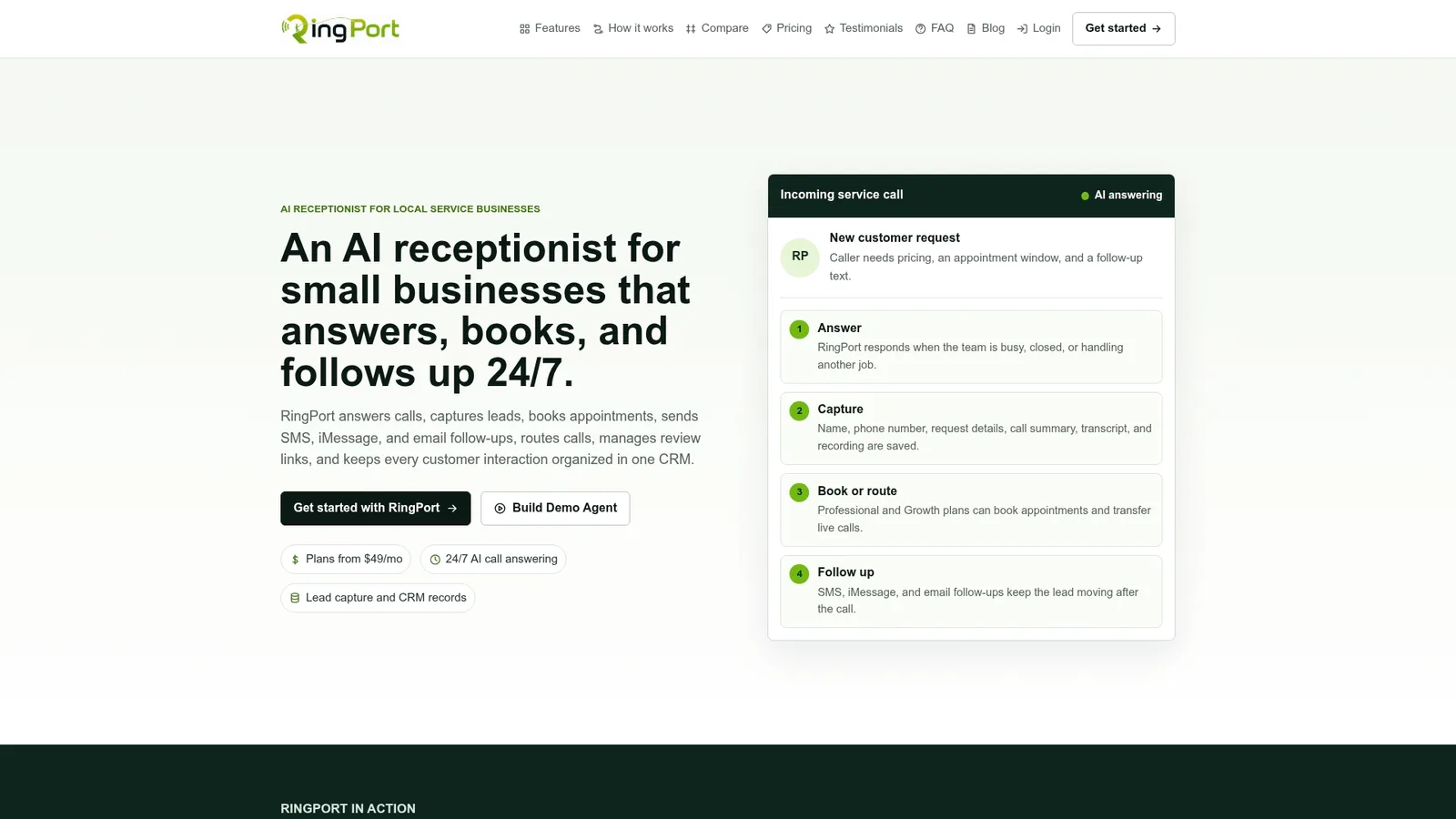
The feature set lines up directly with what this guide covers: 24/7 automated call answering, smart call routing to the right person or team, built-in CRM management so calls log themselves, Missed Call Text Back so a missed call still turns into a conversation, local presence dialing for outbound follow-up, and a Fast Agent option for teams that want an assistive layer on top of automation. It fits the pilot path this article recommends: start with a small rollout, validate the call logging accuracy against real calls, then scale once the data holds up.
Plans run Starter at $49 per month, Professional at $149 per month, and Growth at $299 per month, with pay-as-you-go add-ons available for extra minutes. Check current details and start a trial on the RingPort landing page, or look at the Fast Agent page if you want an assisted option for higher-touch calls.
Sources
For hands-on integration work, start with the Calls API documentation from HubSpot for engagement object schemas, Zoho's call logging help articles for manual workflow patterns, and Live Caption AI's breakdown of AI summary outputs for validating what AI extraction should produce. Review RingPort's smart call routing guide for field-mapping practices specific to service businesses.
FAQ
What Is the Best CRM for Call Logging?
There's no single best CRM for calling. The right choice depends on your call volume and whether you need built-in telephony, third-party CTI integration, or an AI receptionist layer like RingPort that handles answering and logging together for local service businesses.
Can Salesforce Automatically Log Calls?
Yes, when connected to a CTI or telephony integration, Salesforce can automatically create activity records with timestamp, duration, and recording links. Without that integration, reps have to log calls manually through the activity timeline.
What Are the Four Types of CRM?
CRM platforms are generally grouped into operational, analytical, collaborative, and strategic categories, based on whether they focus on daily transactions, data analysis, team communication, or long-term customer strategy. Call logging typically lives in the operational layer, since it captures day-to-day interaction data.
How Does CRM Relate to an IVR System?
An IVR (interactive voice response) system routes incoming calls based on caller input, while the CRM stores and organizes the resulting call data. Platforms like RingPort combine both functions, routing the call intelligently and logging the outcome into the CRM in one step instead of treating them as separate systems.