Decide in 2 Weeks: Answering Service vs Voicemail for Contractors
Contractors: use two weeks of missed call math to see whether voicemail loses jobs or if an answering service or RingPort recovers those leads.

How many customers are slipping away before you can answer?
Answer 4 quick questions and get a simple missed-call estimate for your business.
Answer with one tap. Contact details come after your result.
Here is the estimate.
Thanks. Your result was received.
If your phone drives revenue and you handle more than a handful of inbound calls a week, an answering solution beats voicemail almost every time. Voicemail is free, but it leaks leads. Live answering services capture more calls but cost real money, and AI receptionists now split the difference by offering round-the-clock coverage at a lower per-call cost than either. Read the cost math below if budget is your main concern, or jump to the availability comparison if after-hours calls are the real problem.
TL;DR:
- Voicemail capture rates are typically in the low 20 to 30 percent range, resulting in many missed calls and lost leads for busy businesses.
- AI receptionists can reduce the cost per call to around $0.15 to $0.45, making them a more budget-friendly alternative to traditional answering services.
- After-hours coverage is crucial for urgent trades and seasonal spikes, with AI systems providing continuous availability without staffing limitations.
- Tracking missed calls over two weeks and calculating potential revenue loss can help determine whether investing in paid answering solutions is justified.
- For small operations with fewer than five inbound calls daily and primarily referral-based leads, voicemail with transcription may still be sufficient.
Table of Contents
- Answering Service vs Voicemail: What Voicemail Really Offers
- Answering Service Vs Call Center: What Are Your Real Options?
- How Do Costs and Coverage Compare Across Options?
- When Is Voicemail Actually Enough?
- When Does Paying for Coverage Pay Off?
- What Questions Should You Ask Before You Sign?
- How AI Receptionists Fill the Gap Between Voicemail and Live Staff
- What I'd Actually Do If I Ran a Service Business
- Try RingPort Before You Sign Another Answering Contract
- Sources
- FAQ
Answering Service vs Voicemail: What Voicemail Really Offers
Voicemail is a recorded message system that stores a caller's audio for you to retrieve later, and it hasn't sat still. Most modern business phone systems now bundle voicemail-to-text transcription, email or app delivery, and cloud-based inboxes you can check from anywhere. If you're still dialing in to listen to messages one by one, you're using a decades-old workflow inside a system that's capable of much more.
The practical problem isn't the technology. It's the behavior it produces on both ends of the call. On your end, voicemail piles up into a backlog, and callbacks get pushed to "when I have a minute," which for a busy contractor might mean tomorrow. On the caller's end, plenty of people simply hang up rather than leave a message. Journalistic coverage on voicemail's declining relevance points to a real shift in caller behavior: people increasingly expect an immediate response and treat voicemail as a dead end rather than a queue.
If you're going to lean on voicemail, at least modernize it. A few adjustments make a real difference:
- Turn on voicemail-to-text so you can triage messages by subject line instead of listening to each one.
- Route voicemail alerts to SMS or email so they don't get buried in a phone app you rarely open.
- Set a callback window (same business day, for example) and hold yourself to it.
- Record a message that gives callers a same-day callback promise, which reduces the instinct to hang up.
None of this closes the capture gap entirely, but it narrows it. For a deeper walkthrough, see this guide to voicemail-to-text setups.
Answering Service Vs Call Center: What Are Your Real Options?
"Answering service" covers three fairly different products, and mixing them up is where a lot of buyers get burned on price and expectations.
Traditional live answering services route your calls to a shared team of human operators who answer with your business name, take a message, and forward it to you. They're message-only in most base plans. Anything beyond "take a message and text me" (booking an appointment, checking your calendar, transferring urgent calls) usually costs extra or requires a higher tier.
Virtual receptionists are a step up. Human operators use custom scripts built for your business, can access a shared calendar to book appointments, and can transfer calls based on rules you set (emergency plumbing call versus a vendor sales pitch, for instance). They cost more than basic answering services because they require real onboarding: you're building a script library, training the team on your services and pricing, and reviewing call recordings for quality.
AI receptionists answer every call with a voice agent that follows a conversation flow instead of a script read by a person. They can book appointments directly into your calendar, route urgent calls to your cell, log every interaction into a CRM, and answer unlimited simultaneous calls, something no human team can do without adding headcount.
Here's how the operational reality breaks down:
- Traditional answering services: fastest to set up, weakest on complex requests, cheapest entry point.
- Virtual receptionists: strongest human judgment for nuanced calls, but tied to staffing hours and turnover.
- AI receptionists: consistent scripting and 24/7 uptime, with less flexibility for genuinely unusual requests than a sharp human operator.
The tradeoff comes down to consistency versus judgment. A live person can improvise when a caller describes a weird situation your script never anticipated. An AI receptionist won't improvise as well, but it also won't have a bad day, forget the script, or need a shift replacement when someone calls in sick. Cost structure follows the same split: human labor scales with call volume and complexity, while AI systems scale mostly with call volume and stay flat on complexity.
How Do Costs and Coverage Compare Across Options?
The single biggest number to know: traditional answering services typically run $150 to $1,000 or more per month, often billed per minute, which works out to a moderate to high cost per answered call depending on plan and volume. AI receptionists can bring the raw cost per call down to somewhere around $0.15 to $0.45 for a typical three-minute call, based on the same per-minute cost breakdown. That's not a small gap. It's the difference between an answering solution being a real budget line item and being nearly a rounding error.
Billing structure matters as much as the headline rate. Watch for per-minute rounding (a 47-second call billed as a full minute), hold time counted against your minutes, and "junk calls" (robocalls, wrong numbers) eating into your monthly allotment the same as a real customer would. A plan that looks cheap on the sales page can run well over budget once overages kick in.
Coverage and capture rates tell the other half of the story:
- Voicemail-only setups report capture rates in the low 20 to 30 percent range for callers who actually leave a message and get followed up with.
- Answered calls, whether by a live operator or an AI receptionist, capture a substantially higher share of the same call volume.
- Call tracking data shows that faster speed-to-lead materially increases conversion for inbound callers, meaning the value of answering isn't just about picking up. It's about how fast you respond after.
Fast answers convert better. Every hour a lead sits unanswered lowers the odds you ever close it, according to call tracking benchmarks across multiple industries.
On availability, voicemail is available around the clock in the technical sense (it always records), but nobody's listening at 9 p.m. on a Saturday. Live answering services vary widely: some offer 24/7 coverage, others only staff business hours and roll to voicemail overnight, which quietly reintroduces the exact problem you paid to solve. AI receptionists are built for continuous coverage by default and don't need overflow staffing plans for a busy Monday morning.
Feature parity is where the categories separate cleanly. Basic voicemail offers none of the following without an add-on. Virtual receptionists and AI receptionists both typically offer appointment booking, CRM logging, and call transfer rules, while AI systems tend to include reporting dashboards and integration options as standard rather than as a premium upsell. A benchmarking report on small-business marketing performance found that phone calls remain a major lead channel for small businesses, which makes answer-rate improvements a direct lever on marketing return, not just a customer-service nicety.
When Is Voicemail Actually Enough?
Voicemail can still be the right call for a genuinely small operation, but the threshold is lower than most owners assume.
- You get fewer than five or so inbound calls a day, and most callers already know you personally or are repeat customers who'll wait for a callback.
- Your leads come from referrals, not cold inbound traffic, so a missed call rarely means a lost customer entirely, just a delayed one.
- You can realistically return calls within a few hours, not a few days, and you actually do it consistently rather than in theory.
- Your average job value is low enough that losing an occasional lead doesn't meaningfully hurt your revenue.
If none of those describe your business, voicemail is probably costing you more in lost work than it's saving you in fees. Even if you fit the profile, pair voicemail with transcription and prioritized alerts so nothing sits unread for a full day. It's a low-cost fix that closes part of the gap without a subscription.
When Does Paying for Coverage Pay Off?
Run the math before you decide: multiply your missed calls per week by your close rate, then by your average job value. If that number beats the monthly cost of an answering solution, you're leaving money on the table every month you stick with voicemail alone. A simple missed-call calculation like this is the fastest way to justify (or rule out) the expense.
The scenarios where paid coverage earns its keep back quickly:
- After-hours emergency trades (plumbing, HVAC, locksmith) where the caller is comparing three businesses and will book whoever answers first.
- Seasonal or weekend spikes where your normal staff can't handle simultaneous calls.
- Any business where a missed call means the customer just calls the next name on their list.
There's also a benefit that doesn't show up in a spreadsheet: professionalism. A caller who reaches a real answer, human or AI, forms a different impression of your business than one who hits a generic voicemail greeting.
Pro Tip: Track missed calls for two weeks before you commit to anything. That number, multiplied by your close rate, is the only figure that actually tells you whether paying for coverage makes sense for your specific call volume.

What Questions Should You Ask Before You Sign?
Before comparing quotes, build a short checklist and hold every provider to it:
- What's your average answer rate, and can you show data, not just a claim?
- Are billing minutes rounded up, and how are hold times counted?
- Does the base plan include appointment booking and CRM sync, or are those add-ons?
- What happens to overage minutes, and is there a hard cap on monthly cost?
- How is call data secured, and who has access to recordings and transcripts?
When you're on the call with a provider, ask these directly:
- "Can you send me a sample bill from a customer with call volume similar to mine?"
- "What's excluded from my quoted rate that most customers end up paying for anyway?"
- "What's your process if a call needs a human decision your script doesn't cover?"
Red flags worth walking away from: vague answers about billing increments, no written SLA on answer speed, and reluctance to share reference customers. Review platforms show wide variance in vendor quality, so treat onboarding quality as seriously as price. If a sales rep can't explain their own billing structure clearly, that's usually a preview of what your invoice will look like.
How AI Receptionists Fill the Gap Between Voicemail and Live Staff
This AI receptionist platform is designed for local service businesses that rely heavily on phone calls. It offers 24/7 call answering, appointment booking directly into calendars, routing urgent calls appropriately, and logging interactions into connected CRMs, all without the need to hire a full-time receptionist.
Owners who switch from voicemail or a basic answering service to an AI receptionist consistently report catching leads they used to lose overnight and on weekends, along with fewer double-bookings once appointment scheduling moves off sticky notes and into a synced calendar.
Ringport fits best for businesses that need after-hours coverage, get call volume too high for one person to manage alone, or want booking and CRM logging handled automatically rather than typed in after the fact. See how the underlying automated call answering setup works before deciding if it's the right fit for your call volume.
What I'd Actually Do If I Ran a Service Business
Most owners overthink this decision by comparing features when they should be comparing math. Two weeks of tracking missed calls against your close rate tells you more than any sales pitch. Start there.
If the number says you're bleeding leads, don't jump straight to a full-price contract. Run a 60-day pilot: switch on voicemail-to-text for a quick win, then test limited-hours answering coverage before committing to 24/7. Check speed-to-lead data to see how much conversion you're actually losing to slow response, then re-evaluate.
— Serhii
Try RingPort Before You Sign Another Answering Contract
Ringport costs a fraction of what a traditional answering service charges per call, and unlike a live team billed by the minute, it never puts you on hold for overage fees or rounds up a 40-second call to a full minute. Plans start at the Starter tier for $49 per month, scale up to Professional at $149 and Growth at $299, and a pay-as-you-go option is available for businesses that just want to test the waters first.
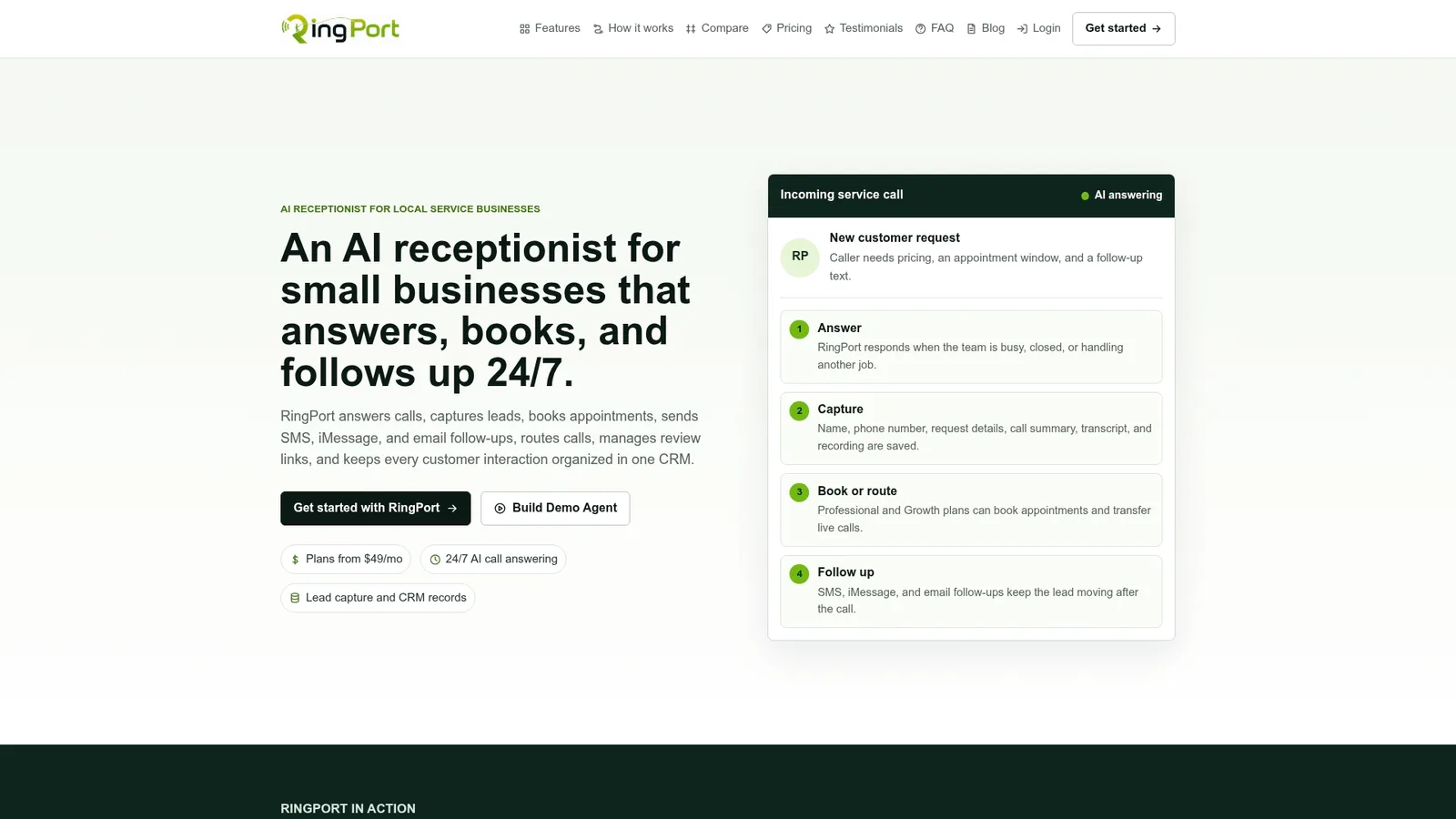
If you're still deciding between a live answering service and something built for how local service businesses actually operate, compare your current missed-call cost against Ringport's pricing plans or look at the Fast Agent booking feature to see how automated scheduling would slot into your calendar today. Get a quote, start a trial, and see your actual answer rate within the first week.
Sources
- How Much Does an Answering Service Cost? (2026 Rates and the Per-Minute Traps) | SuperDupr
- CallRail benchmarking report (summary) | Business Wire
- Is it time to hang up on voicemail? | CBS News
FAQ
Do answering services still exist?
Yes, and demand for them has actually grown as businesses realize voicemail loses leads. The category now spans traditional live services, virtual receptionists, and newer AI receptionist platforms like Ringport, all solving the same core problem with different cost and coverage tradeoffs.
What is the point of an answering service?
The point is capturing calls you'd otherwise lose to voicemail hang-ups or busy staff. Voicemail capture rates sit in the low 20 to 30 percent range, while answered calls, whether by a live operator or an AI receptionist, convert at meaningfully higher rates because callers get an immediate response instead of a recording.
Why did people stop using voicemail?
Caller behavior shifted toward expecting instant responses, and many people now hang up rather than leave a message at all. Reporting on this shift notes that voicemail's relevance has declined as texting and instant messaging became the default for urgent communication.
How much does an answering service charge?
Traditional answering services typically run $150 to $1,000 or more per month, often billed per minute. AI receptionists like Ringport work differently, with subscription plans starting at $49 per month for the Starter tier, up through $149 for Professional and $299 for Growth, listed on the Ringport pricing page.