After Hours First: 30 Day Test to Pick AI or Human for SMBs
Run a 30 day after hours and overflow pilot to compare AI and human receptionists for SMBs. Track answer rate, bookings, and transfers before you decide.

How many customers are slipping away before you can answer?
Answer 4 quick questions and get a simple missed-call estimate for your business.
Answer with one tap. Contact details come after your result.
Here is the estimate.
Thanks. Your result was received.
For routine, high-volume, and after-hours calls, an AI receptionist is usually the better fit. For judgment-heavy, emotional, or physical front-desk work, a trained human still leads. Most small businesses do best with a hybrid setup, using AI to catch overflow and off-hours calls while keeping people on the tasks that need a human touch. RingPort is built for exactly that first move.
TL;DR:
- An AI receptionist handles routine, high-volume calls efficiently by offering unlimited availability and simultaneous handling of dozens of calls.
- Human receptionists remain essential for emotional, judgment-intensive, and physical tasks such as managing visits, handling complaints, or complex legal or medical inquiries.
- Cost-effective AI solutions like RingPort typically charge a monthly subscription starting around $49, with quick payback potential for businesses missing many calls or dealing with frequent after-hours inquiries.
- Implementing a hybrid setup involves automating after-hours and overflow calls with AI while routing complex or sensitive calls to trained staff, with a focus on seamless handoffs and transparent caller communication.
- Small businesses should pilot AI for a month, measure response and booking metrics, and only expand use when the data confirms savings, improved answer rates, and maintained quality.
Table of Contents
- AI Receptionist vs. Human: Where AI Wins
- Where Human Receptionists Still Have the Edge
- How Much Does an AI Receptionist Cost vs. a Human?
- Hybrid Approach and Handoff Best Practices
- How Do I Decide Between AI and Human for My Business?
- RingPort: How the Framework Applies in Practice
- How Does an AI Receptionist Affect Customer Experience?
- What Do Real-World Deployments Look Like?
- Author Perspective: Practical Priorities and Pitfalls
- Start a RingPort Trial: A 30-Day Measurement Plan
- Sources
- FAQ
AI Receptionist vs. Human: Where AI Wins
An AI receptionist doesn't get tired, doesn't take lunch breaks, and doesn't put a caller on hold because two other lines just rang. That's the core advantage: availability and concurrency. A human receptionist can handle one call at a time; an AI system can handle dozens simultaneously, which matters most for businesses that lose leads to voicemail during peak hours or after 5 p.m.
AI also excels at repeatable tasks. Booking appointments, sending reminders, answering the same 15 questions every plumber or dentist gets asked, and logging every call into a CRM without typos. The scripting stays consistent call after call, which a tired staffer on their third double shift can't always promise.
- Answers every call, every time, including nights and weekends
- Handles simultaneous calls without a queue
- Logs and routes leads automatically into your CRM
- Costs less per interaction than a salaried employee once volume climbs
On the numbers: Gartner reports that 85% of customer service leaders are exploring or piloting conversational AI, and most successful rollouts pair AI with a well-maintained knowledge base rather than dropping it in cold.
Pro Tip: Before you turn on any AI receptionist, write out your 20 most common caller questions and their exact answers. That document, not the AI model itself, is usually what determines whether the pilot succeeds.
Where Human Receptionists Still Have the Edge
Some calls need a person, not a script. A distressed patient calling about a medical issue, an angry customer mid-complaint, or a legal intake with nuance that a decision tree can't capture. These moments reward improvisation, tone-reading, and the kind of judgment that AI hasn't matched.
Humans also cover ground AI physically can't. The Bureau of Labor Statistics notes that receptionists greet visitors, manage front-desk traffic, and handle data entry tasks that go well beyond the phone. VIP clients often expect to recognize a familiar voice, and long-term relationship management still benefits from a person who remembers context between calls.
- Emotional or high-stakes calls (complaints, medical concerns, legal matters)
- Physical front-desk duties: greeting visitors, managing mail, office logistics
- VIP continuity and relationship-based service
- Ad-hoc problem solving that doesn't fit a script
Route it to a person and automate everything else instead.
The tradeoff is cost and scheduling. Humans need breaks, get sick, and turn over. Fully loaded staffing costs (salary, taxes, benefits, training) add up fast, which the next section breaks down directly.
How Much Does an AI Receptionist Cost vs. a Human?
A full-time receptionist's real cost is rarely just the paycheck. Salary is the visible number; payroll taxes, benefits, onboarding, and turnover replacement are the hidden ones. BLS data frames the receptionist role as one with high task variety, which also means higher training time before someone is fully productive.
AI receptionist pricing usually looks different: a flat monthly subscription tier, sometimes with usage-based add-ons for extra minutes or messaging. RingPort's own pricing, for example, runs from a Starter plan at $49 per month up through Professional and Growth tiers, plus pay-as-you-go options for overflow volume.
To estimate your own payback window:
- Calculate your missed-call rate (calls unanswered or sent to voicemail)
- Multiply missed calls by your average deal or appointment value to estimate lost revenue
- Compare that lost-revenue figure against your fully loaded staffing cost or AI subscription cost
A quick scenario: A business missing 10 calls a week, at a $150 average job value, is losing roughly $1,500 in weekly opportunity. Against a $49 to $149 monthly AI subscription, the math often favors AI within the first billing cycle for high-volume, routine-call businesses. Low-volume businesses with complex sales conversations may see a longer payback period, or find a human still makes more sense.
Hybrid Approach and Handoff Best Practices
Most small businesses land somewhere in the middle, not all-AI or all-human. The typical pattern: AI handles after-hours calls, overflow during busy periods, and routine bookings, while a human takes calls during business hours or anything flagged as complex.
The technical details of the handoff matter more than the split itself. A warm transfer, where the AI passes context and call history to the human agent, prevents the caller from repeating themselves. Callers should also know they're speaking with an AI system upfront. That transparency builds trust rather than eroding it.
- Route after-hours and overflow calls to AI; keep business-hours judgment calls with staff
- Use warm transfers so humans see full conversation history before picking up
- Disclose AI involvement clearly at call start
- Set monitoring cadence: review transcripts weekly during the first month
Pro Tip: Test your escalation script by calling your own line and asking a tricky, off-script question. If the AI fumbles it, that's your first fix before expanding scope.
Getting the warm transfer mechanics right early on prevents the single most common caller complaint about automated systems: having to explain the same problem twice.
How Do I Decide Between AI and Human for My Business?
Start by measuring your actual call mix, not your assumption of it. Pull your last month of call logs and sort them into two buckets: routine (bookings, hours, pricing questions) and judgment-heavy (complaints, complex triage, sales negotiation).
Next, calculate three numbers:
- Missed-call rate: what percentage of calls go unanswered today
- Missed-call revenue: missed calls multiplied by your average job or appointment value
- Fully loaded staffing cost: current receptionist cost including benefits and overhead, or the AI subscription cost you're evaluating
Once you have those figures, run a 30-day pilot rather than a full switch. Turn on AI for after-hours and overflow calls only. Track answer rate, booking rate, and how often calls get transferred to a human. If error rates stay low and bookings climb, expand the scope. If transfers spike or callers seem frustrated, tighten the knowledge base before going further.
Some situations call for keeping humans in the loop regardless of the math:
| Red flag | Why it matters |
|---|---|
| Regulated intake (medical, legal, financial) | Compliance risk outweighs cost savings |
| High-value client retention | Relationship continuity beats automation speed |
| Emergency or safety-related calls | Judgment and empathy are non-negotiable |
| Highly variable, non-scriptable requests | AI knowledge bases can't cover every edge case |
Gartner's agentic AI forecast projects growing autonomous resolution capability through 2029, but the near-term advice is consistent: phase in, measure, and expand only when the data supports it.
RingPort: How the Framework Applies in Practice
RingPort is built around this exact pilot logic rather than a full rip-and-replace pitch. It handles 24/7 call answering, appointment booking, smart call routing, CRM syncing, and follow-up messaging, the routine layer this framework recommends automating first.
A practical starting configuration:
- Enable AI for after-hours and overflow calls only
- Connect your booking calendar so appointments sync automatically
- Load your top 20 FAQs into the knowledge base before launch
- Track answer rate, bookings, and transfer frequency over the first 30 days
That setup mirrors the NIST AI Risk Management Framework's emphasis on human oversight and phased deployment rather than a single irreversible switch.
How Does an AI Receptionist Affect Customer Experience?
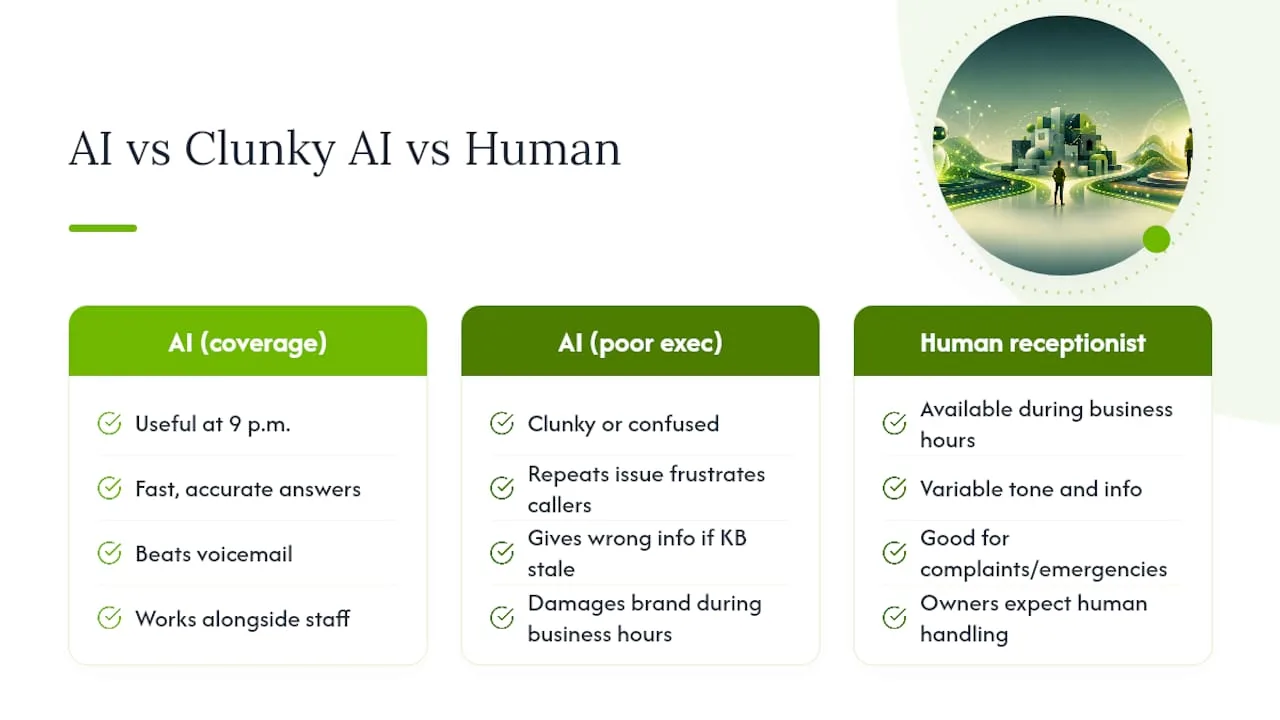
Caller perception hinges less on "AI vs. human" as a category and more on execution. A fast, accurate AI answer at 9 p.m. beats a voicemail every time. A clunky, confused AI answer during business hours, when a human was available anyway, does real brand damage.
The businesses that get this right treat AI as a coverage extension, not a replacement for existing staff attentiveness. Callers generally don't mind talking to an AI system if it solves their problem quickly and is upfront about what it is. What erodes trust is a caller repeating their issue three times, or an AI confidently giving wrong information because its knowledge base was never updated.
Consistency also shapes perception in a way many owners underestimate. A human receptionist has good days and bad days; tone varies, information varies slightly by who answers. An AI system, when properly configured, delivers the identical accurate answer every single time. For businesses where brand consistency matters, especially multi-location service businesses, that reliability is a genuine perception asset.
The risk runs the other direction too. Gartner's research on workforce planning found many organizations pulling back plans to cut human staff after realizing AI works best alongside people, not instead of them. Brand perception suffers fastest when a business over-automates a call type callers expect a human to handle, like a serious complaint or an emergency service request.
What Do Real-World Deployments Look Like?
Consider two common small-business patterns. A home services company (plumbing, HVAC, electrical) typically sees a high share of routine calls: scheduling, pricing questions, service area confirmation. These businesses tend to see the fastest payback from AI receptionist adoption because missed calls after hours often translate directly into a competitor booking the job instead.
A medical or legal office tells a different story. Call volume might be lower, but a much higher share involves sensitive information, insurance questions, or intake details that require careful handling. These offices often keep a human for daytime hours and use AI narrowly, for after-hours scheduling requests or basic office-hours questions, rather than full call coverage.
Salons and property managers land in between. Booking and rescheduling dominate call volume, which AI handles well, but VIP client relationships and urgent maintenance issues still benefit from a familiar human voice. Industry-wide patterns suggest SMBs with high missed-call rates and low call complexity see quicker returns on AI receptionist tools than businesses with complex, consultative sales calls.
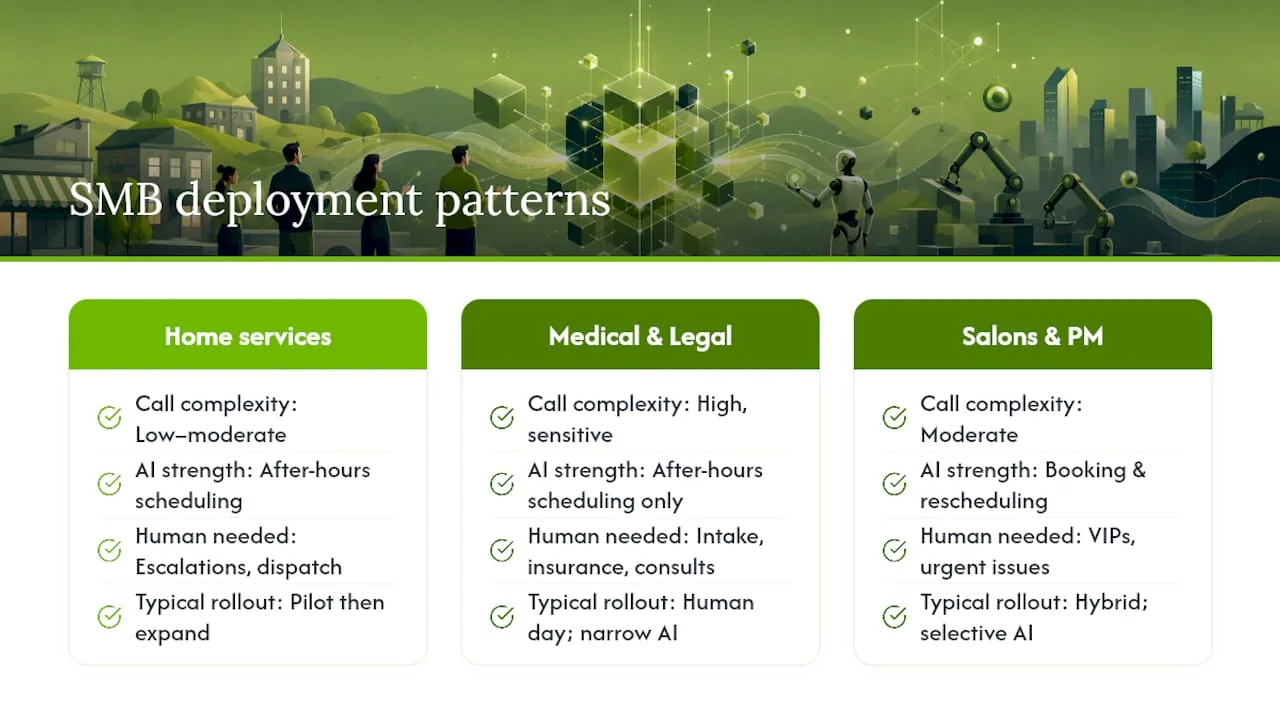
The pattern across all three: businesses that piloted narrowly, measured results, then expanded, fared better than those that flipped every call to AI on day one.
Author Perspective: Practical Priorities and Pitfalls
The mistake I see most is treating this as a replacement decision instead of a workflow decision. Prioritize your knowledge base and oversight first, per NIST and Gartner guidance, and pilot narrowly. Train your staff to act on AI call transcripts, and write your escalation policy before you write your marketing copy.
— Serhii
Start a RingPort Trial: A 30-Day Measurement Plan
RingPort's edge for phone-first local service businesses is simple: it's built specifically for the pilot pattern this article recommends, not a generic chatbot retrofitted for calls. You get 24/7 answering, appointment booking, smart routing, and CRM syncing configured for the after-hours and overflow use case first.
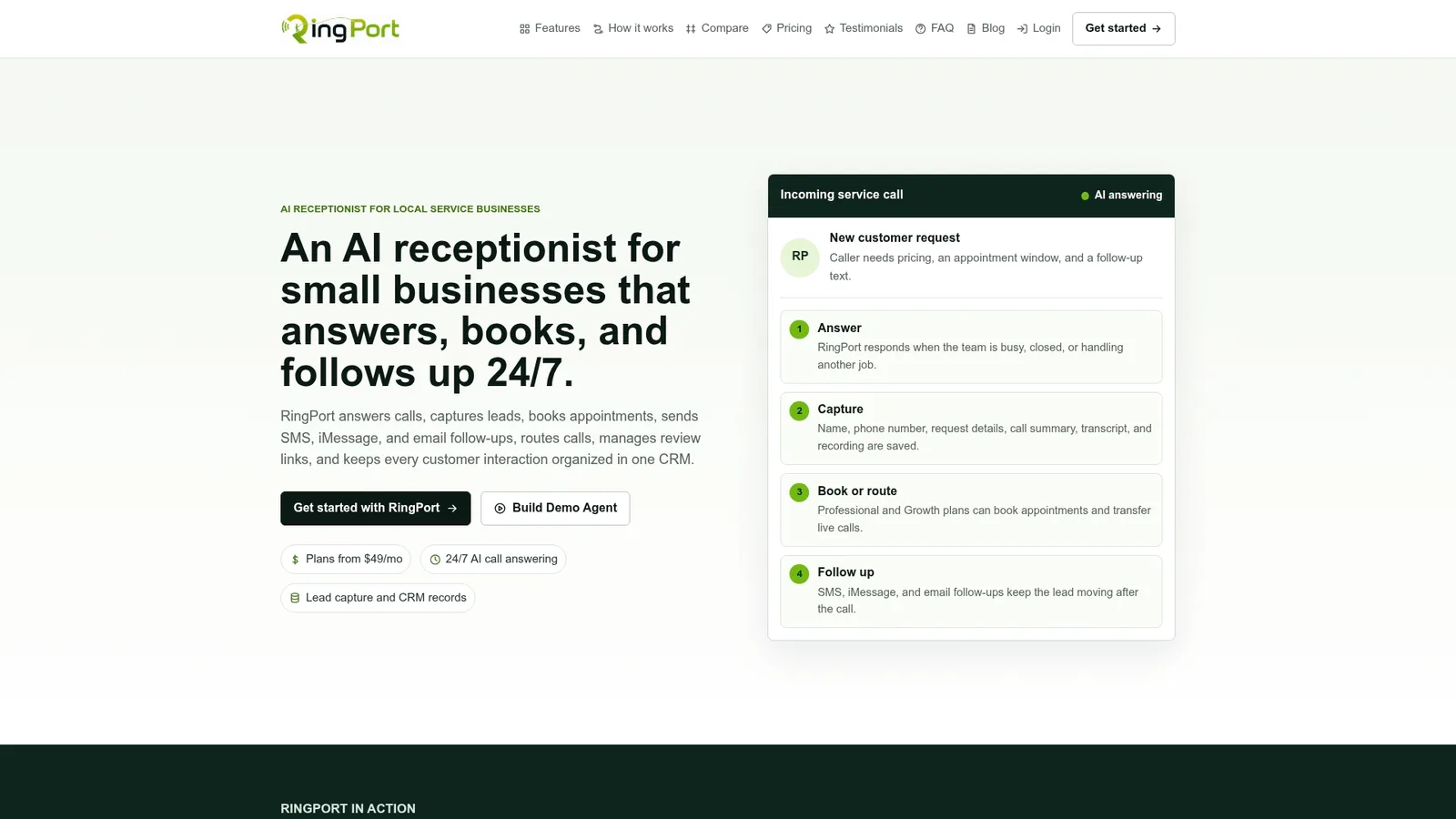
A practical setup takes less than an afternoon. Enable after-hours and overflow coverage, connect your booking calendar, upload your top 20 FAQs, and set warm-transfer rules so complex calls land on a real person with full context already attached. During the first 30 days, track four numbers: answer rate, booked appointments, transfer frequency, and missed-call reduction compared to your prior month.
Plans start at $49 a month with the Starter tier, scaling to Professional and Growth as call volume grows, with pay-as-you-go options for overflow minutes. If your team wants to see the technical side first, the Fast Agent feature page covers deployment details and transfer latency. Either way, the next step is the same: pick your after-hours window, connect your calendar, and start measuring.
Sources
- Gartner survey reveals 85 percent of customer service leaders will explore or pilot customer-facing conversational GenAI in 2025
- NIST AI Risk Management Framework
- Receptionists: Occupational Outlook Handbook — U.S. Bureau of Labor Statistics
FAQ
Are Receptionists Being Replaced by AI?
Not entirely. Many businesses automate routine and after-hours calls while keeping humans for judgment-heavy or physical front-desk work, and Gartner found that many organizations have pulled back plans to cut customer service staff because of AI. The BLS still tracks receptionist employment as an active occupation with tasks beyond phone answering, not one disappearing outright.
Is an AI Receptionist a Good Idea for a Small Business?
For businesses with high call volume, frequent missed calls, or heavy after-hours demand, yes, it usually pays off quickly. For businesses with low call volume or highly complex, judgment-heavy calls, a hybrid approach or continued human coverage often makes more sense.
How Much Does an AI Receptionist Cost?
Pricing typically runs as a monthly subscription with usage tiers rather than a flat industry rate. RingPort's plans start at $49 per month for the Starter tier, with Professional and Growth tiers available as call volume increases, plus pay-as-you-go add-ons for extra minutes.
Who Has the Best AI Receptionist for Local Service Businesses?
The right choice depends on your call mix, integrations, and budget rather than a single universal answer. RingPort is built specifically for local service businesses that need 24/7 answering, appointment booking, and CRM integration without hiring additional staff, making it a strong starting point for the pilot approach this article recommends.